

Table of Contents
In 2026, CNBC reported on travelers who built entire days around AI-suggested landmarks and hotels that turned out not to exist, and on driving directions that sent at least one group toward terrain that was never actually passable. These were not urban legends. They were exactly what happens when someone trusts a confident AI answer without checking it first.
That is the real risk sitting inside a genuinely useful shift. More people are learning how to use AI to plan a trip after 50, and for good reason: it can cut hours off the research phase, from picking a destination to building a day by day itinerary. The question is not whether AI is useful for trip planning. It is knowing exactly where it earns your trust and where it will hand you something completely wrong with total confidence.
This guide walks through which AI tools actually deserve a place in your trip planning, where they fall apart, and a simple two-minute habit that catches the mistakes before they cost you a night in a hotel that does not exist.
Please note this page may contains affiliate links. If you purchase something through these links, I’ll receive a commission at no extra cost to you. Affiliate links help to support my website/blog and I only recommend products I love.
Why More People Over 50 Are Turning to AI to Plan a Trip
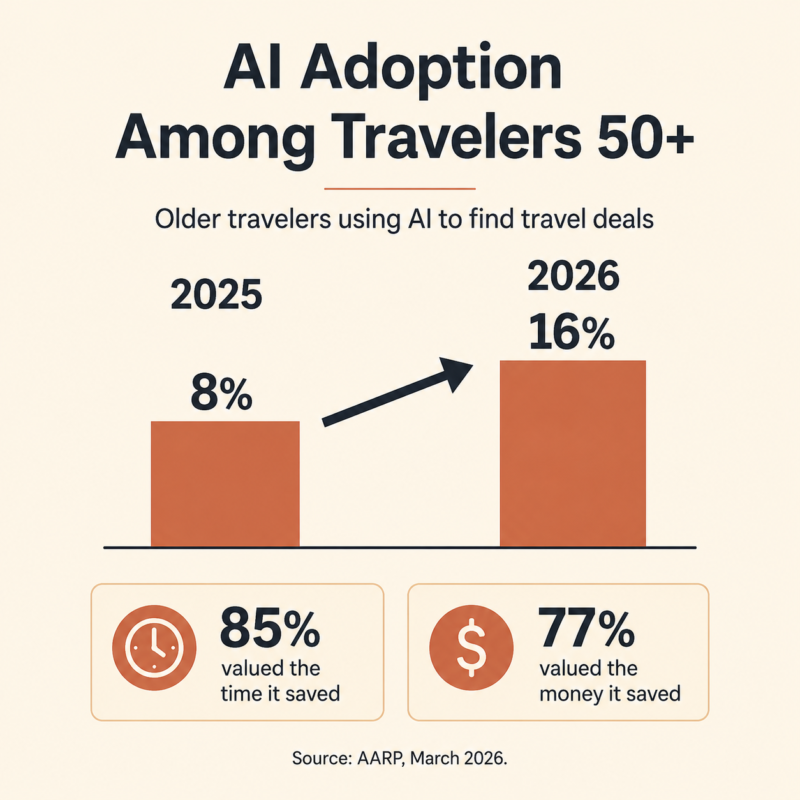
AARP’s March 2026 travel trends report found that AI use for finding travel deals among adults 50 and older doubled in a single year, climbing from 8% to 16%. The same report found 85% of these travelers valued the time AI saved them, and 77% valued the money it helped them save.
That is not a novelty trend. That is a meaningful share of an audience that has historically been the last group to adopt a new technology, not the first.
If you feel behind because everyone else seems to have already figured this out, you have not missed anything. A lot of readers land here after hearing their kids or coworkers casually mention a chatbot and realizing they have never actually opened one themselves.
If that describes you, AI for Beginners Over 50: How to Start Without Overwhelm is worth a look before you go any further, since most people using AI for travel today started exactly where you are.
The bigger shift behind that AARP number is what people are actually asking AI to do. It is rarely the whole trip. It is usually the tedious middle part: comparing three neighborhoods in a city you have never visited, figuring out how many days a destination actually deserves, or untangling a confusing visa page written for someone half your age.
That is the part AI genuinely shortens, and it is worth understanding exactly which of those tasks it handles well before you hand it anything else.
Learning AI: A Beginner’s Guide for Adults Who Don’t Want to Be Left Behind covers the same starting-point ground with a slightly wider lens, if the beginner post above does not fully match your device or software.
What AI Is Actually Good At When Planning a Trip
AI earns its keep as a research assistant, especially in the early, wide-open stage of a trip when you are still deciding where to go and what to do once you get there.
Ask it to rough out a week in Portugal built around slow mornings and short drives, and it can hand you a real starting itinerary in minutes instead of the hour you would spend clicking through blog post after blog post.
It can also draft packing lists, explain local tipping norms, or translate a menu on the spot, tasks that used to mean flipping through a phrasebook or flagging down the front desk.
General-purpose tools like ChatGPT and Gemini are the strongest starting point for that kind of brainstorming. How to Use ChatGPT in Everyday Life: 25 Examples is a good primer if you have only ever asked one of these tools a single question and closed the tab.
Once you like a rough idea and want it organized, a dedicated planner like Wanderlog or Mindtrip will structure the same ideas by day and location and let you share the plan with whoever is coming along.
Gemini has an edge for anything time-sensitive, like current visa requirements or transit schedules, since it searches the live web instead of relying only on what it learned during training.
There is a real, practical example worth naming here. Ask ChatGPT to explain tipping norms in Japan versus Italy and it will give you two genuinely different, generally accurate answers, because that is exactly the kind of stable cultural information it was trained on extensively.
Ask it whether a specific small hotel in a specific neighborhood still has the rooftop bar it had last year, and you are now in a different category of question entirely, one it can answer confidently and still get wrong.
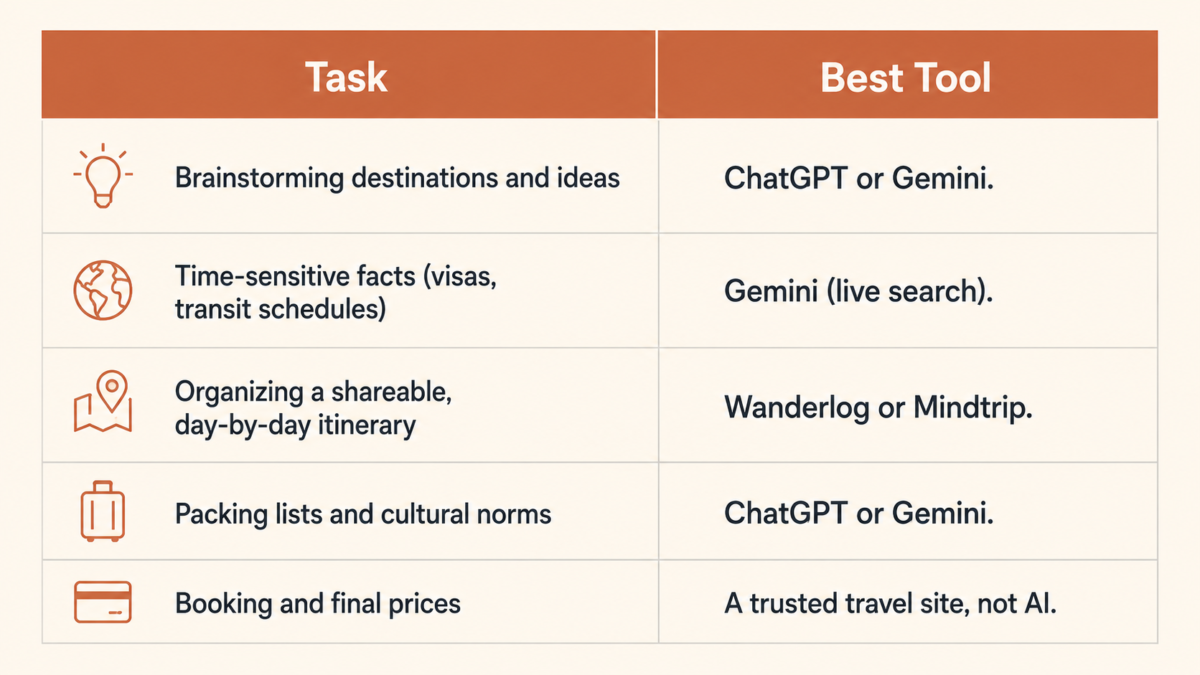
Every one of these tools is a research assistant, not a travel agent. That distinction matters more than it sounds like it should, which is exactly what the next section gets into.
Where AI Gets It Wrong (And Why That Matters More After 50)
The same AI that saves you an afternoon of research can also state something completely false with total confidence. CNBC’s March 2026 coverage of AI travel planning documented cases of tools inventing hotels that do not exist and offering driving directions that led travelers somewhere they should not have gone. The tool does not pause to flag its own uncertainty. It answers, and the answer sounds exactly as certain whether it is right or wrong.
That gap matters more for this audience specifically. McKinsey’s research on AI adoption in travel found that trust and usage still lag among Boomers and Gen X compared with younger travelers, even as the tools themselves keep improving.
There is an upside hiding in that caution, though: someone who has already learned to double check a contractor’s quote or get a second opinion from a doctor already has the instinct this moment calls for. It just needs to be pointed at a chatbot instead of a repair estimate.
The specific ways it goes wrong are worth naming, because they are rarely dramatic. It is an invented amenity, a pool that closed two years ago and still shows up as open. It is a price that is a full season out of date. It is a walking distance that assumes you are twenty-five and moving at a sprint.
None of these are the kind of mistake that makes headlines, but any one of them can turn a planned afternoon into a frustrating one if you build around it without checking.
None of this is an argument against using AI to plan a trip. It is an argument for treating every specific detail, a hotel name, an address, a price, a set of directions, as a claim to verify rather than a fact to act on.
The Verification Habit That Keeps AI Trip Planning Safe
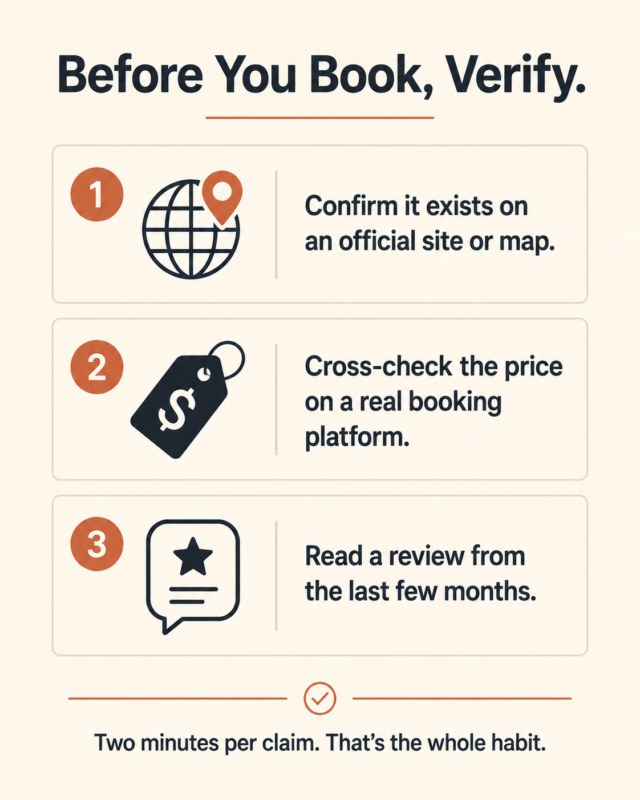
This single habit is what turns AI from a liability into an actual time saver, and it takes about two minutes per claim. Before you book anything or drive anywhere based on an AI answer, run it through three checks: confirm the place actually exists on an official website or a mapping app, cross-check the price on a real booking platform, and read a review dated within the last few months.
Each check catches a different failure. The official-source check catches the hotel or landmark that was invented outright. The price cross-check catches the outdated number that quietly assumes a rate from two seasons ago. The recent-review check catches the place that used to be great and is not anymore, which AI has no reliable way of knowing unless it happens to have very recent, well-indexed information to draw from.
Treat this as a habit, not a one-time checklist you run through once and forget about. AI use for trip planning is only going to grow from here, and the travelers who get the most out of it long-term will be the ones who verify almost automatically, the same way you check a mirror before changing lanes without stopping to think about it first.
How to Use AI to Plan a Trip After 50: A Simple 3-Step Workflow
Once you know what to trust and what to check, the actual workflow is straightforward. Start with ChatGPT or Gemini to brainstorm destinations and build a rough itinerary. Use a dedicated planner like Wanderlog or Mindtrip to organize it by location and date. Then verify every hotel, attraction, and price against an official source before you book anything.
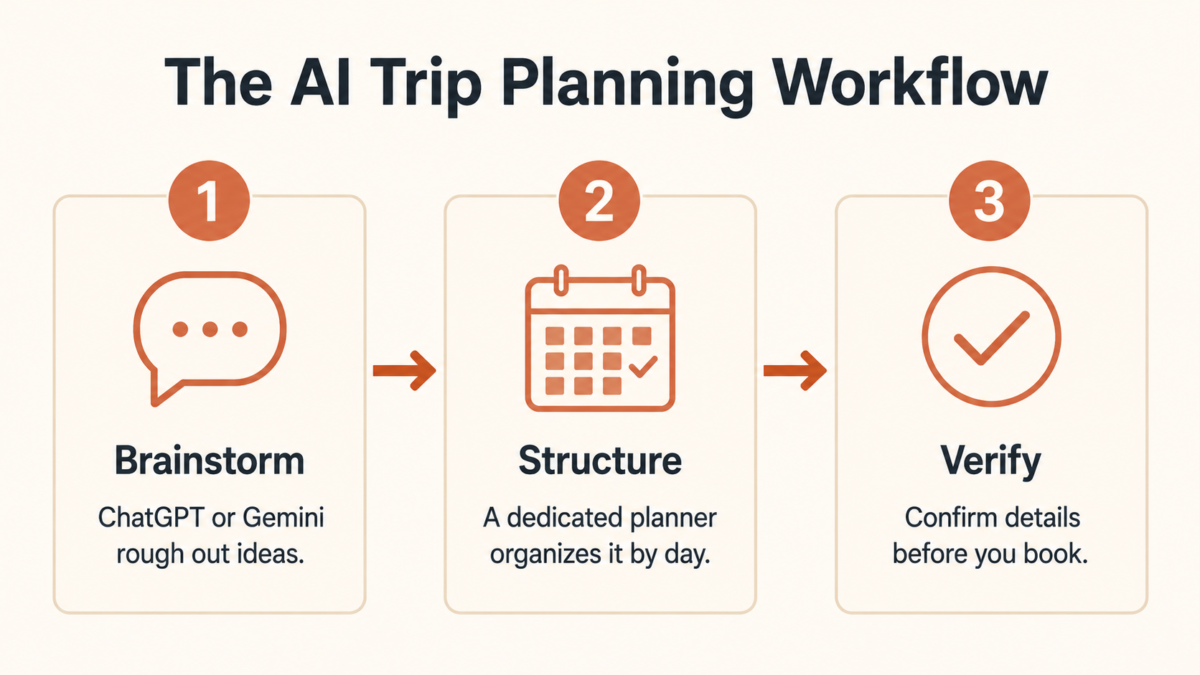
Step one is brainstorming. Bring your rough constraints, dates, budget range, how much driving you actually want to do, and let the AI throw out more options faster than you could on your own.
Step two is structure. Move the ideas you like into a dedicated planner so you have a real day by day plan instead of a wall of text in a chat window.
Step three is verification, using the habit from the section above on every hotel, restaurant, and attraction before you put any money down.
If you are also weighing whether a trip fits your budget at all, How to Afford Travel in Your 50s Without Feeling Broke walks through the cost side once the itinerary itself is already set.
Most first attempts at this workflow go wrong at step three, not step one. People get comfortable with how good the brainstorming feels and start skipping the verification because nothing has gone wrong yet. The habit matters most exactly when it feels least necessary.
Prompts We’d Actually Use (Copy These)
Generic prompts get you a generic itinerary. The prompts worth using are the ones that build in what actually matters at this stage of life: pacing, rest, and not scheduling yourself into exhaustion by day three.
- Build me a 7-day itinerary for [destination] with no more than one major activity per day and at least one full rest day.
- Suggest a version of this trip that avoids red-eye flights and overnight connections.
- Find activities in [destination] that do not require more than 20 minutes of walking at a time.
These are not complicated prompts. They are specific, and specific is what separates a generic answer from one that actually fits how you want to travel. A prompt that just says “plan me a week in Rome” will hand back the same packed, twenty-five-year-old backpacker itinerary every travel blog already recommends.
A prompt that names your actual constraints gets you something you would genuinely choose to live for a week. If the whole idea of taking more trips still comes with a flicker of guilt about whether now is even the right time, The Someday Trap: Why We Prioritized Travel Before Retirement is worth reading next.
The Bottom Line
AI will not replace the judgment you already have. It replaces the hours you used to spend across ten browser tabs, and it hands you a rough plan in minutes instead. The travelers getting the most out of it are not the ones trusting it blindly. They are the ones using it to move fast, then slowing down for two minutes to verify anything they are actually about to pay for.
If you want more of this, the tools we are actually using and the mistakes we have caught before they cost us, join our newsletter.
Have you let AI plan any part of a trip yet, or are you still double-checking everything by hand?
Frequently Asked Questions
Is it safe to use AI to plan a trip after 50?
Yes, for research and ideas. AI tools are reliable for brainstorming and structuring an itinerary, but they can state wrong details with total confidence, so treat every specific claim, a hotel, a landmark, a price, as something to verify rather than a booked fact.
Which AI is better for trip planning, ChatGPT or Gemini?
ChatGPT is the stronger starting point for brainstorming and itinerary structure. Gemini’s live search integration makes it more reliable for time-sensitive facts like visa requirements or current transit options, since it pulls from the web instead of relying only on training data.
Can AI actually book my flights and hotel?
Not directly, and most people do not use it that way. It works best as a research and planning assistant, with the actual booking handled on a trusted travel site or directly with the hotel or airline, where the price and availability shown are real and current.
What happens if AI recommends a place that does not exist?
This is called a hallucination, and CNBC’s March 2026 reporting documented real cases of it happening to travelers. Always confirm a specific place exists using an official website, a mapping app, or recent traveler reviews before building plans around it.
Do I need to pay for an AI travel planning tool?
No. Free versions of ChatGPT or Gemini cover brainstorming, itineraries, and packing lists for most trips. Paid, dedicated planners are worth it mainly if you want a shareable, bookable itinerary with live pricing built in.