

Table of Contents
You ask a chatbot a question. It gives you a decent answer. You close the tab and go back to doing everything the way you always have.
That’s where most people over 40 get stuck. Not because the tools don’t work, but because nobody tells you what to actually do next. Underneath that stall sits a real fear: waste a weekend on the wrong tool, or hand AI something it shouldn’t touch and not catch the mistake until it’s too late.
Here’s what to automate with AI first: one task, a 3-step system for doing it without losing control, and a rule that keeps you safe while you figure out the rest. Pick that one task by the end of this article. That’s the whole goal.
Please note this page may contains affiliate links. If you purchase something through these links, I’ll receive a commission at no extra cost to you. Affiliate links help to support my website/blog and I only recommend products I love.
Why Most “Start Automating With AI” Advice Doesn’t Fit Your Life
Most guides to AI automation assume you already automate things at work. They talk about routing leads in a CRM, generating quarterly reports, or scheduling meetings across five calendars. If that’s not your day-to-day, the advice doesn’t map to anything you’d actually use.
Your starting point is probably different, and that’s fine. Pew Research found that about six-in-ten adults under 50 use AI chatbots, compared with roughly four-in-ten adults ages 50 to 64. You’re not behind some universal curve. You’re behind a curve built for a younger, more tool-stacked audience that the guides were written for.
The bigger issue isn’t unfamiliarity. It’s trust. AARP’s research on older adults navigating AI found that concerns about accuracy and privacy are the top reason adults 50 and older hesitate to use these tools. That hesitation is reasonable. If you haven’t used AI much at all yet, start with the basics before you automate anything, then come back here.
The One-Task Rule: How to Pick What to Automate With AI First
Here’s the method, and it’s simpler than most guides make it sound. Choose one task. Not five, not a whole system. One.
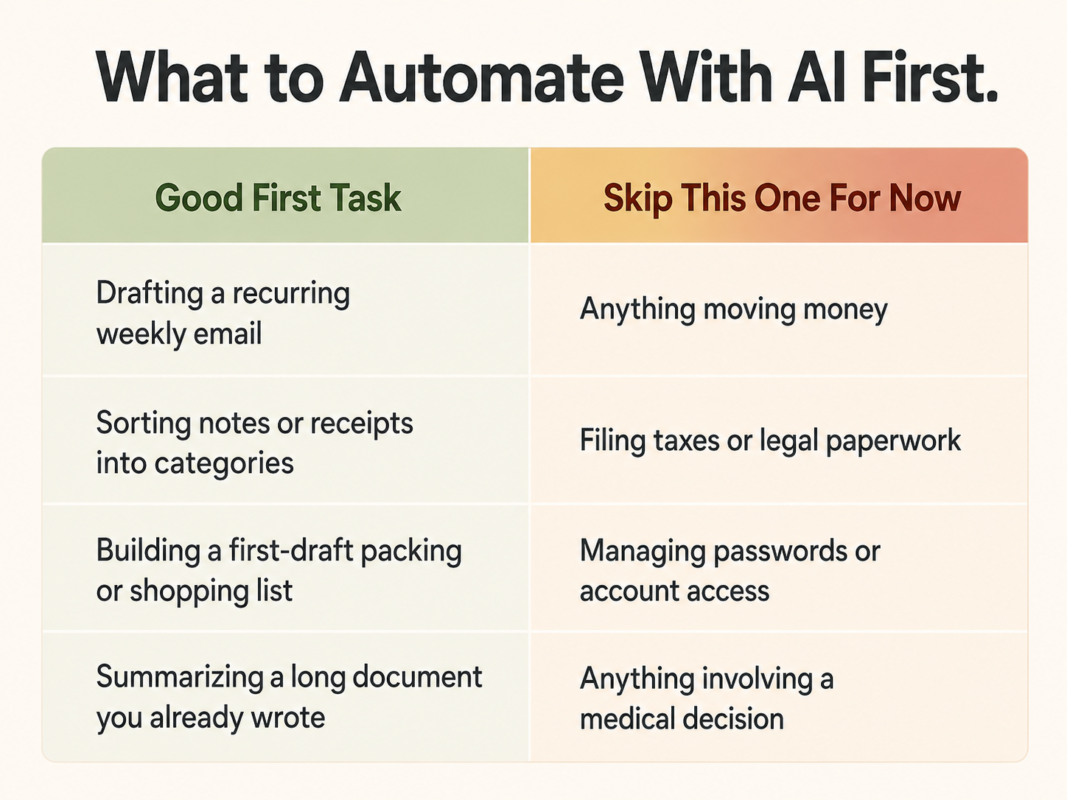
A good first task has three things going for it. It’s repeatable, meaning you do it on some regular schedule, not once a year. It has predictable input, meaning the information going into it doesn’t change shape every time. And it’s low-cost if AI gets it wrong, meaning a bad first draft costs you a few minutes of editing, not a canceled flight or an overdrawn account.
Drafting a recurring email is a good candidate. So is sorting a pile of notes into categories, or building a first-pass packing list before a trip. If you’ve already tried a chatbot for smaller things, our running list of everyday ChatGPT uses is a decent source of ideas for what a first task could look like.
Skip anything involving money movement or sensitive personal data for now. That’s not because AI can’t handle those tasks eventually. It’s because a mistake there costs more than a mistake in a draft email, and you haven’t built the review habit yet that catches errors before they matter.
Why the Human-Review Step Isn’t Optional
This is the part every competing guide mentions and none of them explain well. “Keep a human in the loop” gets repeated so often it’s turned into empty advice. Here’s why it’s actually the whole point.
Researchers who study older workers and AI adoption have documented something called the automation paradox. People who come to trust a tool as “reliable enough” stop checking its output as carefully, and that’s exactly when more errors slip through, not fewer, according to ASA Generations’ reporting on older workers and AI adoption from the American Society on Aging.
Confidence in a tool and the habit of checking its work move in opposite directions if you’re not paying attention.
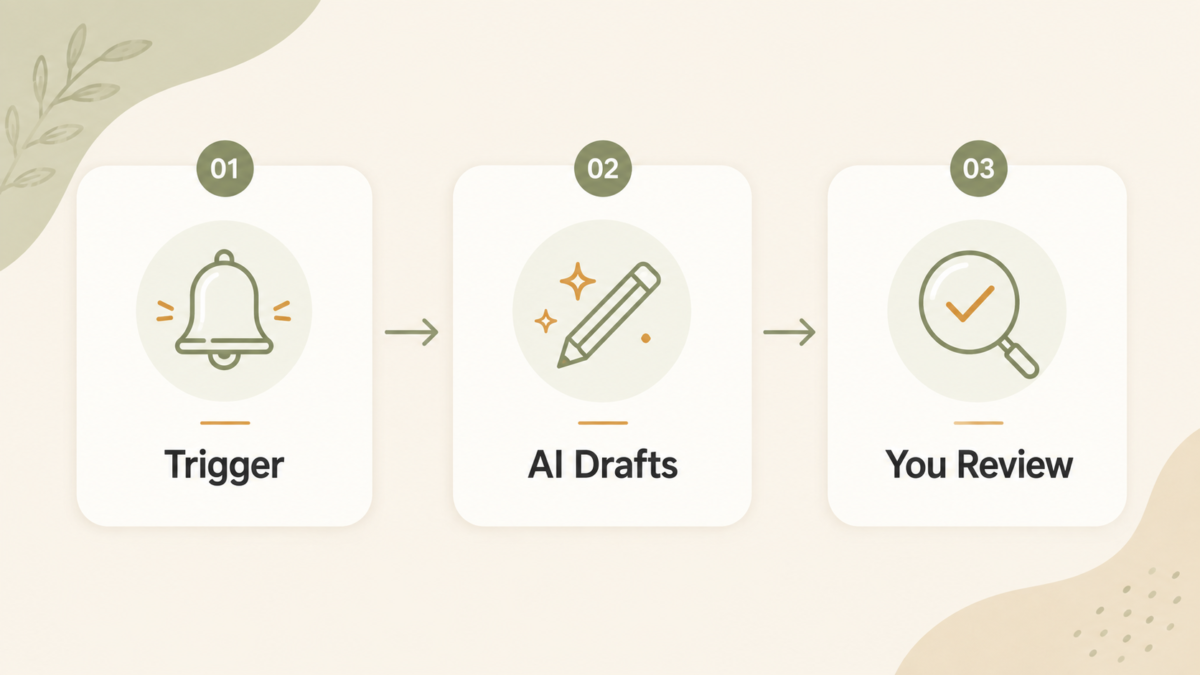
The fix takes under a minute. Something triggers the task, whether that’s a calendar reminder or a recurring day of the week. AI drafts the first version. You read it before it goes anywhere. That third step is the one people drop first once a tool starts feeling trustworthy, and it’s the one you can’t afford to drop.
A Real Example: Automating One Life-Admin Task Start to Finish
Picture a weekly grocery list. Every Sunday, you open a notes app where you’ve been jotting down what’s running low all week: half-legible entries, duplicates, things crossed out and rewritten. You paste that mess into a chatbot and ask it to turn the notes into a clean, categorized list sorted by store section.
The AI drafts the list in about ten seconds. You read it, because you know your fridge better than a chatbot does. Maybe it added something you already have plenty of, or missed that “the usual coffee” means a specific brand. You fix those two lines and you’re done.
What used to take fifteen minutes of squinting at scribbled notes now takes ninety seconds of reading plus two small corrections.
That’s the whole system in miniature: trigger, draft, review. It’s the same pattern we’ve used to keep up with recurring home maintenance tasks, just applied somewhere else. Once one task runs on this loop reliably for a few weeks, you’ll have a much clearer sense of what else in your week could work the same way.
When You’re Ready for the Next Step
At some point, copying a note into a chatbot and pasting the result somewhere else starts to feel like an extra step you’d rather not do by hand. That’s the signal you’re ready for a no-code automation tool, not a requirement to get started.
Make.com is worth a look when you get there. It connects an AI action to the apps you already use, your email, your calendar, a shared spreadsheet, without any coding. It has a free tier that’s generous enough to run one starter automation, with paid plans if you outgrow it. It still has its own learning curve, so don’t reach for it before your first manual task is working the way you want.
If a free chatbot’s usage limits start getting in your way once you’re running something regularly, a paid tier like ChatGPT Plus or Claude Pro solves that specific problem. Neither is worth paying for on day one. Wait until the limit is the actual thing slowing you down.
Once you’ve got more than one task running, keeping track of what you’ve automated and how it works saves you from re-inventing the same setup twice.
What to Do If Your First Automation Doesn’t Work
Most people who quit after one try aren’t quitting because AI automation doesn’t work. They’re quitting because their first attempt hit one of three common snags.
The task itself might have been too unpredictable. If the input changes shape every time, drafts, follow-ups, and questions in no consistent order, AI will struggle to produce something usable without heavy rewriting. Swap in something more repeatable and try again.
The review step might have been skipped or rushed. If a bad output slipped through and caused a real headache, that’s not proof the whole idea is broken. It’s proof the review habit needs to be non-negotiable, not optional when you’re busy.
Or the tool might have been wrong for the task. A general chatbot is great at drafting text and summarizing information. It’s a poor fit for anything requiring precise math or exact formatting every single time. If that’s what tripped you up, the task was the mismatch, not you.
Adjust one variable before giving up entirely. If you’re still early in this whole process, our beginner’s guide for adults getting started with AI is a good next stop once this first task is running the way you want.
The Bottom Line
Pick one task. Keep the human-review step, even after the tool earns your trust. Resist the pull to automate everything at once, because that’s the fastest way to end up trusting the wrong output and quitting for good.
Knowing what to automate with AI first isn’t about finding the perfect tool. It’s about picking a small, low-risk starting point and actually finishing it.
Want the next AI starter idea sent straight to you? Sign up for our newsletter and we’ll send along what we’re testing next, along with the mistakes we made getting there.
What’s the one task you keep meaning to hand off, but haven’t yet?
Frequently Asked Questions
What is the best first task to automate with AI?
Pick something repeatable with predictable input and a low cost if AI gets it wrong, like drafting a recurring email or sorting notes. Skip anything involving money movement or sensitive personal data until you’ve built the review habit on lower-stakes tasks first.
Is AI automation safe for beginners?
Yes, as long as you keep a human-review step in place. Skipping that step, not the automation itself, is where most mistakes actually happen. Reviewing a short draft takes under a minute and catches nearly everything before it causes a problem.
What tools do I need to start automating with AI?
A free chatbot account is enough to start. A no-code tool becomes useful only once you want to connect that chatbot to your email, calendar, or a spreadsheet automatically, which is a later step, not a starting requirement.
How much time can AI automation actually save?
It depends entirely on the task. A five-minute weekly chore that AI drafts in ten seconds saves real time every week. A task that still needs heavy editing after each draft might not save much at all until you refine your approach.
Do I need to know how to code to automate tasks with AI?
No. Everything covered here, including the no-code tool mentioned, is built for people who have never written a line of code. If you can copy, paste, and read a draft carefully, you have every skill this requires.