

Table of Contents
For most of your adult life, someone else was probably tracking half of this: a parent who called the roofer before you noticed the leak, a spouse who remembered when the HVAC filter was last changed, a property manager who scheduled service calls without you lifting a finger. After 50, that safety net often disappears, and figuring out how to use AI to stay on top of home maintenance after 50 might be the fastest way to replace it without hiring anyone or downloading a subscription app.
That disappearing safety net comes with a mental load that’s easy to underestimate. It’s not one big scary project. It’s a dozen small, irregular tasks scattered across a home’s systems, the kind that only becomes urgent once they’re expensive: the water heater that’s due for flushing, the gutter that needed cleaning two falls ago, the smoke detector battery nobody’s checked since the last time change. Homeowners who fall behind on this tend to pay more for it, not less.
This is where AI actually earns its keep. Not as a replacement for a licensed contractor, but as the assistant that remembers what you’d otherwise forget: building a maintenance calendar built around your specific home, prepping smarter questions before you call a repair pro, and turning a phone full of warranty photos into something you can actually find again. It’s also worth knowing exactly where AI should stay out of the decision entirely. That’s covered further down.
Please note this page may contains affiliate links. If you purchase something through these links, I’ll receive a commission at no extra cost to you. Affiliate links help to support my website/blog and I only recommend products I love.
Why Home Maintenance Gets Harder to Track After 50
Nobody assigns you a home maintenance manager when you turn 50. If anything, the opposite happens. Kids move out and take some of the daily noticing with them. A spouse who used to handle “their side” of the house isn’t there anymore, whether from divorce or loss.
Parents who used to call with reminders, or just show up with a ladder, aren’t around to do it either. The tasks themselves didn’t get harder. The tracking system just quietly disappeared.
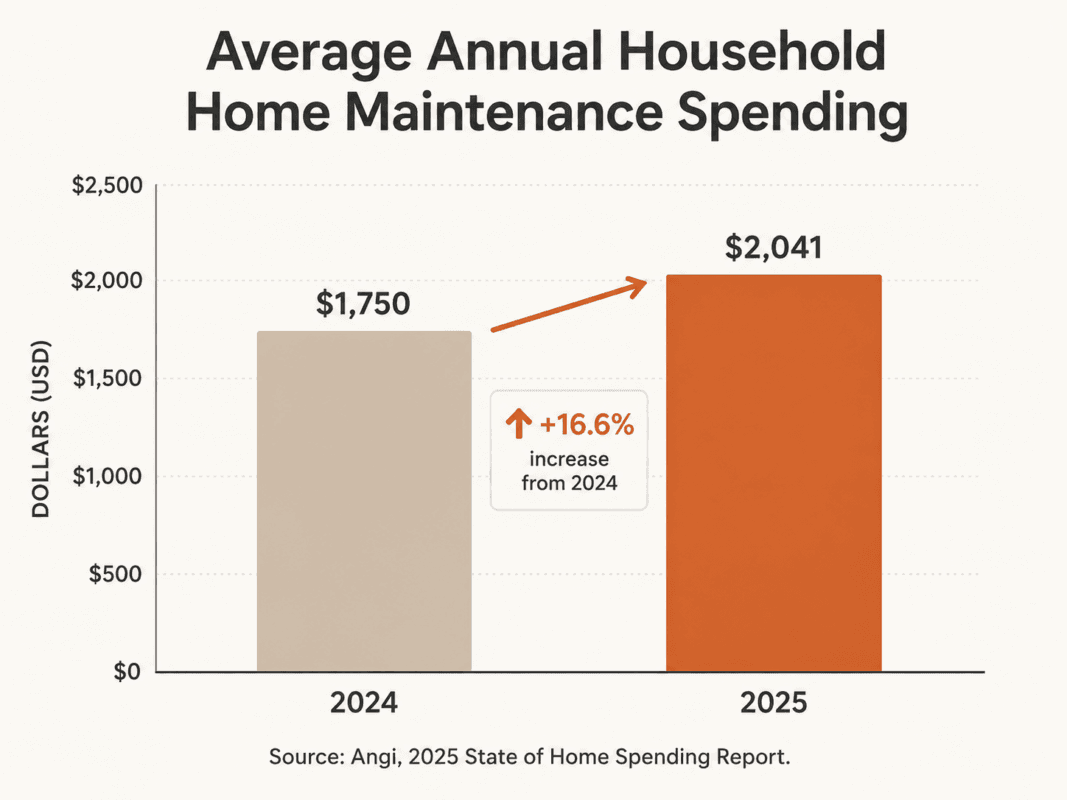
That tracking gap costs real money. Angi’s 2025 State of Home Spending Report found the average household spent $2,041 on maintenance in 2025, up nearly $300 from $1,750 the year before. A missed HVAC filter change doesn’t show up as a line item on its own, but a compressor that fails early because of it does.
So does a roof leak that started as a $200 fix and turned into a $12,000 one because nobody caught it in time. AARP’s home guide for mature homeowners frames it the same way: these are systems people end up managing solo for decades, often without ever writing any of it down.
We went through our own version of this when we started rethinking what our home actually needed to run well, which is part of what pushed us toward the mindset shift that got us rethinking what our home actually needs in the first place. Fewer things to maintain is one fix. A system that remembers for you is the other, and you don’t have to choose just one.
How to Use AI for Home Maintenance After 50: Building a Simple Maintenance Calendar
Here’s the short version: open ChatGPT, Claude, or any AI chat tool and describe your home’s age, size, location, and systems, then ask for a maintenance schedule organized by task, frequency, and season. AI can also help you prepare smart questions before a repair call, but it should never make structural, electrical, or code decisions for you.
The prompt matters more than the tool. Vague requests get vague answers. Give the AI five things: your home’s approximate age, square footage, location and climate, the systems you want tracked (HVAC, plumbing, electrical, roof, appliances), and the format you want back. Ask for a table with four columns: Task, Frequency, Time of Year, and Notes.
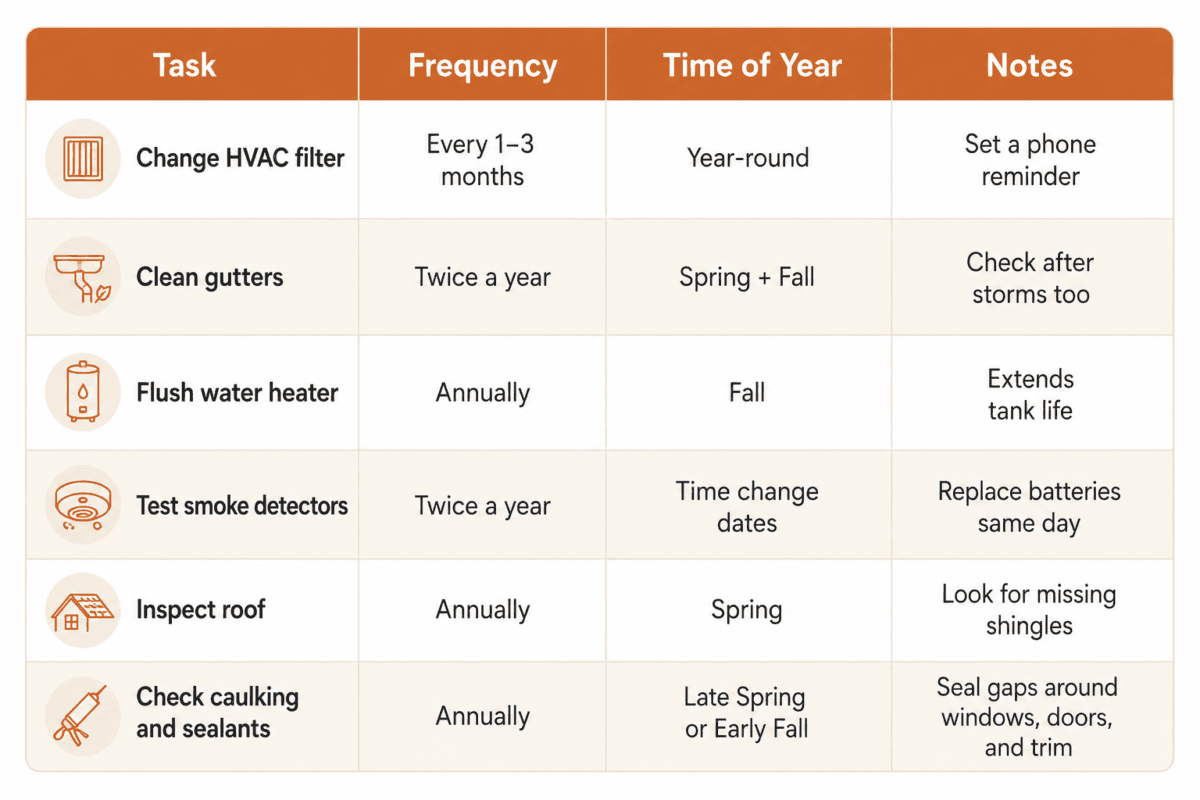
A table beats a plain list because you can actually scan it in ten seconds instead of rereading six paragraphs every time you want to know what’s due this month. Pin it somewhere you’ll actually see it: a notes app, a fridge printout, whatever you’ll realistically check.
If you’ve used AI for anything else in your day, from meal planning to travel research, the same everyday ChatGPT habits we lean on for other parts of life apply here too. Ask, adjust, ask again. If the first schedule feels overwhelming, tell it to cut the list down to the ten tasks that matter most this year, and build out from there once that feels manageable.
Using AI to Prep for Repairs Before You Call a Pro
AI is genuinely useful here, but only for a specific job: helping you understand what might be wrong and preparing you to ask better questions, not making the repair decision itself. Describe the symptom (a rattling noise, a slow drain, a breaker that keeps tripping) and ask what it typically means, what a professional would likely check first, and what questions you should ask before agreeing to a repair.
That kind of prep changes the conversation with a contractor. Instead of nodding along while someone explains a problem you don’t understand, you show up already knowing the two or three things worth asking about. It’s the difference between being talked at and having an actual conversation, and it tends to change how seriously a quote gets taken too. Contractors notice when a homeowner already understands roughly what’s going on.
Be careful about where that help stops, though. Handyman Connection, a licensed repair company, has documented AI chat tools recommending wiring fixes that ignore electrical code and repair advice that misses hidden plumbing or structural issues, the kind of thing a licensed inspector catches and a chatbot simply can’t see.
Use it to walk in informed, not to skip the professional entirely. Even if you’re still getting your footing with AI tools in general, plain English works better than technical jargon when you’re describing a repair problem to it.
Keeping Warranties, Manuals, and Service Records in One Place
The drawer of appliance manuals and folded-up receipts is its own quiet source of stress. AI can turn that mess into something usable. Photograph the model number sticker, the receipt, and the manual’s cover page for each major appliance, then ask AI to organize the model numbers, purchase dates, and warranty windows into one simple reference document.
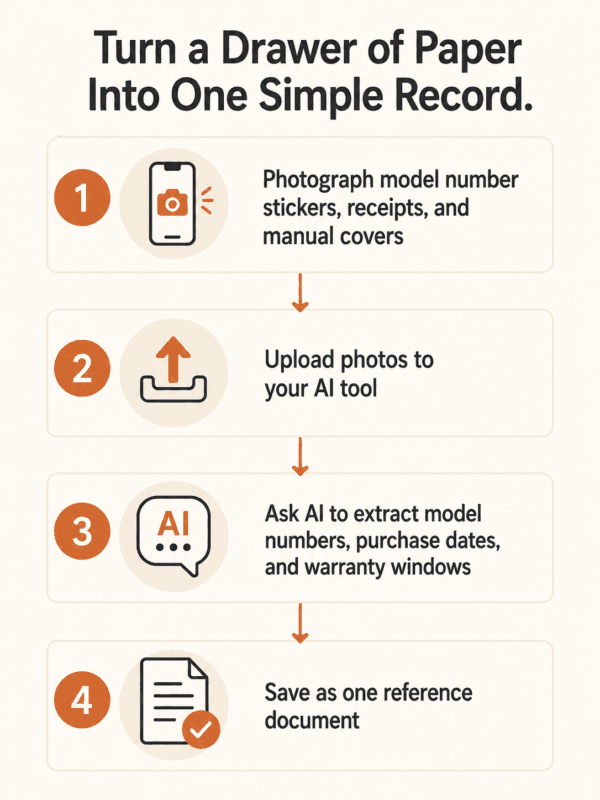
It’s the same approach as the same system we use to keep other important information organized, just pointed at appliances and warranties instead of ideas and research. Once it exists, update it twice a year: once when you do your spring maintenance pass, once in the fall. Ten minutes, and you’re never digging through a junk drawer during a warranty claim again.
Where AI Should Never Make the Call
Scheduling and prep work is one thing. Structural changes, electrical work, code compliance, permits, and roof or foundation decisions are another, and AI doesn’t belong in that conversation. Those calls require a license, a permit, and someone who can be held professionally accountable if something goes wrong. A chatbot can’t pull a permit, and it won’t be the one standing in your basement when a wall you assumed wasn’t load-bearing turns out to be exactly that.
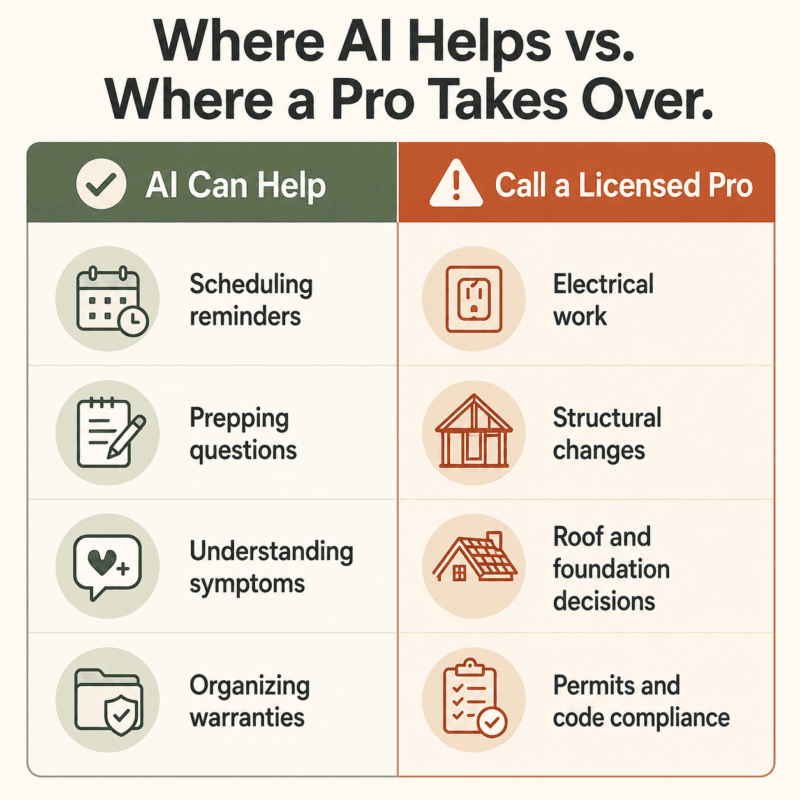
Treat AI the way you’d treat a well-read friend: useful for a second opinion, useless for a license. If a fix involves your home’s wiring, its structure, or a permit office, stop asking a chat window and start calling someone who can be held accountable for the answer.
The National Association of Home Builders’ aging-in-place remodeling checklist is a good example of the professional-standard detail AI simply doesn’t have access to. That level of judgment comes from someone who has stood in hundreds of basements, not from a language model.
If you’d rather hand the tracking off entirely, a home warranty program or a dedicated app like HomeZada or Dwellin can automate more of this than a chat window will, for a monthly or annual fee. That’s a reasonable trade for some people. It’s just not required to get organized in the first place.
If You’ve Downsized or Live in an RV, This Looks Different
Fewer systems doesn’t mean no system. A fifth-wheel RV like ours or a smaller home cuts the list down (no gutters, often no separate water heater closet to forget about) but the same forgetting problem shows up in a different form: generator service intervals, tire age, propane system checks, roof seal inspections that matter more than most owners realize until a seal fails mid-trip.
The same prompt structure above works here too, since we’ve written before about maintaining a much smaller footprint, just with a shorter systems list and different intervals to track. Describe what you actually own instead of a generic home, and the schedule AI hands back will match your real life instead of a house you don’t have anymore.
The Bottom Line
AI won’t fix your roof. It won’t pull a permit or rewire a panel. What it will do is remember the small stuff long enough that a $200 problem doesn’t quietly turn into a $12,000 one, and that’s worth five minutes with a chat window today.
If systems like this are useful to you, our newsletter is where we share more of them: real tools and honest updates on building a freer second act, sent only when we actually have something worth saying.
What’s the one maintenance task you know you’re behind on right now?
Frequently Asked Questions
Can AI actually build me a home maintenance schedule?
Yes. Describe your home’s size, age, location, and systems (HVAC, plumbing, electrical, roof, appliances) and ask for a table organized by task, frequency, and time of year. The more specific your prompt, the more useful the schedule.
Is it safe to use AI for home repair advice?
For scheduling and prep work, yes. For the actual repair decision, be careful. AI has been documented recommending wiring that ignores electrical code and quick fixes that miss hidden plumbing or structural problems. Use it to understand a problem and prepare questions, not to make the final call.
What’s the best free AI tool for tracking home maintenance?
General tools like ChatGPT or Claude work well for building and updating a schedule at no cost. Dedicated apps like HomeZada or Dwellin automate more of the tracking, but that convenience comes with a subscription.
How much should I budget for home maintenance every year?
Angi’s 2025 State of Home Spending Report found households spent an average of $2,041 on maintenance in 2025, up from $1,750 in 2024. A common rule of thumb is 1% to 4% of your home’s value per year, higher for older homes.
Can AI help me keep track of warranties and manuals?
Yes. Photograph appliance labels, receipts, and manuals, then ask AI to help you organize the model numbers, purchase dates, and warranty windows into one simple reference document instead of a drawer full of paper.