

Table of Contents
By the time you hit your 40s, the problem usually isn’t that you don’t know things. It’s that everything you know is scattered. Notes in three different apps. Screenshots you saved and never looked at again. Bookmarks you swore you’d read. A folder of PDFs with names like “scan_final_v2.” Somewhere in that mess is the warranty for your water heater, the name of the supplement your doctor mentioned, and a budget spreadsheet you started in 2022 and never opened again.
A personal knowledge base with AI is how you pull all of that into one place you can actually search. Not another app to babysit. A simple, searchable home for the information you want to use again, where the AI does the boring work of summarizing, tagging, and finding things so you don’t have to.
Here’s the part most articles skip right past. You don’t need a complicated system or a productivity degree to build one. You need a few clear categories, about half an hour, and a willingness to start small instead of trying to organize your entire digital life in one heroic weekend.
Let me walk you through how we think about it.
Please note this page may contains affiliate links. If you purchase something through these links, I’ll receive a commission at no extra cost to you. Affiliate links help to support my website/blog and I only recommend products I love.
What Is a Personal Knowledge Base With AI?
Strip away the jargon and it’s simple. A personal knowledge base is a searchable home for the information you want to reuse. The “with AI” part means you’ve got a tool that can read your messy notes, summarize them in plain language, suggest a few tags, and answer questions about what you saved.
Think of the difference between a junk drawer and a labeled toolbox. Both hold your stuff. Only one helps you find the screwdriver when the cabinet door is hanging off its hinge and the dog is barking and dinner is burning.
What AI adds is retrieval. You ask, “What did the cardiologist say about Dad’s medication?” and instead of scrolling through six months of notes, you get the answer in a sentence. AI summarizes the long stuff, spots patterns across old notes you’d forgotten you wrote, and turns a wall of text into a short list you can act on today.
What it is not: a perfect archive of everything you’ve ever touched. It is not a hobby. And it is not a replacement for your own judgment. If you treat it like a museum, you’ll abandon it by spring. If you treat it like a tool you actually reach for, it earns its place fast. Plenty of people already use AI in small everyday ways without realizing a personal knowledge base is the natural next step.
Why This Matters More After 40
Younger people are still building their pile of digital stuff. You already have the pile. Two or three decades of it, sitting in folders and apps and the back of your mind.
By midlife you’re holding more than notes. You’ve got family documents, travel research, health history, financial questions you keep meaning to sort out, photos in five different places, and a quiet graveyard of half-finished ideas. The goal was never to collect more. The goal is to find what you already know the moment you actually need it, usually under a little pressure.
There’s an emotional weight to digital clutter too, and nobody talks about it. Information saved everywhere and useful nowhere sits in the back of your head like a chore you can never quite finish. Getting it into one place you trust quiets some of that noise. In the same way that building habits that actually stick after 40 clears mental space, a system you trust frees you from re-finding the same answer over and over again.
And here’s the midlife advantage most people miss. You have better judgment now about what’s worth keeping. You’ve learned, often the hard way, which information actually gets used and which just makes you feel productive for saving it. That instinct is exactly what makes a knowledge base work.
Start With Five Life Buckets, Not a Complicated Tag System
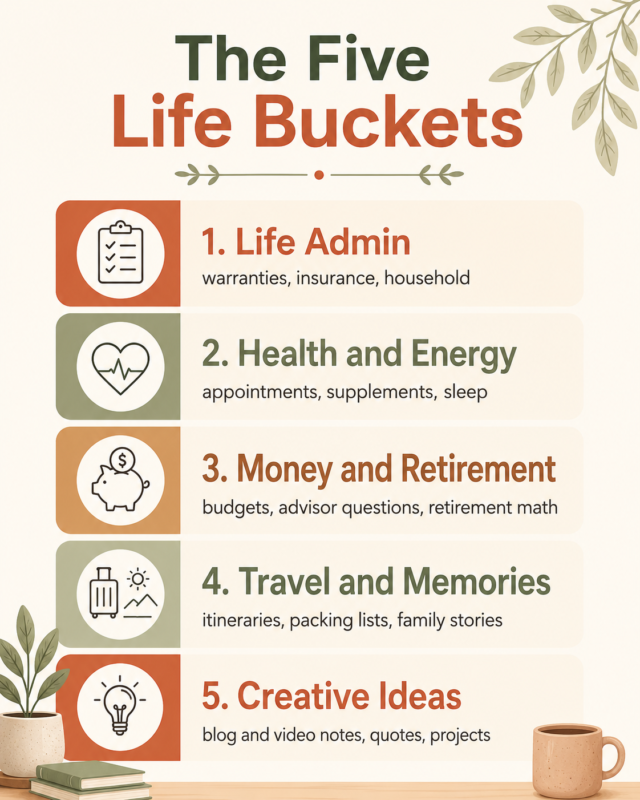
The fastest way to quit is to start with a forty-tag filing system you’ll never maintain. So don’t. Start with five buckets that match real life:
- Life Admin. Warranties, insurance details, household instructions, the stuff you scramble for once a year and can never find.
- Health and Energy. Appointment notes, supplement questions, sleep experiments, what worked and what didn’t.
- Money and Retirement. Financial reading, questions for your advisor, retirement math, plain budget notes.
- Travel and Memories. Itineraries, packing lists, trip lessons, and the family stories worth holding onto.
- Creative Ideas. Blog topics, video notes, quotes you loved, the projects rattling around your head at 2 a.m.
That’s the whole structure. Five folders, five labels. When you find something worth keeping, it goes in one of five places. You can always get more specific later, but the honest truth is most people never need to. The five-bucket version is the one that survives contact with a busy week.
A few of these buckets connect to things you may already be working on. Your Money and Retirement bucket pairs naturally with using AI to plan smarter for your second act, and your Travel and Memories bucket is where the habit of keeping a travel journal finally pays off years down the road.
The 30-Minute Starter Workflow
To build a personal knowledge base, gather your most useful notes, files, and bookmarks in one place, sort them into a few simple buckets, then use AI to summarize and tag each item. Test it by asking real questions you need answered. That’s the whole method.
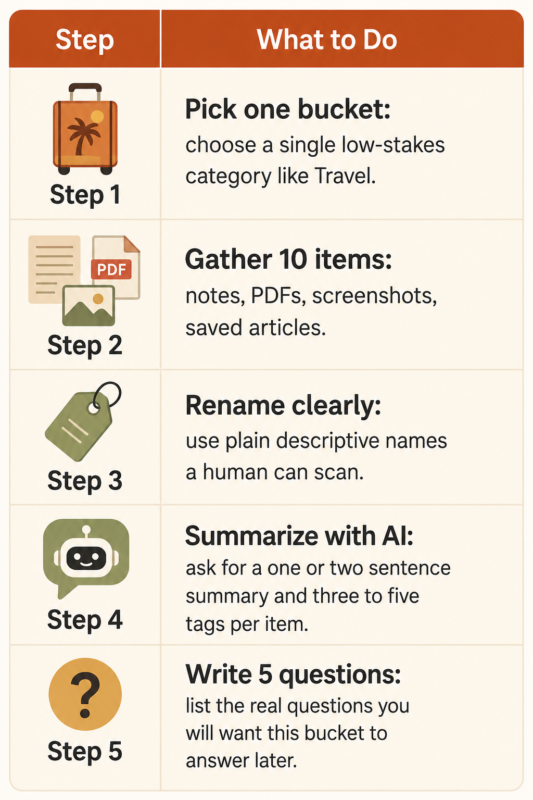
You don’t build this all at once. You build it once, small, and let it grow on its own. Here’s the very first session, start to finish.
Pick one bucket. Just one. Travel is a good place to start because the stakes are lower than health or money, and it’s the kind of thing you enjoy thinking about anyway.
Gather ten useful items. Notes, a couple of PDFs, a few screenshots, a saved article or two. Don’t aim for complete. Complete is the enemy here. Aim for ten things and stop.
Rename them so an actual human can tell what they are. “Alaska_cruise_packing” beats “IMG_4471” every single time, and your future self will thank you when you’re searching at 11 p.m. the night before a trip.
Then hand those items to your AI tool and ask it to summarize each one in a sentence or two. Ask it to suggest three to five tags. Finally, write down five questions you’ll want this bucket to answer later, things like “What did we forget to pack last time?” or “Which cruise line did we actually like best?”
Thirty minutes. One bucket. That’s a real start, and more importantly, it teaches you how the whole thing feels before you scale it to the rest of your life.
AI Prompts That Do the Heavy Lifting
The system gets useful the moment you stop filing and start asking. These are the prompts I keep coming back to, and you can paste any of them into whatever AI tool you already have open.
For summarizing: “Summarize this note in two sentences a busy person could skim.”
For sorting research: “Turn these scattered notes into a simple checklist I can act on.”
For finding patterns: “Here are five notes from the last year. What themes or repeated problems show up across them?”
For next steps: “Based on this document, what are the three things I should actually do?”
For review: “Looking at everything in my Health bucket, what should I bring up at my next appointment?”
Notice that none of these require special software or a subscription you don’t already have. They work in the AI tool sitting on your phone or laptop right now. OpenAI’s own documentation walks through how to upload files and ask questions about them directly, so the core capability is already built into tools most people over 40 are using every week without thinking of it this way.
How to Keep It From Becoming Another Abandoned App
This is where most systems quietly die, so this is the part that matters most.
Use it weekly for one real question. Not a maintenance ritual, not a Sunday-night organizing session, just an actual question you needed answered anyway. That single habit keeps the whole thing alive better than any cleanup spree ever will.
Add only what you expect to reuse. If you’ll never look at it again, it isn’t knowledge. It’s clutter wearing a costume. Keep your tags light, almost lazy. Review one bucket a month instead of trying to tend all five every week, which is a promise nobody keeps.
And stop shopping for the perfect tool. Tiago Forte, who popularized the “second brain” idea through his Building a Second Brain framework, has been making this point for years: the system matters far more than the app. The best personal knowledge base with AI is the one you’ll still open in March, not the prettiest one you set up in January. A clunky system you actually use beats a beautiful one you don’t.
If creative work is your thing, the same principle shows up the moment you try starting a YouTube channel after 40. The people who keep going aren’t the ones with the fanciest setup. They’re the ones who kept it simple enough to sustain on a normal Tuesday.
The Bottom Line
A personal knowledge base isn’t about collecting more. It’s about making the useful pieces of your life searchable, understandable, and easier to act on. You’ve spent decades gathering this information. The real win at midlife is finally being able to put your hands on it when it counts.
Start with one bucket and ten items this week. Not the whole system. One bucket. See how it feels to ask a question and actually get the answer instead of opening four apps and giving up.
If you are just getting started with AI, grab yourself a copy of our FREE AI Starter Guide for People Over 40.
What’s the one pile of digital clutter you’d organize first if you knew it would finally stay organized?
Frequently Asked Questions
What is a personal knowledge base with AI?
It’s a searchable system for your notes, files, ideas, and documents where AI helps summarize, organize, and retrieve what you saved. Instead of hunting through five apps, you ask a question and get an answer.
What should I put in it?
Start with information you actually reuse: health notes, travel plans, financial research, family documents, creative ideas, checklists, and saved articles. Skip anything you know you’ll never open again.
Do I need a special app to build one?
No. You can start with the tools you already use, then add AI features when they make finding and summarizing easier. The method matters more than the software you pick.
How much should I organize before using AI?
Organize lightly. A few clear buckets are enough. AI works best when your material is gathered and named clearly, not when every single item is perfectly tagged.
How do I keep it from becoming another abandoned system?
Build it around questions you ask often, not a complicated filing method. If it helps you find useful answers fast, you’ll keep coming back to it on your own.