

You type a real question into ChatGPT. Something you actually need help with. What comes back is vague, generic, or just wrong. So you close the tab and quietly decide this AI stuff isn’t for you.
That moment is more common than most AI content admits. Prompt engineering for beginners isn’t about learning to code or memorizing ten clever tricks. It’s a plain communication skill, the same kind you already use when you text a friend clearly enough that they don’t have to ask a follow-up question. Most people just never learned how to apply it to a chatbot.
Here’s the part that should be reassuring. You don’t need a technical background, a course, or a subscription to any special tool. You need a handful of small habits that make almost any AI tool, ChatGPT, Claude, Gemini, noticeably more useful within the next ten minutes.
Please note this page may contains affiliate links. If you purchase something through these links, I’ll receive a commission at no extra cost to you. Affiliate links help to support my website/blog and I only recommend products I love.
What Prompt Engineering for Beginners Actually Means (No Coding Required)
Prompt engineering sounds like something built for developers. It isn’t, at least not the version that matters for everyday use. At its core, it just means being deliberate about how you ask for something, giving context, naming what you want, and being specific about the result, instead of typing a bare question and hoping for the best.
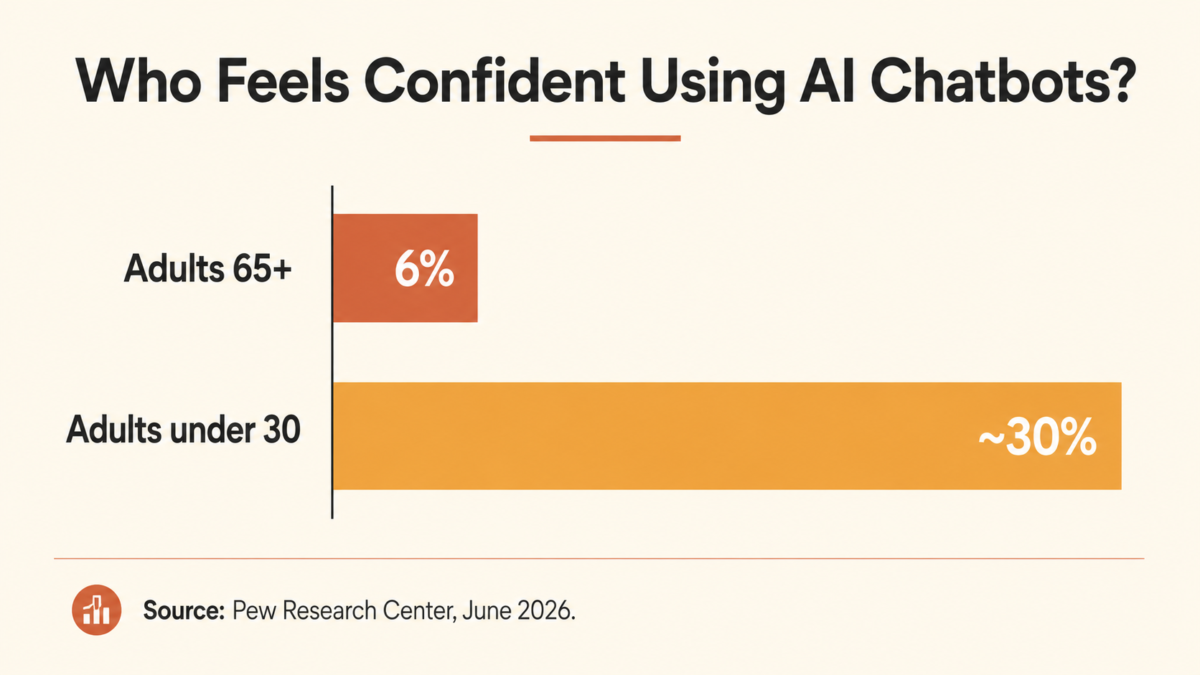
The confidence gap here is real, and it’s bigger than the actual skill gap. Pew Research Center found in a June 2026 report that only 6% of adults 65 and older feel very confident using AI chatbots, compared to roughly 3 in 10 adults under 30. That’s not a competence problem. Most older adults who try AI tools can use a smartphone, manage a spreadsheet, and write a clear email. The gap is exposure, not ability.
If you’ve walked away from ChatGPT assuming you’re bad at this, you’re measuring yourself against the wrong bar. You’re not behind on some technical skill. You just haven’t been shown how to phrase the request yet, and once you do, most of the frustration disappears. If you want a broader entry point before going further here, getting comfortable with AI tools in the first place is a good place to start.
The One Framework Beginners Should Start With: Role, Task, Format
Most guides to prompt engineering hand you eight or ten techniques at once. That’s overwhelming, and it’s exactly backward for a beginner. Start with one framework, get comfortable with it, and layer in more only when you actually need to.
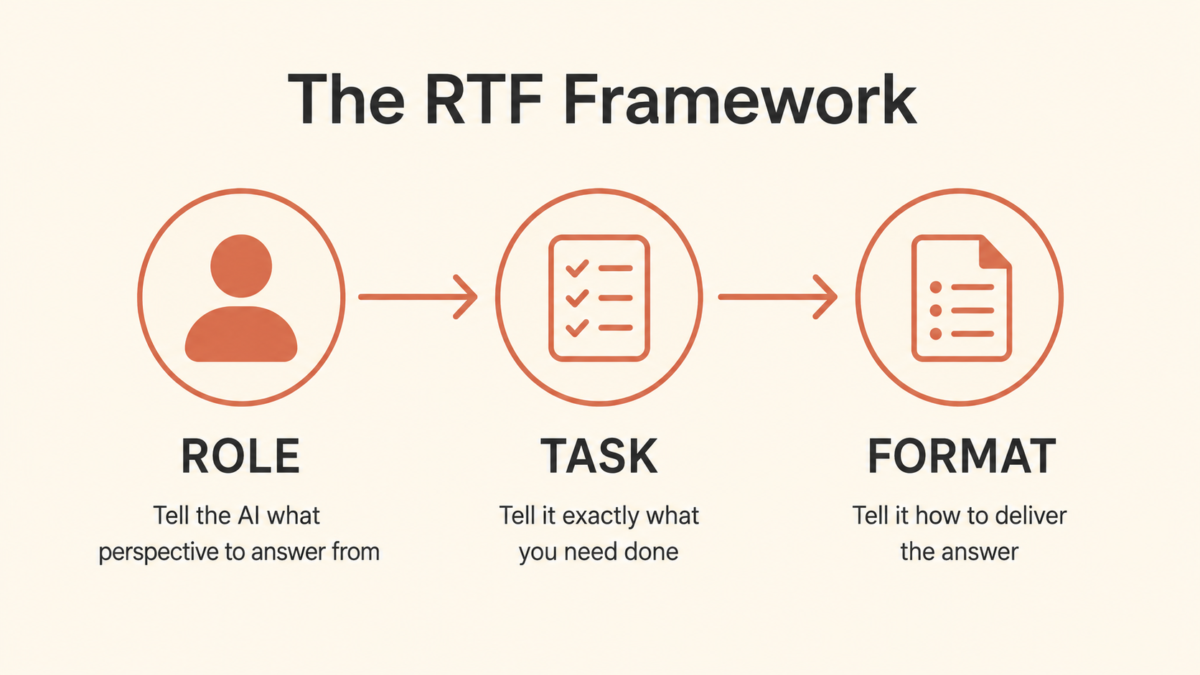
The simplest version worth memorizing is Role, Task, Format, or RTF for short.
Role tells the AI what perspective to answer from. Task tells it exactly what you need done. Format tells it how you want the answer delivered, a list, a short paragraph, a table, a script you could read out loud.
Here’s what that looks like in practice. Instead of typing “help me plan a family trip,” try: “You’re a travel planner who specializes in multigenerational family trips. Help me build a 3-day itinerary for a trip with two grandparents, two adults, and three kids ages 6 to 14. Format it as a day-by-day list with one backup activity per day in case of rain.
Notice what changed. The AI now knows the lens to answer from, the specific job, and exactly how you want the result structured. That single shift, from a vague ask to an RTF request, is responsible for most of the improvement people notice once they start doing this deliberately. Even OpenAI’s own guidance for ChatGPT users comes back to the same three ingredients: context, a clear task, and a specified format.
Why Your First AI Answer Is Usually Wrong (And What to Do About It)
Here’s something nobody tells beginners: your first prompt is a draft, not a final attempt. Treat the first response the way you’d treat a first draft of an email, something to react to and adjust, not something to accept or throw out entirely. MIT Sloan’s Teaching & Learning Technologies group lists iteration alongside context and specificity as one of the three core habits that separate people who get good results from people who don’t.
Two or three revisions is normal. It is not a sign you’re doing something wrong. If the answer is too generic, add context about your specific situation. If it’s too long, ask for a shorter version. If it missed the point, name exactly what it missed instead of just saying “that’s not right.”
This iterative habit is the single biggest difference between people who give up on AI after one bad answer and people who use it well. The tool didn’t get smarter between attempt one and attempt three. Your request did.
Here’s a small example. Say you ask an AI tool to summarize a long insurance document and the first summary comes back too technical to actually use. Instead of giving up, try: “That’s still too technical. Rewrite it for someone with no insurance background, using everyday words, and keep it under 150 words.” That single follow-up usually solves the problem completely.
The fix was never the tool. It was treating round two as expected instead of a failure. For a wider look at building this habit across different tools and situations, a broader guide to learning AI without feeling behind walks through more of the general mindset shift.
Five Small Habits That Instantly Improve Any Prompt
Beyond the RTF framework, a handful of small habits stack on top of each other and compound fast.
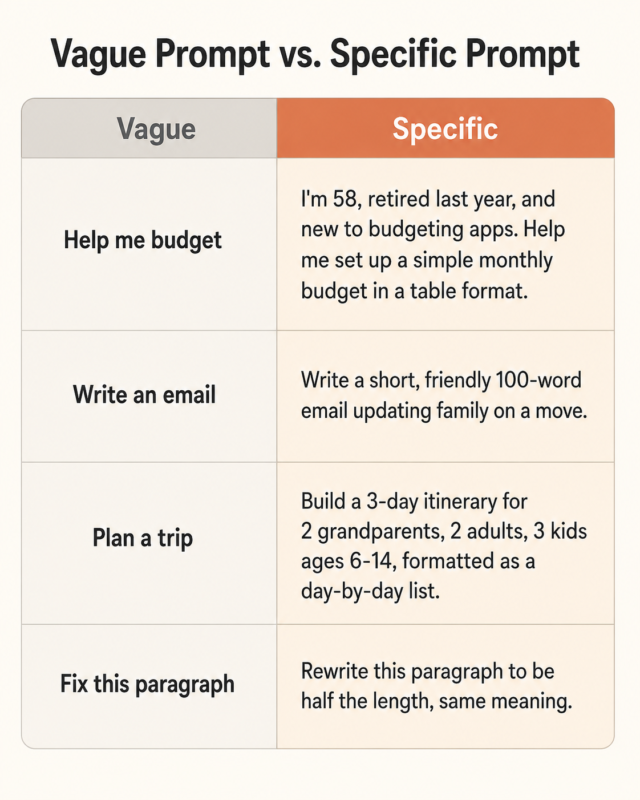
- Give context first. Tell the AI who you are and what you already know before asking your question. “I’m 58, retired last year, and new to budgeting apps” gets a very different answer than a bare “how do I budget.”
- Be specific about the outcome. “Write a short, friendly email” beats “write an email.”
- Focus on one thing at a time. Asking for a trip itinerary and a packing list and a budget breakdown in one prompt usually produces a rushed, shallow version of all three.
- Ask for a format. A table, a numbered list, three bullet points. Naming the shape of the answer forces more useful organization.
- Say what to leave out. “Skip the intro paragraph” or “no bullet points, just a short paragraph” trims the filler AI tools default to.
None of these require technical knowledge. They’re the same instincts you already use when you leave a detailed voicemail instead of a confusing one.
Real Prompts You Can Copy and Paste Today
Theory only goes so far. Here are four prompts built around real midlife life admin, not marketing copy or coding tasks.
Before a doctor’s appointment: “You’re a patient advocate helping someone prepare for a doctor’s visit. I’m dealing with [symptom or concern] for the past [timeframe]. Help me write 5 clear questions to ask my doctor, plus 2 follow-up questions in case the first answer is vague. Format as a numbered list.”
A family update email: “Write a warm, brief email updating extended family on [event or news]. Keep it under 150 words, friendly tone, no corporate phrasing. End with an invitation for them to call if they have questions.”
Planning a trip budget conversation: “You’re a financial planner. Help me think through a conversation with my spouse about budgeting for a trip costing around $[amount]. Give me 4 questions we should answer together before booking anything, formatted as a short list.”
Tidying up a rambling paragraph: “Rewrite this paragraph to be clearer and about half the length, keeping the same meaning: [paste your paragraph].”
These work because each one follows the same shape. Role, clear task, format. If you want more everyday examples beyond these four, everyday ways people are already using ChatGPT has 25 more.
Once you’re generating useful answers regularly, the next problem is usually keeping track of them. If you’re trying to keep information organized across multiple AI conversations, organizing scattered information with AI covers that next step well.
When Prompt Engineering Won’t Save a Bad Answer
Better prompts improve clarity. They do not improve accuracy on high-stakes topics, and that distinction matters more than any framework in this post.
A sharper prompt about a medical symptom will get you a more organized, more readable answer. It will not turn an AI chatbot into a doctor. The same goes for legal questions, and it goes double for money. We’ve drawn this same line before on the same guardrail already drawn on money questions: AI is excellent at helping you ask a professional better questions. It is not a replacement for the professional.
Treat prompt engineering as a tool for getting clearer, more useful answers on everyday tasks, research, writing, organizing, planning. On anything where being wrong actually costs you something serious, use AI to prepare your questions, then bring those questions to a real person who can be held accountable for the answer.
A good gut check: if getting the answer wrong would only waste ten minutes, experiment freely. If getting it wrong would cost you money, your health, or a legal outcome, use the AI to sharpen the question, not to supply the final answer.
The Bottom Line
You don’t need to become an AI expert. You need one framework, Role, Task, Format, and the willingness to treat the first answer as a draft instead of a verdict. Give context, be specific, expect to revise once or twice, and save the AI’s confident tone for topics where being wrong doesn’t cost you much.
That’s genuinely most of it. The rest is just practice, and practice is the one part nobody can shortcut for you.
If you haven’t built the basic comfort level yet, start with our beginner-friendly walkthrough of AI tools for adults over 50 and come back to this framework once the tool itself feels less foreign.
Want more like this? Join our newsletter and discover more midlife tools and knowledge we’re actually using.
What’s the AI answer that made you want to give up on the whole thing? Tell us in the comments, there’s a decent chance the fix is a two-word tweak to how you asked.
Frequently Asked Questions
What is prompt engineering for beginners?
It’s a communication skill, not a coding skill. It means giving AI tools like ChatGPT enough context, specificity, and structure that they return a useful answer instead of a generic one. Anyone who can write a clear, detailed message already has the core skill needed to start.
Do I need to learn to code to write good AI prompts?
No. Everyday prompt engineering has nothing to do with programming. If you can write a detailed text message to a friend explaining exactly what you need, you already have the foundational skill required to write a good prompt.
What’s the easiest prompt framework to start with?
Role, Task, Format, known as RTF, is the simplest framework for a true beginner. Tell the AI what role to answer from, what task to complete, and what format to return the answer in. It’s simple enough to remember without writing it down.
Why do my ChatGPT answers feel generic or off-target?
Usually because the original prompt was too broad. Adding context, who you are, what you already know, and what outcome you actually want, narrows the AI’s guesswork and sharpens the response considerably.
How many times should I expect to rewrite a prompt before it works?
Two or three revisions is completely normal, not a sign of failure. Treat the first answer as a rough draft: read it, adjust one specific detail, and ask again. Most people get a workable answer by the second or third try.