
Table of Contents
Six in ten American adults don’t have a will or any estate planning documents in place, according to a 2025 AARP survey. Even fewer have something simpler: a plain-language sheet that tells their family where the important accounts are, what the passwords might be, and who to call first. That gap is what an in case something happens to me document is built to close, and you can build a real first draft of yours this afternoon using a free AI tool.
Most people know they should do this. Almost nobody does. The task feels heavier than it needs to be: legal jargon, decades of accumulated accounts, and no clear starting point. It sits on the list behind everything more urgent, until a health scare or a phone call from a hospital makes it urgent in the worst possible way.
This is not a will, and it will not replace one. What it is: a single, organized document that answers the questions your spouse, adult kids, or siblings would actually ask if something happened to you. Below is the five-part framework and the AI prompts that turn a blank page into a working draft in under an hour.
Please note this page may contains affiliate links. If you purchase something through these links, I’ll receive a commission at no extra cost to you. Affiliate links help to support my website/blog and I only recommend products I love.
What Actually Goes in an In Case Something Happens to Me Document
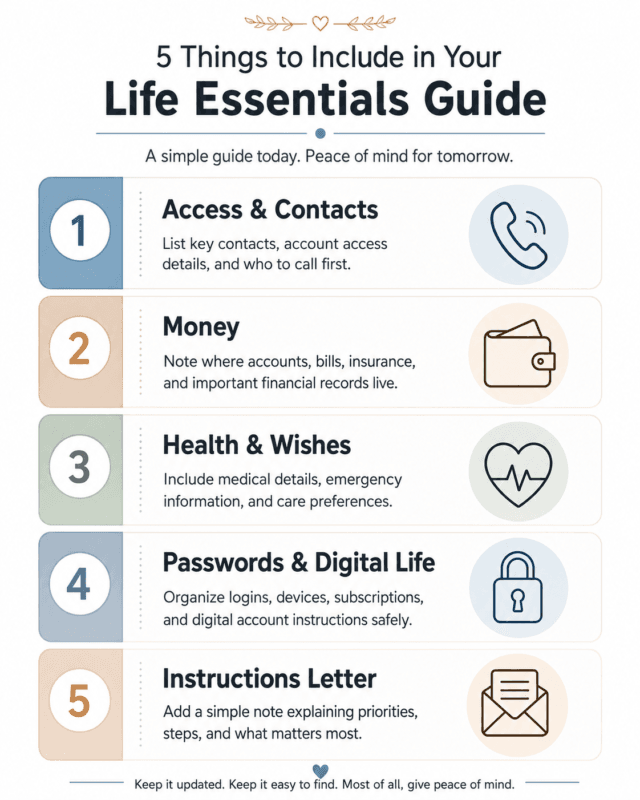
An in case something happens to me document breaks into five parts. Each one answers a different question your family would face in the first 48 hours, and in the weeks after.
- Access & Contacts: who to call first (doctor, employer, close friend) and how to reach them
- Money: bank accounts, retirement accounts, recurring bills, and who holds the mortgage or lease
- Health & Wishes: your health directives if you already have them, allergies, medications, and where those legal documents are kept
- Passwords & Digital Life: which accounts matter (email, banking, social media) and where the master list of logins lives, not the passwords themselves
- Instructions Letter: a plain paragraph in your own words about anything that isn’t obvious from a list
The instructions letter tends to be the part people skip, but it’s often the most useful. This is the place for anything that doesn’t fit neatly into a category: the name of the person who knows how to shut off the water main, which sibling already agreed to take the dog, or a note that the good china goes to a specific grandchild.
None of that belongs in a bank statement, and all of it is exactly what someone standing in your kitchen would actually want to know.
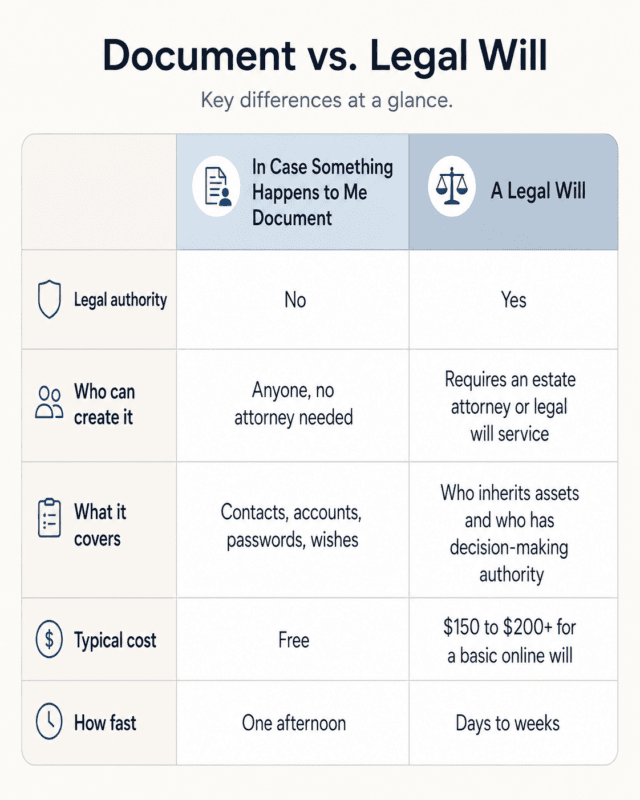
None of this replaces a will. A will decides who inherits what and who has legal authority to make decisions. This document does something narrower, and in the first week, more useful: it tells your family where to look.
If you’ve already started organizing other parts of your life with AI, the same approach carries over directly. We covered the broader version of this in how to build a personal knowledge base with AI after 40, and this document is really a focused slice of that idea aimed at one specific, high-stakes use case.
The AI Prompts That Do Most of the Work For You
Open a free AI chat tool. ChatGPT, Claude, and Gemini all work fine for this. Paste in three prompts in sequence, and each one builds on the last.
Prompt 1: “Build me a five-category outline for an in case something happens to me document: access and contacts, money, health and wishes, passwords and digital life, and instructions letter. For each category, list the specific items I should gather.”
Prompt 2: “Turn this outline into a one-page plain-language cover sheet a family member could read in under two minutes during a stressful moment.”
Prompt 3: “Write a short ‘where things are’ summary sheet template I can fill in by hand, one line per item, so I am not typing anything sensitive into you.”
Run through all three and you’ll typically end up with something like a five-section outline, a half-page cover sheet in plain English, and a blank fill-in-the-blank sheet ready to print. That’s a working first draft, not a finished product, but it’s a long way from the blank page most people are stuck on.
The National Institute on Aging’s “Getting Your Affairs in Order” checklist, published by the NIH, uses nearly the same category structure. That overlap is a good sign. It means the AI-generated outline lines up with established elder-care guidance, not just what sounded reasonable to a chatbot.
If this is your first time using an AI chat tool for something this personal, how to use ChatGPT in everyday life walks through two dozen lower-stakes examples first.
What You Should Never Type Into an AI Tool (And What’s Fine)
AI chat tools are genuinely useful for structuring this document. They are the wrong place to type your actual account numbers, passwords, or Social Security number.
Use placeholders while you draft. Try “[bank name here]” instead of the real bank, “[account number]” instead of the digits, “Mom’s SSN, see safe” instead of the number itself. Fill in the real details by hand afterward, in the actual document, not in the chat.
OpenAI’s own data controls documentation confirms that conversations can be used to improve its models unless that setting is turned off, and even then, the company retains data for a period for safety and legal review. That’s a reasonable tradeoff for brainstorming a category structure. It is not a reasonable tradeoff for a working password list.
A useful trick: draft the whole document with placeholders first, then do one final pass by hand where you swap in the real numbers. That way the AI conversation never contains anything worth stealing, even if you decide to keep the chat log.
Fine to include: category names, general descriptions, hypothetical examples. Not fine: real numbers, real passwords, real answers to security questions.
Getting Your Spouse, Kids, or Siblings on the Same Page
An in case something happens to me document that nobody knows exists doesn’t help anyone. Once you have a working draft, the next step is telling at least one other person it exists and roughly where to find it.
For a spouse, this might be a five-minute conversation over dinner. For adult kids or siblings, it can open into something bigger: a real conversation about family history, health wishes, and the stories behind the accounts and decisions, not just the logistics.
If that conversation with a parent or sibling ends up going deeper than logistics, what a legacy interview actually involves is a good next step, and how to record your parents’ life stories before it’s too late covers the practical side of capturing it.

Where to Store It and When to Update It
Storage is simple. Keep one copy somewhere secure but findable: a locked drawer or fireproof safe for anything printed, plus a password-protected cloud folder shared with one trusted person. Don’t email the finished document as an attachment. Don’t leave it open in a browser tab on a shared computer.
Review it once a year, or right after a major life event: a new account, a move, a divorce, a new grandchild, a diagnosis. A document from three banks and one job ago isn’t much better than no document at all.
Set a recurring reminder for the same month every year, tied to something you’ll already remember: a birthday, tax season, the start of daylight saving time. That way the review doesn’t quietly become another good intention that never actually happens.
This kind of practical organizing is its own quiet form of legacy work. We wrote about that idea more directly in the most meaningful legacy you can leave your children, and the through-line is the same: what your family remembers is rarely the money.
This Isn’t a Will, and That’s Okay
One more time, because it matters: this is not a will, a power of attorney, or a substitute for either one. It has no legal authority. If you need someone to have the legal power to make financial or medical decisions on your behalf, or you want a say in who inherits what, talk to an estate attorney. This document doesn’t replace that conversation. It just means your family isn’t starting from zero while you have it.
If you want a formal legal document alongside this one, services like Trust & Will can walk you through a basic will for a flat fee, typically somewhere in the $150 to $200 range, a fraction of what an attorney-drafted estate plan costs. More complex situations, a blended family, a business, multiple properties, usually still call for an actual attorney.
A platform like Everplans is built specifically to store and organize this kind of information long term if a single document ever grows into something you want managed more formally. Either is worth a look once the practical version exists. Neither one is required to get started today.
The goal with your in case something happens to me document was never perfection. It was a findable one. A messy five-part outline that your spouse or your oldest kid knows exists beats a flawless plan that only lives in your head.
If building this practical document got you thinking about the bigger picture, the free 30 Living Legacy Questions is a natural next step. It moves past logistics into the stories, memories, and wishes that a spreadsheet can’t capture, and it takes the same afternoon-project approach as this document.
What’s the one account or password you’d hate for your family to have to guess?
Frequently Asked Questions
What is an in case something happens to me document?
It’s a plain-language file, not a legal document, that gathers the contacts, accounts, passwords, and wishes your family would need if something happened to you suddenly. Think of it as a map, not a will.
Does this replace a will or power of attorney?
No. This document organizes information your family needs quickly. A will and power of attorney are legal documents that need an estate attorney. Many people do both: the practical document now, the legal paperwork when they’re ready.
Is it safe to use ChatGPT or another AI tool to help build this?
Yes, for structuring and drafting, but never paste real account numbers, passwords, or Social Security numbers into an AI chat. Use placeholders while you draft, then fill in the real details yourself afterward.
How long does this actually take?
Most people can build a solid first draft in a single afternoon using the prompts and structure in this post. Adding every account and password can take longer, but the skeleton comes together fast.
Where should I keep it once it’s done?
Somewhere secure but findable: a locked drawer or fireproof safe for a printed copy, plus a password-protected cloud folder shared with one trusted person. Update it once a year or after any major life change.