

Table of Contents
AI phishing attacks jumped 14 times over in a single month and now make up roughly 40% of all phishing attempts in 2026, according to a July 2026 TechTimes report on the shift. That number matters because it means the old advice you grew up trusting, look for typos and broken English, doesn’t work anymore. The scam texts and emails hitting your phone right now are often grammatically perfect.
That’s the problem this post solves: how to spot an AI scam text or email when the writing quality gives you nothing to go on. Instead of scanning for spelling mistakes, you’re going to learn to read the request itself. What is this message actually asking you to do, and does that ask make sense coming from who it claims to be from?
By the end, you’ll have one simple test you can run on any text or email in about ten seconds, plus the four scam formats currently targeting adults over 50 the hardest, and exactly what to do if you’ve already clicked something you shouldn’t have.
Please note this page may contains affiliate links. If you purchase something through these links, I’ll receive a commission at no extra cost to you. Affiliate links help to support my website/blog and I only recommend products I love.
Why “Look for Bad Grammar” Doesn’t Work Anymore
For years, the standard scam-spotting advice was simple: bad grammar, awkward phrasing, and misspelled words were the giveaway. Scammers, often working from overseas with English as a second language, left a trail of tells in their writing.
AI closed that gap. Any scammer can now run a message through a large language model and get back something that reads like it was written by a native English speaker with a marketing degree. The writing quality tell is gone, completely.
The numbers back this up. Older adults lost roughly $352 million to AI-powered scams in 2025, according to FBI-sourced reporting covered by Bitdefender. That’s not a small, isolated problem. It’s a fast-growing one, and it’s growing specifically because the tool that used to catch scams (bad writing) has been erased.
Here’s the reframe worth remembering: the tell was never really the grammar. It was always the request. A well-written scam and a poorly-written scam are asking you to do the same suspicious thing. AI just removed your easiest excuse to ignore it. If you want a broader sense of which AI tools are worth trusting day to day and which aren’t, the everyday AI tools worth trusting is a good place to start.
How to Spot an AI Scam Text or Email With One Question
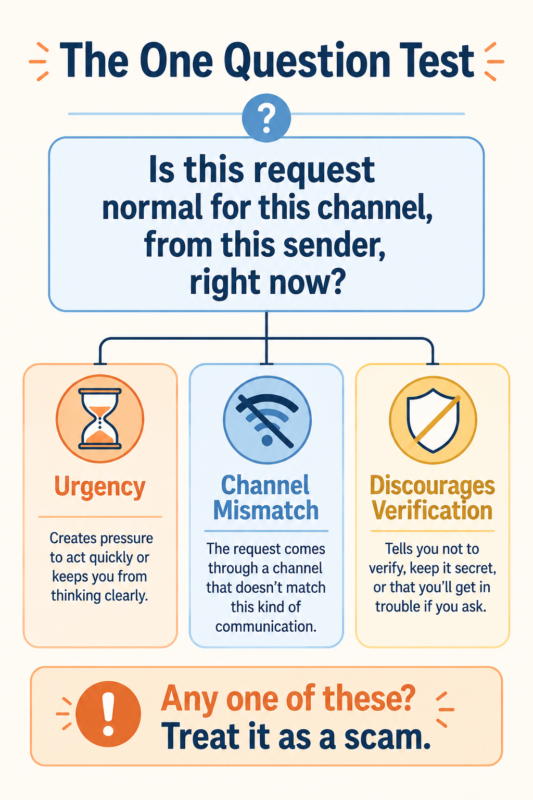
Here’s the test. Ask yourself: is this request normal for this channel, from this sender, right now?
Break that down and you get three things to check every time:
- Urgency. Does the message push you to act in the next few minutes, before you can think it through or call someone?
- Channel mismatch. Would this sender actually reach you this way? Your bank doesn’t text you a link to “verify” your account. The Social Security Administration doesn’t text you at all about your benefits.
- Discouraged verification. Does the message discourage you from checking with anyone else, or from calling the number you already have on file?
You usually can’t tell from the writing anymore. AI-generated scam texts and emails are grammatically perfect, so the real test is the request: does it create urgency, does it ask you to skip your normal verification process, and does the channel match what the sender would actually use? If any of those are off, treat it as a scam.
That one question works whether the message is a text, an email, or a phone call. It’s why this is the habit worth building, rather than trying to memorize a growing list of scam formats. Plenty of people already use AI for smaller everyday tasks without a second thought, which makes it easy to forget scammers have the same access. How people are already using AI day to day is worth a look if you want to see the more useful side of that same technology.
The 4 Scam Types Hitting Adults Over 50 Right Now
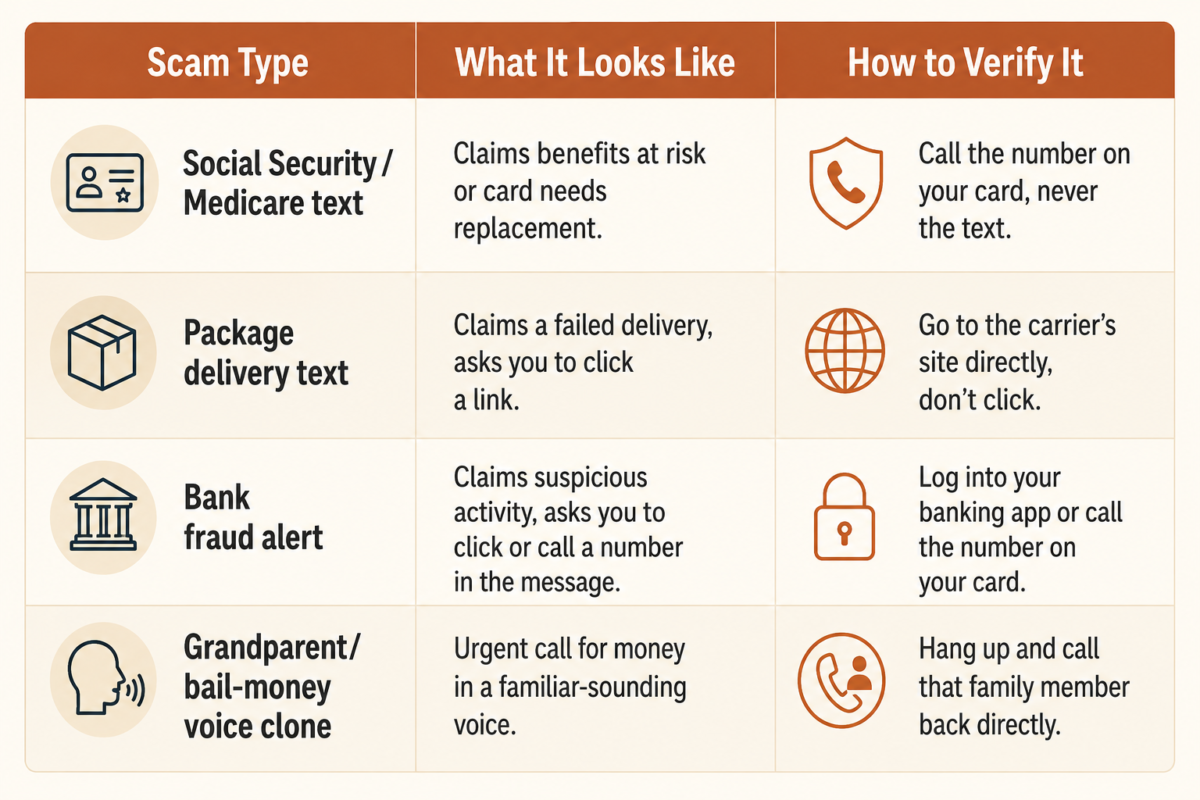
The one-question test matters most when you can match it against real, current examples. Four formats are doing most of the damage right now.
The first is the fake Social Security or Medicare text. It usually claims your benefits are at risk, your card needs “replacement,” or your cost-of-living adjustment needs confirming. Neither agency contacts you this way. The Social Security Administration doesn’t text you asking to verify your number or send a link to confirm benefits.
The second is the package delivery text, often called smishing. It tells you a package couldn’t be delivered and asks you to click a link to reschedule. This one is common: 31% of people report receiving one of these texts, according to AARP reporting on the trend.
The third is the bank fraud alert, a fake text or email claiming suspicious activity on your account and asking you to click a link or call a number to “verify” your identity. The real version of this alert never asks you to click anything. It tells you to log in through your own app or call the number on the back of your card.
The fourth is the grandparent or bail-money voice clone call, where AI-generated audio mimics a family member’s voice in distress, asking for money to be wired immediately. This format uses the same urgency-and-channel-mismatch pattern as the text scams, just delivered by voice instead of writing.
Older adults are a specific target here, not an incidental one. Nearly 9 in 10 older adults say they’re worried about AI-enabled scams, according to the University of Michigan National Poll on Healthy Aging, cited by the AARP Public Policy Institute.
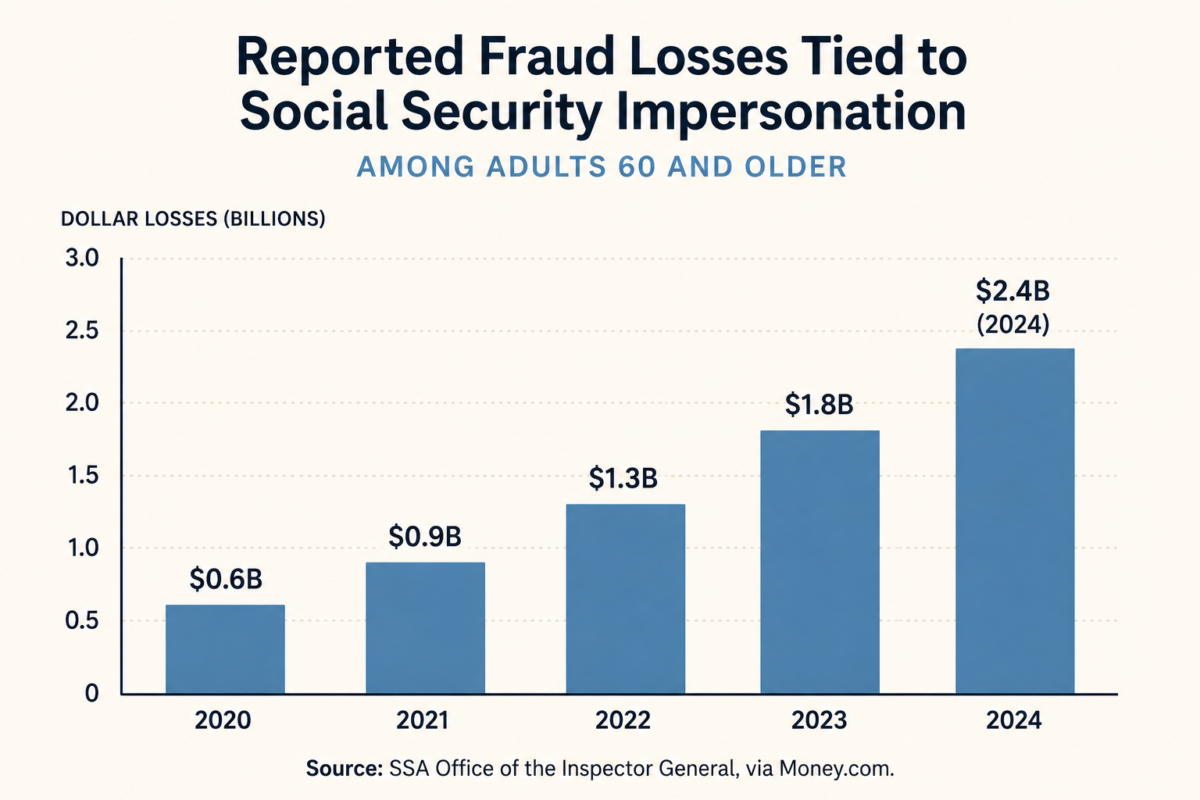
That concern is well-founded. Government impersonation complaints to the FTC rose 25% in 2025 to more than 330,000, and reported fraud losses tied to Social Security impersonation among adults 60 and older have roughly quadrupled since 2020, reaching $2.4 billion in 2024, per SSA Office of the Inspector General data reported by Money.com.
If you’re newer to using AI tools yourself and want a gentler entry point before tackling scam-detection specifically, getting comfortable with AI without the overwhelm covers the basics without assuming prior tech experience.
How to Verify Before You Click or Respond
The fix is a habit, not a piece of software. Two rules cover almost every situation.
First, call the agency or company back on a number you already have, never one from the text or email itself. If Medicare texts you, don’t call the number in that text. Pull out your Medicare card and call the number printed on it. If your “bank” emails you, don’t click through. Open your banking app directly or call the number on the back of your card.
Second, never use a link in an unexpected text or email. Go to the website directly by typing the address yourself or using a bookmark you already saved. This one habit closes off almost every version of this scam, because the entire scheme depends on you clicking their link or calling their number instead of your own.
This same verify-independently habit applies just as much to financial decisions as it does to scam texts. If you’re using AI tools to help manage money, using AI to manage money without risking bad advice walks through where that verification instinct matters most.
What to Do If You Already Clicked
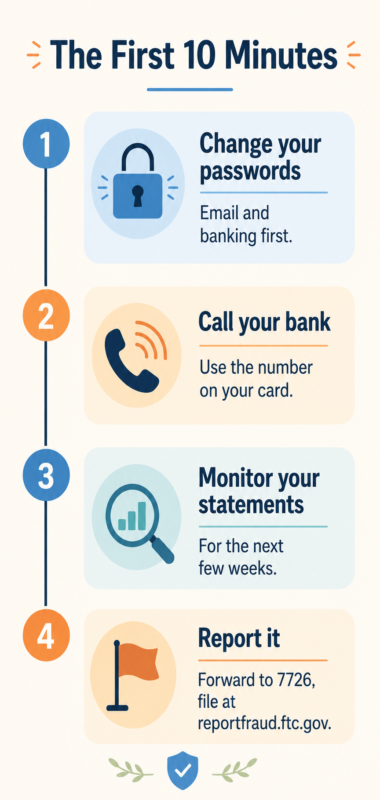
If you’ve already clicked a link or responded to one of these messages, the next ten minutes matter more than any regret about the click itself.
Change your passwords first, starting with your email and banking logins. Call your bank directly, using the number on the back of your card, and tell them what happened. Monitor your statements closely for the next few weeks, not just the next few days.
Then report it. Forward the message to 7726 (SPAM) with your carrier, file a report with the FTC at reportfraud.ftc.gov, and if it involved Social Security or Medicare, report it to the SSA Office of the Inspector General as well.
None of this requires special technical skill. It requires acting quickly and calmly, in that order. If part of what worries you about a scam is the financial damage it could do to a retirement plan you’ve worked years to build, the plan behind your Freedom Number is worth revisiting so you know exactly what you’re protecting.
The Bottom Line
AI changed the writing. It didn’t change the fact that a simple verification habit still catches almost every one of these scams. Stop reading for typos. Start reading for the ask: is this urgent, does the channel match, and is it trying to talk you out of checking with someone else first? If any of those feel off, it’s a scam, no matter how well it’s written.
Want more of this kind of practical, no-jargon look at using AI in everyday midlife life? Sign up for our newsletter and we’ll send the next one straight to your inbox.
Have you gotten a scam text this convincing? What gave it away?
Frequently Asked Questions
Can AI really write a scam email that looks completely real?
Yes. AI phishing attacks jumped 14 times over in a single month and now make up about 40% of all phishing attacks in 2026, largely because AI closes the writing-quality gap that used to give scams away, according to TechTimes’ July 2026 reporting.
How do I know if a text about my Social Security or Medicare is real?
The Social Security Administration and Medicare do not text you asking to “verify” your number or send a link to confirm benefits. Call the agency back using the number on your card or the official SSA or Medicare website, never a number or link from the text itself.
What should I do if I already clicked a link in a scam text?
Change your passwords, call your bank directly using the number on your card, monitor your statements closely, and report the message to the FTC at reportfraud.ftc.gov.
Are older adults really targeted more by AI scams?
Yes. Government impersonation complaints to the FTC rose 25% in 2025 to more than 330,000, and reported fraud losses among adults 60 and older tied to Social Security impersonation have roughly quadrupled since 2020, reaching $2.4 billion in 2024.
Is there a way to report an AI scam text?
Report it to the FTC at reportfraud.ftc.gov, to the SSA Office of the Inspector General at oig.ssa.gov if it involves Social Security or Medicare, and forward the text to 7726 (SPAM) with your carrier.