

Table of Contents
Nearly one in five adults over 50 has no retirement savings at all, according to AARP’s 2026 Financial Security Trends Survey. If that stat makes your stomach drop a little, you are not alone, and you are not as behind as it feels.
Here is what nobody tells you: a lot of people who look like they have it together are quietly typing retirement questions into ChatGPT at 11pm, the same way you might be. There is no shame in that. The problem is most people do it without a system, get a vague answer, and close the tab feeling worse than when they opened it.
Say you’re 47, you’ve got $80,000 saved, and you’d like to retire around 65. That’s not a crisis. It’s a starting point, and it’s exactly the kind of scenario AI can help you turn into a workable plan, provided you know what to ask and where to stop trusting the answer.
This post is how to use AI to prepare for retirement after 40 the right way: with real prompts, real 2026 numbers, and a clear line for where AI should step back and a licensed professional should step in.
Please note this page may contains affiliate links. If you purchase something through these links, I’ll receive a commission at no extra cost to you. Affiliate links help to support my website/blog and I only recommend products I love.
How to Use AI to Prepare for Retirement After 40: What It Can (and Can’t) Do
Use free AI tools like ChatGPT to organize your numbers, not to decide your tax or investment strategy. Enter your age, savings, and target retirement age, then ask for a decade-by-decade savings breakdown and a catch-up contribution plan. Bring what AI gives you to a fiduciary advisor before making any final decisions.
That distinction matters more than it sounds like it should. AI is genuinely good at a specific set of tasks: organizing scattered information, explaining unfamiliar terms in plain English, running rough math faster than you could with a calculator app, and helping you frame questions you didn’t know you needed to ask.
Ask it to explain what a Roth conversion actually means, or to translate your 401(k) summary plan description into normal sentences, and it will usually do a solid job.
It is not good at knowing your full financial picture, your state’s specific tax rules, or the fine print of your particular employer’s retirement plan. It doesn’t carry a fiduciary duty to act in your best interest, the way a Certified Financial Planner legally does. It will also answer with total confidence even when it’s working from incomplete or outdated information, which is the part that trips people up most.
Our walkthrough on using ChatGPT for personal finance covers this same caution for everyday money questions. Retirement planning raises the stakes, because the mistakes are harder to walk back with fewer working years left to recover from them.
Think of AI as a research assistant who never gets tired of your questions, not as the person who signs off on the plan.
The First 3 AI Prompts to Run If You’re Starting From Zero
If you have never used AI for anything money-related, start here. If you’re brand new to AI tools entirely, our beginner’s guide for adults over 50 walks through the basics first.
Open ChatGPT (or a similar tool) and try these three prompts, in order. Swap in your real numbers, not round ones. The more specific you are, the more useful the answer.
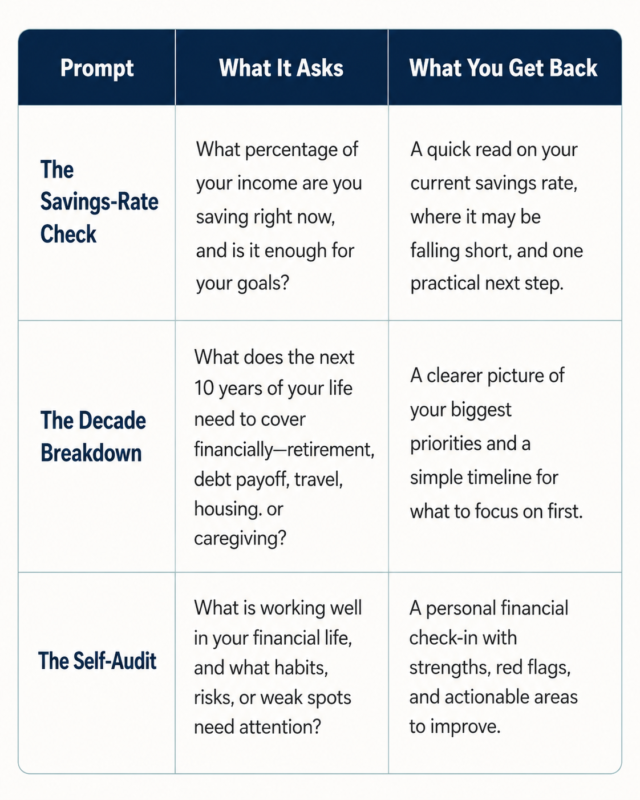
Using the 47-year-old, $80,000 scenario from earlier, the first prompt might come back suggesting a savings rate range and a note that starting later means leaning harder on catch-up contributions once you turn 50. That’s a reasonable starting draft. It is not a plan you should act on until you have checked it against your actual account statements and, ideally, a real advisor.
None of these prompts hand you a finished plan. They hand you a starting draft and a shorter list of things to research next, which is a real head start over staring at a blank page or avoiding the topic for another year.
How to Use AI to Understand the 2026 Catch-Up Contribution Numbers
Catch-up contributions exist specifically for people who started saving later or want to accelerate before retirement, which makes 40+ the exact audience they were built for.
For 2026, the IRS set the 401(k) and 403(b) catch-up contribution limit at $8,000 for workers ages 50 to 59 and 64 and older. Workers ages 60 to 63 get a higher catch-up limit of $11,250 under the SECURE 2.0 Act’s special provision. IRA catch-up contributions add another $1,100, bringing the total IRA limit to $8,600 for eligible savers (IRS.gov, “Retirement Topics: Catch-Up Contributions,” 2026).
Once you know your numbers, a useful next prompt is: “If I’m [age] and start maxing out my catch-up contribution starting this year, roughly how much extra could that add to my retirement savings by [target age], assuming [growth rate]% average annual growth?” AI can run that math faster than you can find a calculator online.
As a rough illustration, contributing an extra $8,000 a year starting at 55 and growing at a modest average rate for ten years can add well over $100,000 by 65, though the exact number depends entirely on your actual investments and market conditions. Double-check any projection like this against your real account before you change your contribution elections.
What the Average Household Your Age Has Actually Saved (and Why It Matters Less Than You Think)
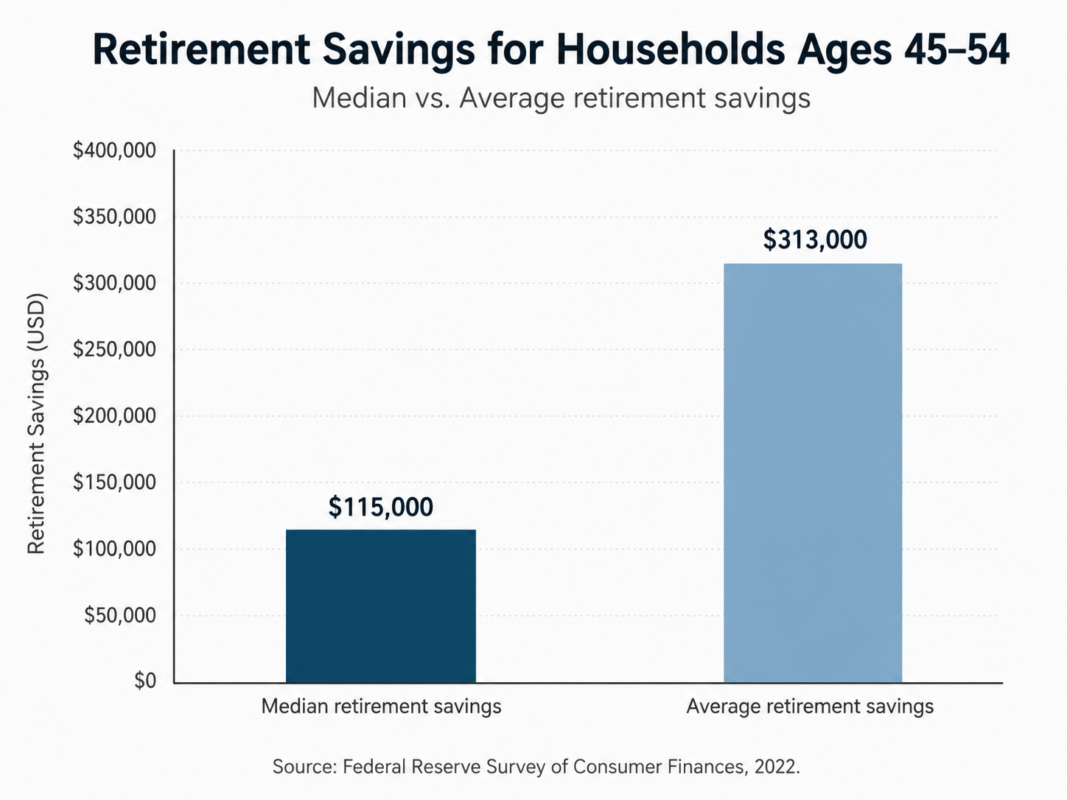
The Federal Reserve’s 2022 Survey of Consumer Finances, the most recent full data set available, found the median retirement account balance for households aged 45 to 54 sits around $115,000, with the average pulled higher, to roughly $313,000, by a smaller number of households with much larger balances.
Meanwhile, AARP’s 2026 Financial Security Trends Survey found 20% of adults 50 and older report having no retirement savings at all, and 70% worry inflation will outpace their income.
It’s tempting to read those numbers and immediately compare yourself to them. Resist that. The average household balance tells you almost nothing about your specific situation: your expenses, your Social Security timing, your paid-off house or your rent, your spouse’s income if you have one, whether you’re supporting adult kids or aging parents. What matters is your own trajectory starting from today, not a stranger’s midpoint on a national survey.
That’s exactly the gap the Freedom Number Calculator is built to close. Instead of comparing yourself to a national average, it works from your real numbers, your real expenses, and your real timeline to show what you actually need. That turns a vague worry into a specific target you can plan around.
Where AI Should Never Make the Retirement Call
AI is useful right up until the decision has legal, tax, or account-specific consequences. Past that line, hand it off to a licensed professional every time, no matter how confident the answer sounds.
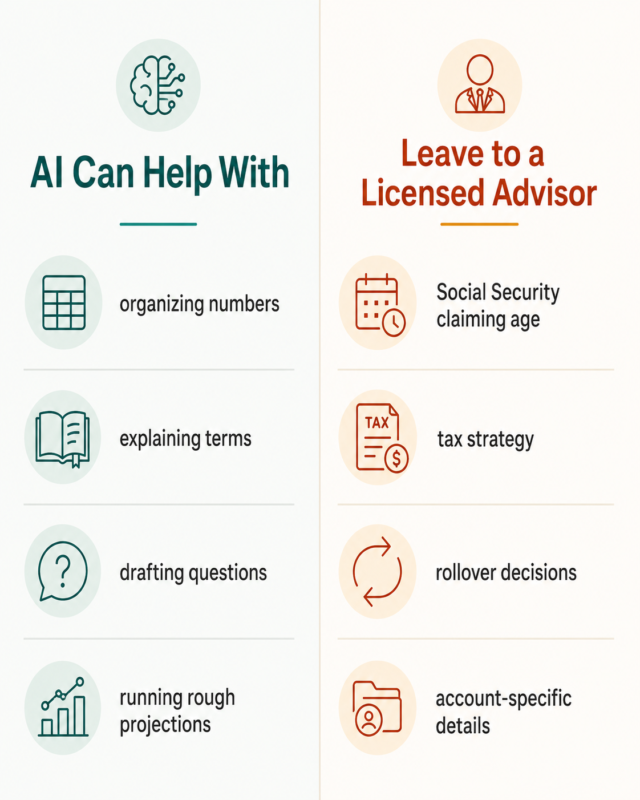
Keep AI out of the following decisions:
- Social Security claiming age. The right age to claim depends on your health, your spouse’s benefits, your other income sources, and your expected longevity. This is a permanent decision that deserves a real conversation, not a chatbot guess.
- Tax strategy specifics. AI can explain what a Roth conversion is in general terms, but it doesn’t know your tax bracket, your state, or the rest of your return. Bad tax guidance is expensive and hard to undo, and you’re still the one legally responsible for the outcome.
- Rollover decisions. Moving money between a 401(k), an IRA, and other accounts has rules and deadlines that vary by plan and provider. A mistake here can trigger taxes and penalties you didn’t see coming.
- Anything requiring your actual account numbers. Never type account numbers, Social Security numbers, or full birthdates into an AI chat window. Most conversations are stored, and you don’t fully control who can access them later.
Our guide to AI for financial independence covers this same boundary in more detail for FI-specific planning, if you want the fuller version of the trust-and-verify approach.
Turning This Into an Actual Plan This Week
Reading about this is easy. Doing it is three steps, and none of them require a full weekend.
First, run the three prompts from earlier, this week, not someday. Second, write the real numbers down somewhere you’ll actually see them again, not just buried in a chat history you’ll never reopen. A notes app, a spreadsheet, even a sticky note on the fridge all beat leaving it in ChatGPT.
Third, book one real conversation. That means a financial advisor if you can afford one, or at minimum a real budget talk with a spouse or partner if you can’t yet. The goal isn’t to have every answer by Friday. It’s to stop avoiding the topic and start working from actual numbers instead of a vague sense of dread.
If you want more everyday ways to put AI to work beyond retirement planning, our roundup of 25 ChatGPT examples is a good next stop.
The Bottom Line
AI won’t build your retirement plan for you. It’s not a fiduciary, it doesn’t know your full picture, and it will sound confident even when it’s wrong. What it can do is get you further in one evening than most people get in a year of avoiding the topic entirely: organized numbers, sharper questions, and a real starting point instead of a vague sense of dread.
Start with the free Freedom Number Calculator to turn today’s post into an actual number. It takes your real numbers, not a national average, and gives you a target to work toward.
What’s the number you’ve been avoiding looking up?
Frequently Asked Questions About Using AI for Retirement Planning
Is 45 too late to start saving seriously for retirement?
No. Workers starting at 45 still have roughly 20 years of growth potential before traditional retirement age, and catch-up contributions available starting at 50 add meaningfully to that runway.
What are the 2026 retirement catch-up contribution limits?
For 401(k) and 403(b) plans, the catch-up limit is $8,000 for ages 50 to 59 and 64 and older, and $11,250 for ages 60 to 63 under SECURE 2.0. IRA catch-up is $1,100, for a total IRA limit of $8,600 (IRS.gov, 2026).
Can ChatGPT actually build me a retirement plan?
No. It can organize numbers, explain concepts, and draft questions, but it doesn’t know your full financial picture and can get specifics wrong. Treat it as a prep tool for a conversation with a real advisor, not a replacement for one.
What retirement questions should I never let AI decide for me?
Social Security claiming age, tax strategy specifics, rollover decisions, and anything requiring your actual account numbers. Those need a licensed professional who knows your full situation.
What’s a free way to get a real number to start from?
Run the AI prompts in this post first, then use the site’s free Freedom Number Calculator to turn those numbers into a concrete target.