

Table of Contents
Most people try ChatGPT once, ask it something big, get an answer that sounds confident but feels a little off, and never open it again. That single experience shapes how a lot of adults over 40 think about AI: interesting, maybe useful for someone else, not really for me.
The truth is simpler than that. Learning how to use ChatGPT in everyday life has almost nothing to do with dramatic questions. It is about handing off the small, repetitive thinking you already do every day: planning dinner, rewriting an awkward text, making sense of a confusing bill, or turning a vague goal into an actual plan.
This post walks through 25 real-life examples, organized by the situations you actually run into: home and routines, communication, learning, money and travel, and creativity. Along the way are a few firm rules about what never belongs in a chat window.
Please note this page may contains affiliate links. If you purchase something through these links, I’ll receive a commission at no extra cost to you. Affiliate links help to support my website/blog and I only recommend products I love.
How to Use ChatGPT in Everyday Life (Without Overthinking It)
ChatGPT works best as a conversational assistant for drafting, summarizing, planning, comparing, and simplifying. It is not a search engine, and it does not know things the way a person knows things. It predicts likely next words based on patterns in its training data, which means it can sound completely sure while being wrong. That one fact should change how you use it: treat it like a fast, capable first draft, not a verified answer.
OpenAI’s own help documentation is direct about this limitation. It states plainly that ChatGPT can produce inaccurate or outdated information and should not be relied on as the sole source for decisions involving health, legal, financial, or other high-stakes matters. That caution matters more, not less, once a tool becomes part of your daily routine.
A 2025 survey from the AP-NORC Center for Public Affairs Research found that six in 10 American adults have used AI to search for information, and roughly a third have used it to write emails or generate images. The everyday examples below are not a niche experiment. They are already how most adults are starting to use these tools, whether or not they would call themselves “AI people.”
You can use ChatGPT in everyday life to plan meals, write emails, simplify decisions, organize errands, summarize information, learn new topics, brainstorm travel ideas, and turn big goals into smaller steps. Use clear context, ask for realistic suggestions, and verify anything involving health, money, legal issues, or safety.
If you want the slower, more basic starting point before trying any of the examples below, the guide to AI for beginners over 50 walks through opening an account and asking your first few questions without feeling foolish.
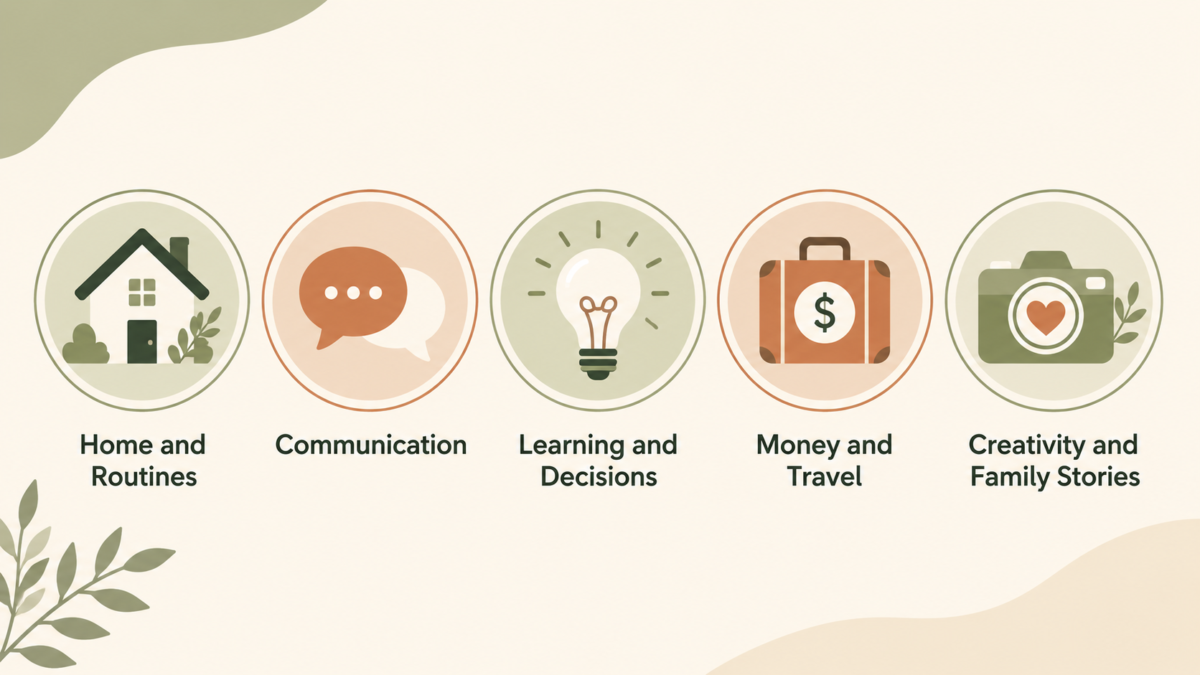
25 Real-Life Examples (Organized by Where They Actually Help)
You do not need to memorize these. Skim the list, find the one that matches something on your plate this week, and try just that one. Each example below comes with a prompt you can copy, paste, and adjust. Swap in your own details and the answers get better fast.
Put ChatGPT to Work on Home and Daily Routines
1. Plan a few dinners from what you already have. Open the fridge, list what is in there, and ask for three easy meals built around it. Tell it you want realistic weeknight food, not a recipe with twelve ingredients you have to go buy. You get a usable plan in seconds instead of staring into the fridge at 6 p.m.
Example prompt: “Help me plan three easy dinners using chicken thighs, rice, eggs, and frozen broccoli. Keep them simple enough for a tired weeknight and tell me what I would need to pick up.”
2. Build a chore checklist sized to your real energy. Most cleaning lists assume you have a free afternoon and full motivation. You usually do not. Tell it how much time and energy you actually have, and ask for a short list in the order you should tackle it. A 20-minute reset beats a perfect list you never start.
Example prompt: “I have 30 minutes and low energy. Give me a short cleaning checklist for my kitchen, in the order I should do it, so it feels noticeably better when I am done.”
3. Compare two household purchases without the rabbit hole. Give it the two options you are stuck between, a coffee maker, a vacuum, a mattress, and ask for the honest tradeoffs. It will lay out what each one is better at so you stop having the same circular conversation in your head.
Example prompt: “I am choosing between a drip coffee maker and a French press for daily use at home. Give me the honest tradeoffs on taste, cleanup, and cost, then tell me which suits a simple morning routine.”
4. Turn a chaotic Saturday into an ordered plan. Dump everything you need to get done into the chat, errands, a repair, a phone call you keep avoiding, and ask it to put them in a sensible order. Sometimes the only thing standing between you and a productive day is deciding what to do first.
Example prompt: “Here is my Saturday list: grocery run, fix a leaky faucet, call the dentist, mow the lawn, and return a package. Put these in a sensible order and tell me which one to start with.”
5. Draft a quick note you keep putting off. A message to a neighbor about a fence, a landlord about a repair, a reply you owe someone. Describe the situation in a sentence or two and ask for a short, friendly version. You edit it in ten seconds instead of rewriting it in your head for two days.
Example prompt: “Write a short, friendly note to my neighbor letting them know a section of the fence between our yards is leaning and asking if we can split the repair. Keep it warm and low-pressure.”
6. Sort a messy to-do list into today versus later. Paste in the running list in your head and ask it to split what genuinely has to happen today from what can wait. Half the weight of a to-do list is not the tasks. It is the not knowing which ones actually matter right now.
Example prompt: “Here is everything on my mind: pay the water bill, schedule an oil change, buy a birthday gift for Saturday, organize the garage, reply to two emails. Split this into what truly has to happen today versus what can wait.”
Use ChatGPT to Write the Messages You Keep Putting Off
A surprising amount of daily friction comes from writing something short and not knowing how to start. ChatGPT is genuinely good at this.
7. Warm up an email that came out too cold. Write the blunt version first, the one you would never send, then paste it in and ask for a warmer tone that still says the same thing. This works especially well when you are annoyed and it shows.
Example prompt: “Here is a draft email I wrote while frustrated: [paste it]. Rewrite it so it stays clear about what I need but sounds calm and reasonable, not annoyed.”
8. Get the wording right with a contractor or service. You want to be clear about a problem without sounding like you are picking a fight. Describe what happened and what you need, and ask for a version that is direct but polite. Clear and kind is harder to write than it looks, and this is exactly the kind of thing it is good at.
Example prompt: “The contractor finished a week late and missed two things we agreed on. Write a message that is direct about getting those fixed but stays polite and keeps the relationship workable.”
9. Boil a long thread down to what you actually need to do. Paste in a long email chain or a page of meeting notes and ask for the three or four things that matter. You stop rereading the same thread looking for the one detail you half remember.
Example prompt: “Here is a long email thread: [paste it]. Summarize it in four sentences and tell me clearly what, if anything, I am expected to do next.”
10. Turn scattered thoughts into a short update for people. You have news to share with family or friends but no energy to write it well. List the bullet points and ask for a few warm sentences. Good enough and sent beats perfect and never written.
Example prompt: “Turn these notes into a short, warm update I can text my family: trip went well, Mom is recovering fine, we are home now, and we will call this weekend.”
11. Draft a caption or bio from rough notes. If you post anything online, give it a few rough lines about what you are sharing and ask for a first-pass caption or bio. Then rewrite it in your own words so it still sounds like you. The draft kills the blank page. Your edit keeps it yours.
Example prompt: “Here are rough notes for a post: [paste them]. Write me three short caption options in a plain, friendly voice. No hype and no exclamation points.”
Grab a copy of our FREE AI Starter Guide for People Over 40
Use ChatGPT to Learn Something New or Decide Faster
Adults over 40 are often juggling more learning than they realize: a new app at work, a health term from a doctor’s visit, a hobby picked up in retirement. ChatGPT can explain a confusing topic in plain English, then let you ask follow-up questions without feeling like you are bothering anyone.
12. Get a confusing term explained in plain English. A word from a doctor’s visit, a setting on a new app, a phrase on a form. Ask it to explain like you are smart but new to the topic, then ask follow-up questions until it clicks. Nobody is keeping score on what you already know.
Example prompt: “Explain what an A1C test measures in plain English, like I am smart but new to the topic. Then tell me what number range I should ask my doctor about.”
13. Lay two options side by side. For a decision that has been sitting unresolved for weeks, ask it to put both choices in a simple pros-and-cons layout and list the questions you still need answered. Seeing it written down often shows you that you already know the answer.
Example prompt: “I am deciding whether to keep my older paid-off car or buy a newer used one. Lay out the pros and cons of each, then list the questions I should answer before I decide.”
14. Get a beginner plan for a new skill. Whether it is a hobby in retirement or a tool at work, ask for a simple plan broken into small steps. Then ask it to start you on step one only, so you are not staring at the whole mountain at once.
Example prompt: “I want to learn basic woodworking as a beginner with no tools yet. Give me a simple plan in small steps, then walk me through step one only.”
15. Have it quiz you on something you just read. Reading something and remembering it are two different things. Paste in what you just learned and ask it to ask you a few questions about it. Recalling it once makes it stick far better than reading it twice.
Example prompt: “Here is something I just read: [paste it]. Ask me five short questions to test whether I actually understood it, one at a time, and wait for my answer before the next.”
16. Surface the assumptions hiding inside a decision. Before you commit to something, describe the decision and ask what you might be assuming without realizing it. This one is underused, and it catches the blind spots that usually only show up after you have already chosen. (The guide on using AI to reinvent yourself after 40 goes deeper into bigger life and career questions.)
Example prompt: “I am thinking about [describe the decision]. Before I commit, what assumptions might I be making without realizing it, and what would change my mind if it turned out to be wrong?”
This matters more in midlife than people expect. A lot of the decisions sitting unresolved on your mental list are not really about information. They are about momentum. Talking through a choice with a tool that does not get tired of your questions, does not judge the question as silly, and will happily rephrase its answer five different ways can be the nudge that finally moves a stalled decision forward. The guide on using AI to reinvent yourself after 40 goes deeper into using these tools for bigger life and career questions.
Use ChatGPT for Money, Travel, and Planning
Everyday Money Decisions
ChatGPT will not manage your investments, and it should not. What it can do is help you think through a decision before you act on it. The post on AI for financial independence covers this in more depth, including where AI tools genuinely help and where a human advisor still matters.
17. Brainstorm realistic ways to trim one specific expense. Not a whole budget overhaul. Pick one expense that bugs you and ask for a few practical ways to bring it down. Small and specific is easier to actually do than big and vague. (The post on AI for financial independence covers where these tools help and where a human advisor still matters.)
Example prompt: “My monthly grocery bill feels too high for two people. Give me five realistic ways to bring it down that do not involve coupon clipping or extreme budgeting.”
18. Get a financial term explained without judgment. There is probably a money word you nod along to and have never fully understood. Ask for a plain explanation and a quick example. Better to ask a chat window than to keep pretending you know.
Example prompt: “Explain the difference between a Roth IRA and a traditional IRA in plain English, with one simple example of when each one makes more sense.”
Trip Planning and Travel Logistics
Travel planning is full of small, repetitive decisions, which makes it a natural fit.
19. Build a packing list for your actual trip. Tell it the destination, the length, and the kind of trip, and ask for a packing list. It catches the things you forget every single time. Treat it as a checklist to adjust, not a rule to follow.
Example prompt: “Build a packing list for a 5-day trip to a cool, rainy coastal town in spring. We are doing light hiking and casual dinners out, traveling with one carry-on each.”
20. Compare two itinerary ideas by budget and pace. If you are torn between two versions of a trip, describe both and ask which fits your budget and energy better. Some trips look great on paper and exhausting in real life, and this helps you see that before you book.
Example prompt: “I have two ideas for a week in Italy. One is three cities in seven days, the other is two cities at a slower pace. Compare them on budget and energy, and tell me which suits travelers who like to relax.”
21. Turn a travel wish list into a rough day-by-day. List everything you want to see and ask it to spread it across your days at a realistic pace. It will not know live prices or availability, so use it as a planning draft and confirm the real details yourself.
Example prompt: “Here is my wish list for four days in San Diego: the zoo, Balboa Park, a beach day, Old Town, and a harbor cruise. Spread these across four days at a relaxed pace and flag anything I should book ahead.”
Use ChatGPT for Creativity and Family Stories
This is where ChatGPT moves from convenience to something more meaningful. It can brainstorm ideas for a blog post, video, or newsletter when you have a topic but no angle yet. It can turn a single memory into several story prompts, or draft a first-pass outline for a creative project you have been putting off.
22. Find an angle when you have a topic but no idea where to start. Give it the subject and ask for a handful of different angles or hooks. You are not looking for the finished idea. You are looking for the spark that gets you moving.
Example prompt: “I want to write something about downsizing our home after the kids moved out, but I do not have an angle yet. Give me five different directions I could take it.”
23. Turn one memory into several story prompts. Describe a single memory and ask it to pull a few story directions out of it. One small moment usually holds more than you think, and this helps you see the threads worth pulling.
Example prompt: “Here is one memory: my dad teaching me to drive in an empty parking lot on a Sunday. Pull four different story directions out of it that I could write about.”
24. Write interview questions before recording a parent or grandparent. This is the one I would not skip. Before you sit down to record someone’s story, ask for thoughtful questions that go past the basic facts. The right questions are the difference between an ordinary chat and something your family keeps for decades. ( Our guide on recording your parents’ life stories before it’s too late shows how a short list of the right questions can turn an ordinary conversation into something your family keeps for decades.)
Example prompt: “I am recording my 80-year-old mother’s life story this weekend. Give me 15 thoughtful questions that go beyond dates and facts and draw out real memories and feelings.”
25. Sort years of photos into themes someone will actually enjoy. Describe the piles of photos you have and ask for a few ways to group them into a story, by year, by trip, by person. The difference between a folder nobody opens and something worth sharing is usually just a little structure.
Example prompt: “I have about 2,000 phone photos from the last five years sitting in one folder. Suggest a few simple ways to group them into themes I could turn into small albums worth sharing.”
Get Better Answers, and Know What to Keep Out of the Chat
Add Real Constraints for Sharper Answers
Generic prompts produce generic answers. The fix is simple: add the details that make your situation different. Mention your actual time, budget, energy level, and what you have already tried. Ask ChatGPT to “optimize this for real life, not perfect conditions,” which is one small phrase that consistently produces more usable results.
You can also ask for a shorter version, a different tone, a checklist instead of a paragraph, or a list of what you should double-check before acting. Save the prompts that work well in your notes app so you are not starting from scratch every time.
What Never Belongs in a ChatGPT Conversation
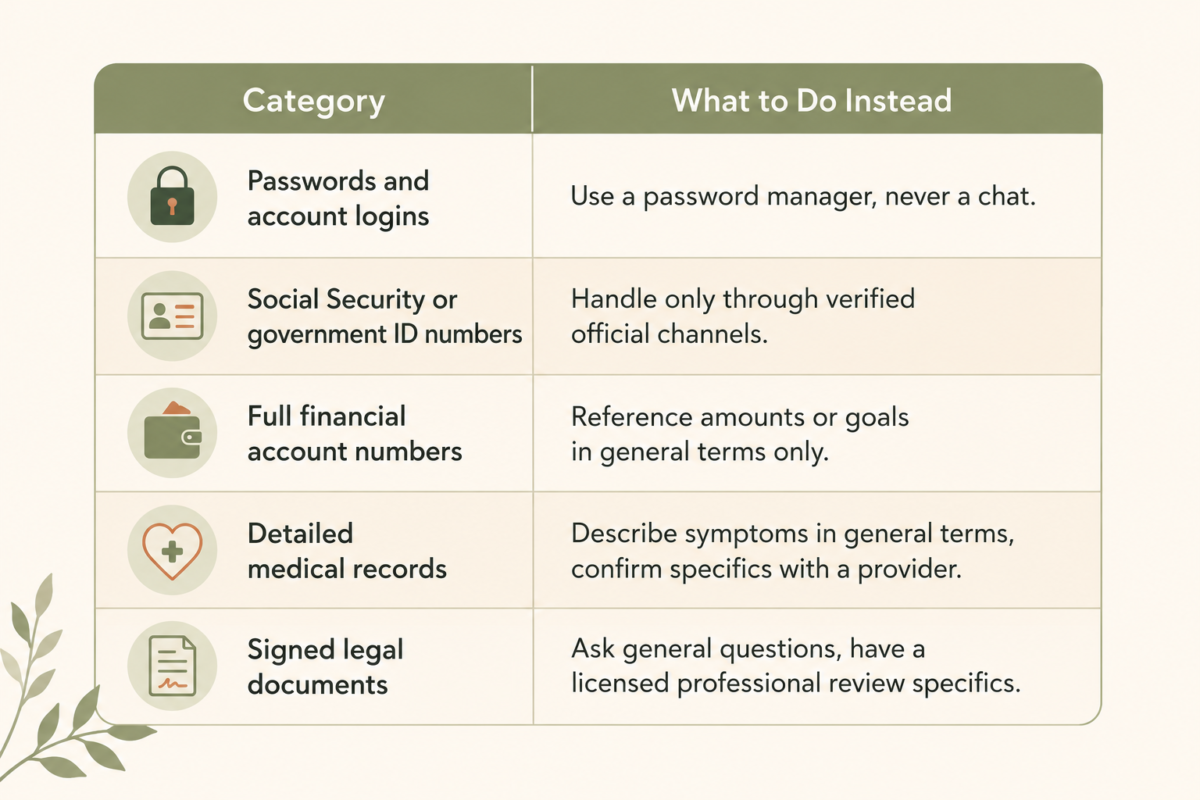
Treat ChatGPT the way you would treat a smart assistant who has no obligation to keep your secrets, because in a practical sense, that is what it is. According to OpenAI’s data controls documentation, conversations can be reviewed or stored depending on your account settings, so the safest habit is to keep certain categories out entirely.
Curiosity about AI and carefulness with your own information are not in conflict. They work better together.
The Bottom Line
ChatGPT earns its place in your day through small, ordinary tasks, not big dramatic ones. The fastest way to get comfortable with it is to pick one task from this list, the dinner plan, the awkward email, the travel packing list, and try it this week. You will learn more from one real attempt than from another article about what AI can theoretically do.
What is one task you keep doing the slow, frustrating way that you could hand to ChatGPT this week?
Grab a copy of our FREE AI Starter Guide for People Over 40
Frequently Asked Questions
What is the easiest way to start using ChatGPT day to day?
Start with one small task you already need to do, such as rewriting an email, planning dinner, making a checklist, or summarizing notes.
What are good ChatGPT prompts for everyday life?
Good prompts include context, a clear task, and constraints. For example: “Help me plan three easy dinners using chicken, rice, and frozen vegetables. Keep it realistic for a busy weeknight.”
Can ChatGPT replace Google?
No. ChatGPT is useful for drafting, summarizing, brainstorming, and planning, but important facts should still be verified with a trusted source.
What should I not put into ChatGPT?
Avoid passwords, Social Security numbers, account numbers, private medical details, legal documents, financial records, or anything you would not want stored or reviewed outside your control.
How do I make ChatGPT’s answers less generic?
Add real constraints: your time, budget, energy, tools, audience, and tone, plus what you have already tried. Asking it to optimize the answer for real life instead of perfect conditions makes a noticeable difference.