

Table of Contents
You get home from a trip with 400 or 500 photos on your phone. You mean to do something with them, sort them, maybe write a few notes, but then life closes back in, and the folder just sits there with everything else you’ve been meaning to get to.
Here’s the thing nobody says out loud. It’s not that you’re lazy. It’s that “do something with these photos” isn’t a real task. It’s a vague idea with no steps, so your brain files it under later.
This post will show you how to turn your travel photos into a story worth sharing, whether that ends up being a blog post, a slideshow for the family, a digital photo frame, or a short video. None of it requires you to be a photographer or a video editor.
Here’s the short version: pick the photos that set the scene, show a detail, or capture a person or moment. Put the keepers in order from beginning to end, add a sentence of context to each one, then pick the format, a blog post, slideshow, or video, that fits how you want to share it.
Please note this page may contains affiliate links. If you purchase something through these links, I’ll receive a commission at no extra cost to you. Affiliate links help to support my website/blog and I only recommend products I love.
Why Hundreds of Travel Photos Usually End Up Going Nowhere

The honest reason most travel photos never become anything is overwhelm. You come home with hundreds of images, no clear starting point, and a nagging sense that “organizing photos” is a multi-hour project you don’t have time for. So you don’t start. And every week that passes makes the pile feel a little more permanent, a little more like something you’ll “get to eventually.”
There’s actually research that backs up why this matters beyond sentimentality. A 2014 study out of Fairfield University, published in Psychological Science, found that people who took photos and then reviewed them with some context remembered more details about the experience than people who just snapped pictures and moved on. In other words, the photo itself isn’t the memory. What you do with it afterward is what makes it stick.
That’s a useful reframe. You’re not just organizing files. You’re doing the thing that actually locks the trip into your memory, and into your family’s, in a way the raw photo dump on your phone never will.
If you’ve ever felt like you came home from a trip with more photos than you knew what to do with, you’re not alone, and it’s not really a photography problem. If you want to go deeper on the photo-taking side of travel, how to travel as a photographer covers the habits that lead to a strong starting set of images. But even a great set of photos goes nowhere without the next four steps.
Step 1: Cull Ruthlessly. Keep Only the Photos That Tell the Story
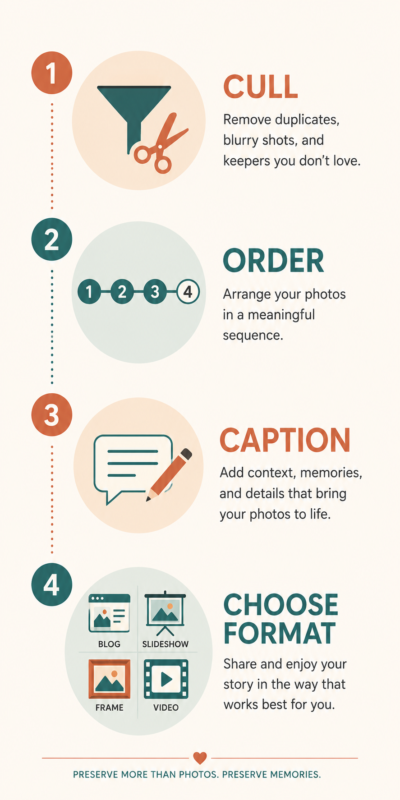
This is the step most people skip, and it’s the one that makes everything else possible. You don’t need all 412 photos. You need the ones that actually do something.
A simple way to sort through them: every photo earns its spot by doing one of three jobs. It sets the scene (the view from the balcony, the street outside your hotel, the table before the food arrives). It shows a detail (the texture of the cobblestones, the menu in a language you couldn’t read, the kids’ shoes lined up by the door). Or it captures a person or a moment (your spouse laughing at something off-camera, the stranger who gave you directions, the exact second the fireworks started).
Everything else, the eight nearly identical shots of the same sunset, the blurry ones, the duplicates you took “just in case”, can go. Not forever. Just out of the running for this story.
A good target is somewhere around 20 to 30 photos per trip. That sounds low if you’re staring at 400, but it’s almost always enough to cover a real arc: where you went, what stood out, who you were with. If you’re having trouble being ruthless, ask yourself one question per photo: if I could only keep this one, would it tell someone something about the trip? If the answer is no, it’s probably not a keeper.
This is also where it helps to slow down and actually look at what you shot, instead of scrolling past it. Mindful photography is as much about noticing what’s in front of you after the fact as it is about the moment you press the shutter. The same habit that helps you take better photos in the moment helps you spot the ones worth keeping later.
Step 2: Put Them in Order. Beginning, Middle, End
Once you’ve got your 20 to 30 keepers, the next step is deciding what order they go in. Most of the time, chronological order is the right call. It mirrors how the trip actually unfolded, and it’s the easiest structure for anyone else to follow, whether that’s your kids, your parents, or a stranger reading your blog.
But chronological isn’t always the best choice. If your trip had a clear theme, food, hiking, a specific city you fell in love with, it can work better to group photos by that theme instead of by day. A week-long trip where you ate at twelve different places might tell a better story as “the food of the trip” followed by “everything else” than as a strict day-by-day account.
Either way, think of it the same way you’d think of telling a friend about the trip out loud. You wouldn’t start with a random detail from day four. You’d set the scene first (where you went, who you were with), build through the middle (what happened, what surprised you), and land somewhere that feels like an ending (the last night, the flight home, the thing you’d do differently next time). Your photos can follow that same shape.
Step 3: Add Just Enough Context With Captions
This is the step that turns a photo album into a story. A photo by itself is just a photo. A photo with a sentence next to it, where this is, who’s in it, what happened right before or after, becomes something you and your family will actually want to look at again.
You don’t need to write much. One or two sentences per photo is plenty. “This is the view from our hotel balcony in Lisbon, the first morning, before we figured out the espresso situation” tells you more, and will mean more to you in five years, than the photo alone ever could.
If you already keep any kind of trip notes, even scattered ones on your phone, you’re ahead of the game. Travel journaling is really just this same captioning habit, started earlier and kept up throughout the trip instead of after you get home. If you don’t do that yet, this step is a low-effort way to start. You’re writing the captions anyway. Might as well jot a few notes during your next trip so you’re not trying to remember details three weeks later.
Step 4: Turn Your Travel Photos Into a Story With the Right Format
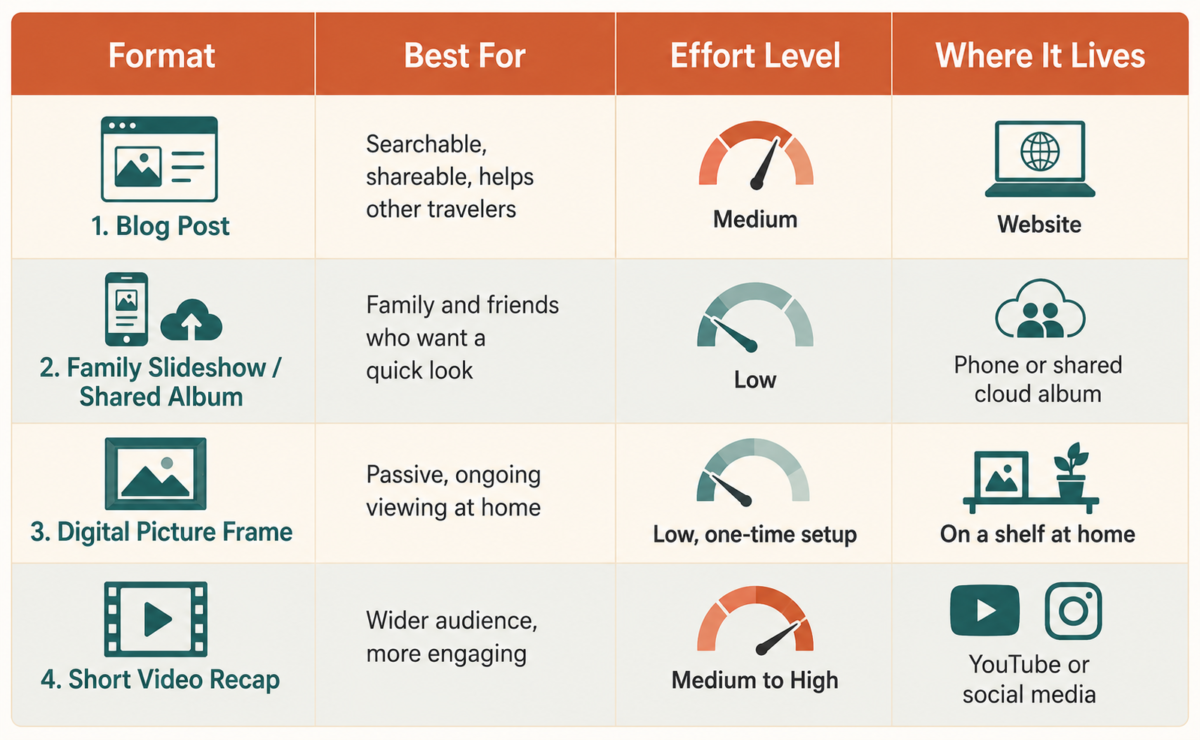
Here’s where a lot of advice about travel photos goes sideways. It jumps straight to “make a photo book” or “buy this product” before you’ve even decided what you’re trying to do with the photos. Once you’ve culled, ordered, and captioned your set, the format is just a container. The same 20 to 30 photos can become more than one thing.
A blog post works well if you want something searchable and shareable, a record you can point people to later, or even something that might help other travelers planning the same trip. A family slideshow or shared album is the right call if the main audience is people who already know and love you, and just want to see what you got up to.
A digital picture frame is a quieter option that works surprisingly well. It just sits on a shelf, cycling through photos, and somehow gets looked at far more often than any photo album ever did. And a short video recap is worth considering if you’ve got even a little bit of video footage mixed in with your stills, since most phones can stitch together a basic slideshow-style video in a few minutes.
The format question also depends a bit on what kind of photos you ended up with. If your “keepers” lean heavily on photos of people and moments rather than scenery, capturing authentic cultural moments while traveling tends to produce images that work best in a format where context matters, like a blog post or captioned slideshow, rather than a frame that just cycles through images with no text.
Here’s the part that matters most: you don’t have to pick just one. The selection and ordering work you did in steps 1 through 3 is reusable. A blog post can become the script for a video. A slideshow can become the source material for a blog post later. Do the hard part once, and the format becomes a much smaller decision than it feels like right now.
What to Do With the Photos That Didn’t Make the Cut
Don’t delete the photos that didn’t make it into your story. Seriously, don’t. Back them up somewhere safe, an external drive, cloud storage, wherever you keep things you don’t want to lose, and then basically forget about them.
Here’s why that matters. The Library of Congress, which has spent a lot of time thinking about how regular people should preserve their own digital history, recommends keeping multiple copies of personal photos and not relying on a single device or app as your only backup. Phones get lost, apps shut down, and “I’ll deal with it later” applies to backups just as much as it applies to organizing in the first place.
There’s also a practical reason to hang onto the leftovers. Photos that didn’t fit this story sometimes turn out to be exactly what a different story needs. Maybe that detail shot of a menu becomes useful for a “what we ate” post six months from now. Maybe that slightly-too-dark photo of a sunset is the one that finally makes sense once you’re putting together a “lessons learned from this trip” video.
If you’re working on getting more out of your shots in general, understanding exposure is worth a read, since a lot of “didn’t make the cut” photos are really just exposure problems that are fixable, not photos that were never any good to begin with.
The Bottom Line
Turning a phone full of travel photos into a story worth sharing isn’t a talent some people have and others don’t. It’s a process: cull down to the photos that earn their spot, put them in an order that makes sense, add just enough context that the photos mean something on their own, and then pick whatever format actually fits how you want to share it.
It gets easier every time you do it. The first time might take an hour. By your third or fourth trip, you’ll have a rhythm, and that pile of 400 photos won’t feel like a chore anymore. It’ll feel like the start of something you actually want to make.
If you’ve been sitting on photos from a trip you took months ago, that’s a good place to start. Pick one folder, run it through these four steps, and see what you end up with. And if you want a low-effort way to make sure those photos actually get seen again, a digital picture frame is one of the simplest changes we’ve made.
If you’d rather get more posts like this one, plus updates on what we’re working on, our newsletter is the easiest way to keep up.
What’s sitting in your camera roll right now that deserves to be more than just a folder?
Frequently Asked Questions
How many travel photos should I keep when turning them into a story?
Aim for somewhere around 20 to 30 photos per trip. That’s usually enough to cover the arc of where you went, what stood out, and who you were with, without overwhelming whoever you’re sharing it with.
What’s the best app for organizing travel photos?
Your phone’s built-in photo albums work fine for most people. If you want more structure, dedicated travel journaling apps let you group photos by trip and add notes as you go, which makes the captioning step in this process even easier.
Do I need professional camera gear to tell a good travel photo story?
No. Phone cameras are good enough for almost every part of this process. What matters more is choosing the right photos and giving them context, not the equipment they were taken with.
What should I do with travel photos that don’t make it into the final story?
Don’t delete them right away. Back them up somewhere safe, like cloud storage or an external drive, and revisit them later. Photos that didn’t fit one story sometimes turn out to be exactly what a different one needs.
Can the same travel photos become more than one piece of content?
Yes. The same set of photos can become a blog post, a family slideshow, and a short video recap. Each format reuses the same selection and sequencing work, it just gets presented differently.