

Table of Contents
By 4 in the afternoon, your eyes ache, your brain feels stuffed with cotton, and you are somehow bored and wired at the same time. You blame the coffee. You blame your age. Screen time and energy levels are connected in ways most people never get told about, and the connection has almost nothing to do with willpower.
Between a work laptop, a phone that never stops buzzing, the news, and a nightly scroll to unwind, most adults over 40 spend more hours looking at a screen than they would ever guess. Nobody warns you that this adds up to more than tired eyes. It shows up as afternoon fog, short patience with people you love, and a kind of exhaustion that a nap does not fix.
This is not an argument for throwing your phone in a drawer. It is a look at four specific ways screens drain energy, backed by research from sleep scientists, eye doctors, and public health agencies, plus a realistic reset you can start today without disappearing from modern life.
Please note this page may contains affiliate links. If you purchase something through these links, I’ll receive a commission at no extra cost to you. Affiliate links help to support my website/blog and I only recommend products I love.
Screen Time and Energy Levels Are Connected in More Than One Way
Most articles treat this as a blue light problem. Blue light is part of it, but it is not the whole story, and treating it as the only culprit is why so many people buy a pair of amber glasses, feel no different, and give up on the whole idea.
There are actually four separate leaks running at once: your eyes, your sleep, your attention, and your body’s stillness. Each one drains energy on its own. Stack them across a normal workday and evening, and the total is bigger than any single habit would suggest.
Researchers who study smartphone use and sleep found real evidence for at least one of these leaks. A 2016 study published in PLOS ONE by Christensen and colleagues tracked actual phone screen time, not self-reported guesses, and found that heavier use, especially later in the day, was associated with shorter total sleep and lower sleep efficiency. That is not a lifestyle opinion. That is measured behavior linked to measured sleep outcomes.
Blue light gets blamed for all four leaks at once, and that is part of why the fix never seems to stick. Buy the amber glasses, notice nothing changes, and it is easy to conclude the whole “screens are draining me” idea was overblown. What actually happened is narrower: the glasses might help the eye leak a little, but they do nothing for the sleep, attention, or sitting leaks running alongside it.
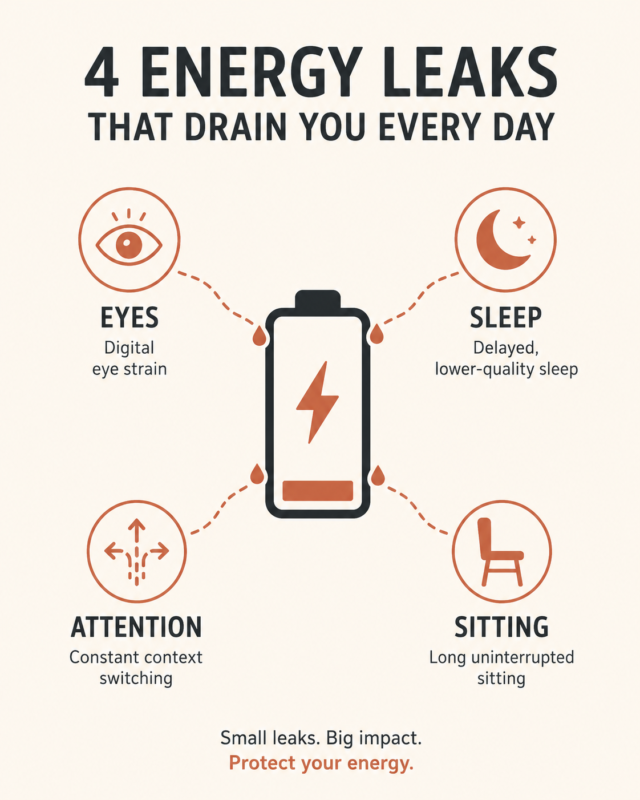
Here is the short answer, if you only read one paragraph of this post: Yes, screen time can affect your energy levels through more than one channel at once. Screens strain your eyes, delay sleep when used late at night, encourage long stretches of sitting, and keep your brain in a constant switching loop. The combination drains you, not any single habit.
Your Eyes Get Tired Before Your Brain Does
Long before you feel mentally foggy, your eyes are already working overtime. Staring at a screen means blinking less, which dries out the surface of your eyes, and it means focusing at a fixed close distance for hours, which tires the small muscles that control your vision.
The American Optometric Association calls this cluster of symptoms digital eye strain, or computer vision syndrome. Dry eyes, headaches, blurry vision, and neck or shoulder tension are all on the list, and none of them feel like an “eye” problem when you are living through them. They feel like general fatigue, which is exactly why people miss the connection.
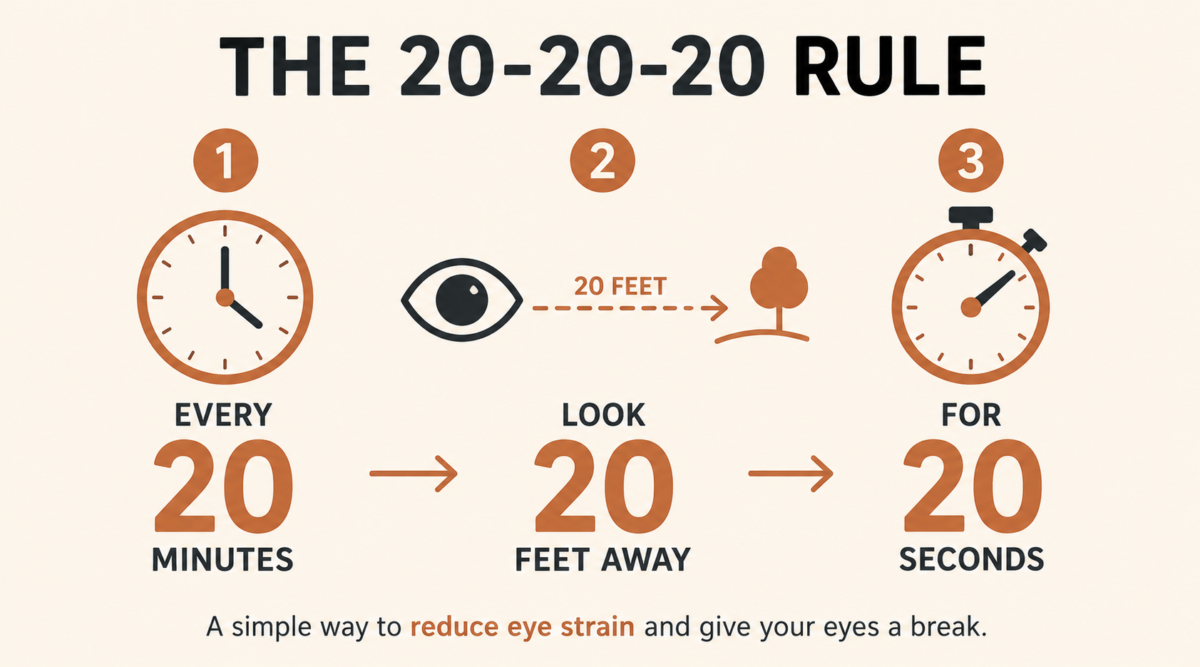
The fix the AOA and other eye care sources point to most often is the 20-20-20 rule: every 20 minutes, look at something 20 feet away for at least 20 seconds. It sounds almost too simple to matter, but it is not a productivity break. It is maintenance, the same way you would not skip an oil change because you were too busy driving.
There is also a midlife-specific piece nobody mentions. Somewhere in your 40s, the natural lens in your eye starts losing flexibility, a normal change called presbyopia. Near-focus work, which is exactly what a screen demands, takes more effort than it used to.
You are not imagining that reading a phone screen feels harder at 46 than it did at 26. Your eyes are doing more work for the same task, which means the eye leak drains faster now than it would have a decade ago.
A few small adjustments help more than people expect. Increasing your phone and laptop font size, moving your monitor slightly farther away, and keeping the top of the screen at or just below eye level all reduce how hard your eyes have to work to hold focus. None of it costs money, and most of it takes less than five minutes to set up once.
Bedtime Scrolling Can Borrow Energy From Tomorrow
There is a difference between screen time that helps you and screen time that quietly steals from the next day, and the clearest example shows up at night.
Harvard Health Publishing recommends avoiding bright screens for two to three hours before bed if sleep has become a struggle. That window feels unrealistic for most households, so treat it as a direction rather than a rule: the closer to bedtime the scrolling happens, the more it borrows from tomorrow’s energy.
Brightness is only part of the problem. What you are scrolling matters just as much. An argument on social media, a stressful headline, or a group chat that needs a careful reply will keep your mind working long after you put the phone down, regardless of how dim the screen is. If you want to understand why the timing matters at a deeper level, it helps to look at how your circadian rhythm actually works and how light and stimulation signal your brain to stay alert well past when you meant to wind down.
You do not need a strict digital curfew to see a difference. Charging your phone in the kitchen instead of on the nightstand removes the easiest version of the habit without requiring willpower at 11pm, when willpower is at its lowest anyway. If the phone is not within reach, the choice to scroll has to be a deliberate one, made while you are still standing up and thinking clearly.
The Bigger Problem Is Constant Switching
Eye strain and bad sleep are specific and fixable. The harder problem is more diffuse: constant switching between a work screen, a text thread, a news app, and a streaming queue, often within the same 20 minutes.
Every switch has a cost. Your brain has to drop what it was holding, load a new context, and then try to pick the original thread back up later, usually with some of it missing. Do that 40 or 50 times a day, which is not an exaggeration for a lot of working adults, and you have spent real mental energy on switching costs before you have done any actual thinking.
None of this means technology is the enemy. Used with intention, it is one of the more useful tools available to a midlife household, and there are genuinely good ways to use technology with intention that reduce friction instead of adding to it.
The problem is passive checking: opening an app out of boredom or habit, with no real question you are trying to answer. That is where the energy quietly leaks out, and it is worth asking yourself the bigger question of whether a given habit is helping you or just filling a gap.
Picture a fairly normal Tuesday. You answer a work email, glance at a group text about weekend plans, check a headline, look up a restaurant for date night, and scroll social media while the coffee brews, all before 9 in the morning.
None of those five minutes felt draining on its own. The cost was in the switching between them, not the content of any single one. By the time an actual demanding task shows up, some of your attention has already been spent on nothing in particular.
Sitting Still Makes the Screen Drain Worse
Screens rarely operate in isolation. Most screen time also means sitting time, and sitting for long stretches has its own well documented energy cost, separate from anything happening on the screen itself.
The CDC’s adult physical activity guidelines call for at least 150 minutes of moderate activity a week, plus two days of muscle strengthening work. Most people read that number and think about the gym. Fewer people connect it to the fact that a five minute walk after a long screen block changes how the rest of the afternoon feels, not because it burns many calories, but because it interrupts the stillness that was compounding the fatigue.
Pairing a screen break with a movement break, even a short one, does more than switching from a laptop to a phone ever will. One is rest. The other is just a different screen.
This matters more at midlife than it did a decade ago. Muscle and bone respond less automatically to daily life than they used to, which is part of why consistency tends to beat intensity once you are past 40.
A short walk after a screen block is not a workout. It is closer to a reset button, and it is one of the few energy fixes on this list that also happens to support the longer-term goal of staying strong and mobile for the second half of life.
A Realistic Screen Reset for Adults Over 40
None of this requires quitting technology or pretending you have more free time than you do. It requires a few specific boundaries, placed where they matter most.
Here is a simple version worth trying for one week:
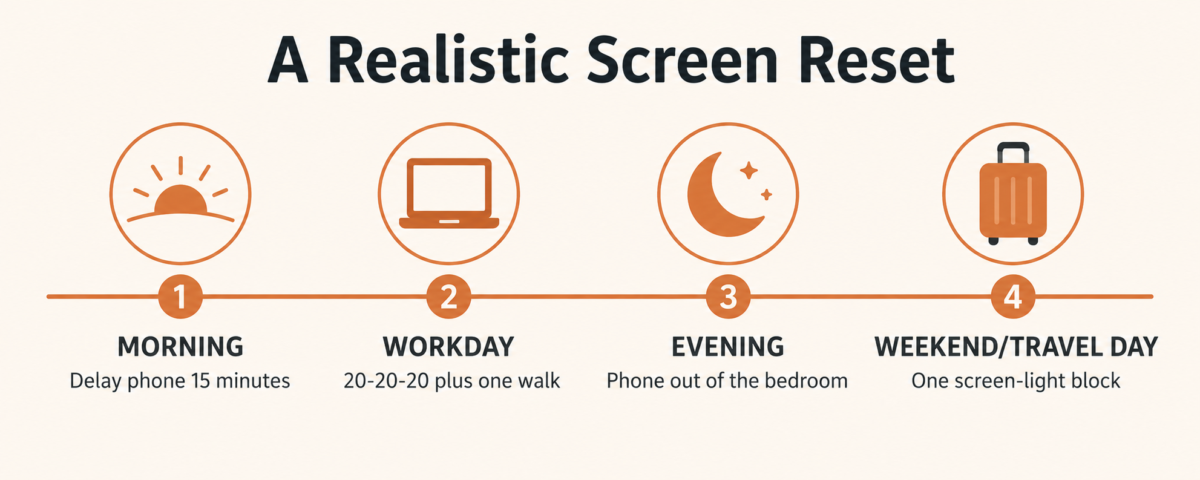
None of these changes eliminate your screens. They just put boundaries around the moments that were draining you the most, which tend to be the ones you were not paying attention to in the first place.
If your schedule does not follow a traditional workday, the same four boundaries still apply, just move the labels. Retired readers and anyone building a location-independent business can swap “workday” for whatever block of the day involves the most screen use, whether that is managing a rental property from a laptop, planning a trip, or handling a side business between other commitments. The leaks do not care what your calendar looks like.
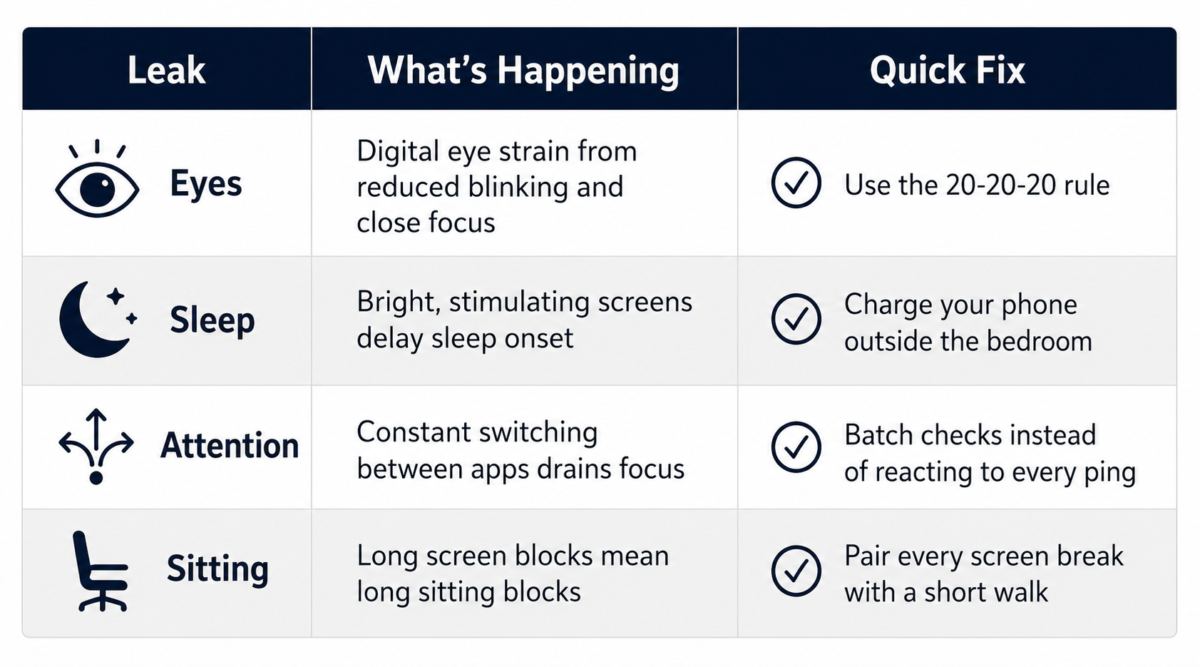
If you build one habit from this, building habits that actually stick after 40 usually comes down to starting smaller than you think you need to, and a single 20-20-20 break or a 15 minute delay on your morning phone check is small enough to actually keep.
The Bottom Line
Screen time and energy levels are connected through four separate channels working at once: your eyes, your sleep, your attention, and how much you are sitting. No single fix solves all four, but you do not need all four solved by next week either. Pick the leak that sounds most like your life right now and give it seven days.
If you try the reset above, we would genuinely like to know how it goes. Which of the four leaks, eyes, sleep, attention, or sitting, is draining you the most right now?
Find What Is Draining Your Energy
Use the free Midlife Energy Audit to track sleep, movement, stress, connection, and daily rhythm for seven days so you can see what is actually helping and what is draining you.
Frequently Asked Questions
Can too much screen time make you tired?
Yes. Long, unbroken screen blocks can cause digital eye strain, headaches, poor posture, mental switching costs, and disrupted sleep, and any one of those alone can leave you feeling more tired than the hours you actually slept would suggest.
Does screen time before bed affect sleep?
It can. The 2016 PLOS ONE study on smartphone use found that longer screen time, especially closer to bedtime, was associated with shorter sleep duration and worse sleep efficiency in adults who were tracked over real usage, not self-reports.
How much screen time is too much for adults?
There is no single universal number. The more useful question is whether your current screen habits are hurting your sleep, focus, movement, mood, or relationships. If the answer is yes in even one category, that is worth addressing before worrying about a specific hourly limit.
What is digital eye strain?
Digital eye strain, sometimes called computer vision syndrome, is a cluster of symptoms linked to extended screen use. The American Optometric Association lists dry eyes, blurry vision, headaches, and neck or shoulder tension among the most common signs.
What is the easiest way to reduce screen fatigue?
Start with one boundary instead of an overhaul. Try the 20-20-20 rule for your eyes, add a five minute walk after long screen blocks, and keep your phone away from the bed if sleep has been the hardest part.