
Table of Contents
You already have a capable camera in your pocket. Most smartphone photography tips will tell you to buy more gear or learn complicated settings, but the ones that actually make a difference on a trip are simpler than that. If you carry a modern smartphone, you carry a camera that can handle landscapes, street scenes, candid moments, meals, and cruise ports without a bag full of lenses.
Most travelers over 40 come home from a trip with photos they’re underwhelmed by. Blurry dinners. Tilted landmarks. People looking stiff and caught off guard. And somewhere on the camera roll: forty-three nearly identical shots of the same fountain.
This guide is not for professional photographers. It’s for travelers who want to come home with meaningful, clear, shareable photos from real trips, without buying new gear or spending the entire vacation chasing perfect shots. A few simple habits, applied consistently, are what separate the keepers from the deletes.
Please note this page may contains affiliate links. If you purchase something through these links, I’ll receive a commission at no extra cost to you. Affiliate links help to support my website/blog and I only recommend products I love.
Why Your Phone Is Enough for Most Travel Photos
Modern smartphones can handle the full range of what most travelers actually photograph: landscapes, restaurants, street scenes, hotel interiors, family moments, city skylines, and quick video clips. The camera technology in a current flagship phone is genuinely strong, and even mid-range phones from the past few years produce photos that look great on social media, in photo books, and in digital frames.
The real advantage for travelers over 40 is not image quality. It’s the lighter load.
A dedicated camera means a bag, extra batteries, lens management, and the mental overhead of switching modes. A phone is always in your pocket. You can take a photo in three seconds without stopping the group, sitting down to change gear, or worrying about leaving a bag unattended at a café table.
There are honest limits worth knowing. For distant wildlife, fast sports action, very dark church interiors, or large-format prints above 16×20 inches, a dedicated camera still has technical advantages. For the overwhelming majority of travel photography (the trips, the people, the meals, the places), the phone you already own is ready to go. Paris, for example, is a genuine test case for how well a modern phone camera holds up across every lighting condition and subject type you’ll encounter on a real trip. If your phone can shoot Paris, it can shoot most of what you’ll face in any destination.
If you’re interested in taking your phone further, our guide on how to take amazing photos in Paris walks through exactly that.
The Smartphone Photography Tips That Fix Most Bad Travel Photos
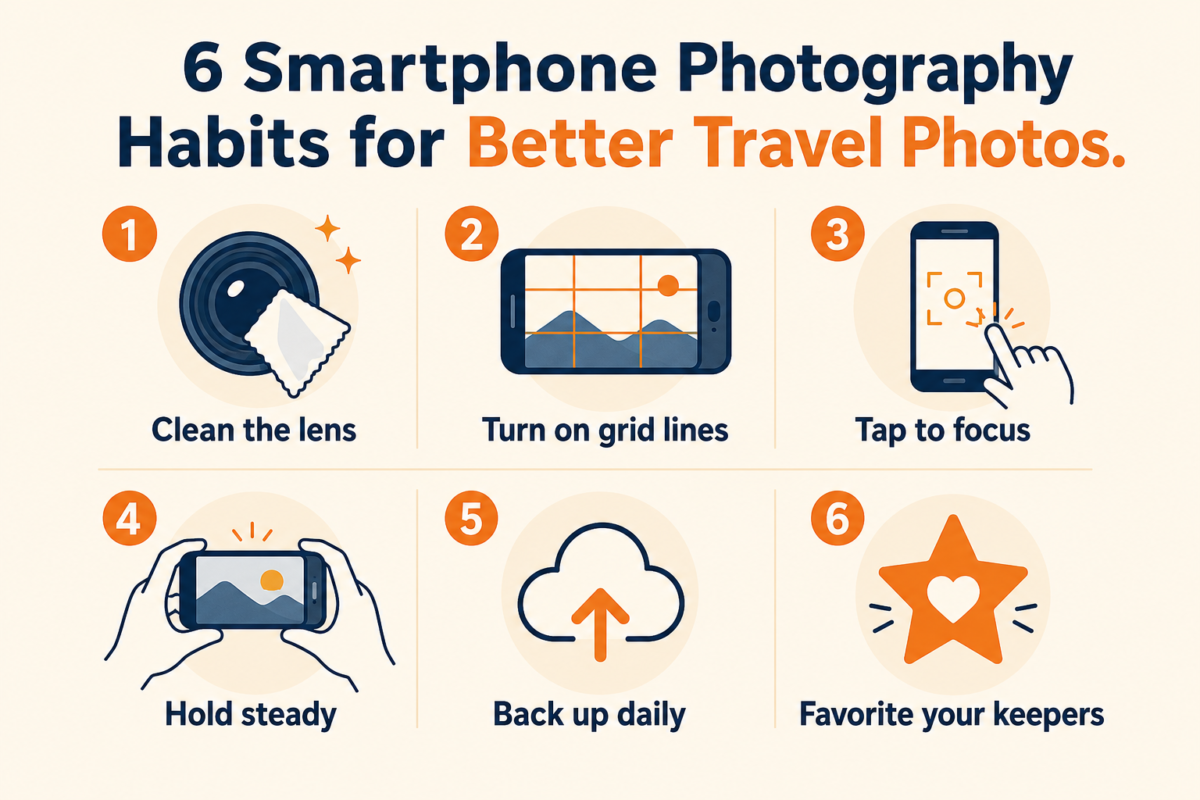
Before any advanced settings or techniques, four habits make an immediate difference in the quality of every shot.
The best smartphone photography tips for travel are simple: clean your lens, use natural light, turn on grid lines, tap to focus, hold the phone steady, avoid digital zoom when possible, and capture wide shots, people, and details. At the end of each day, favorite your best photos and back them up.
Clean the lens before important shots. This sounds too basic to matter until you notice how much sunscreen, finger oil, bag fabric, and jacket pocket lint accumulates on a lens over a full day of travel. A quick wipe with a small microfiber cloth clears up the soft, hazy quality that often gets blamed on the phone’s camera.
Turn on grid lines. Most phones let you overlay a rule-of-thirds grid on the camera screen. It takes about thirty seconds to enable in settings, and it helps you keep horizons level and subjects well-placed without consciously thinking about it every time you press the shutter.
Tap the screen to set focus. Do not let the phone guess which subject you care about. Tap directly on the face, the dish, or the landmark you want sharp. After you tap, a small slider usually appears. You can drag it to brighten or darken the exposure before shooting.
Stabilize the phone. Hold it with both hands, press your elbows against your body, or brace your wrists against a railing, table, or wall. For self-timer shots, use the volume button or a small Bluetooth remote shutter so the phone is not moving at the moment the image is captured. Understanding the basics of exposure, focus, and steadiness translates directly from traditional photography to phone cameras, and these principles behind sharp photos are the same regardless of the camera type. Our guide to understanding exposure and getting the right balance explains the fundamentals in plain terms that apply just as well to phone cameras.
Use Light Before You Use Filters
Good light does more for travel photos than any editing app or filter. The goal is to find the light that is already there and work with it, rather than fighting it.
Early morning and late afternoon are easier to work with than midday sun. Midday light comes straight down and creates harsh shadows under eyes and chins. Morning and late afternoon light comes in at an angle, which is softer, warmer, and more flattering for both people and landscapes.
outdoor markets, on cruise ship decks, outside restaurants, and at tourist sites at noon when the midday heat has you in the shade anyway.
For indoor shots in restaurants, museums, ship dining rooms, and hotel lobbies, position people near the best natural light source in the room. A window with indirect daylight almost always gives you enough to work with if you place your subject facing it or at a slight angle. The phone’s built-in flash tends to flatten faces and push backgrounds into darkness.
Night mode on modern smartphones is more capable than most people realize, but it requires stillness. According to Android Central’s breakdown of how phone Night Mode works, the phone captures multiple frames in quick succession and combines them, which takes one to two seconds. Any movement during that window produces blur. Hold very still, brace against something solid, and wait for the camera to finish the process before moving. The result is usually cleaner than a flash shot taken in the same conditions.
Edit lightly. The best travel photos look like the trip felt. Heavy filters shift the mood and color of places in ways that make photos feel generic instead of yours.
Compose Travel Photos That Tell the Story
The photos that hold up long after the trip are usually the ones that captured something specific, not just evidence that you were at the famous place.
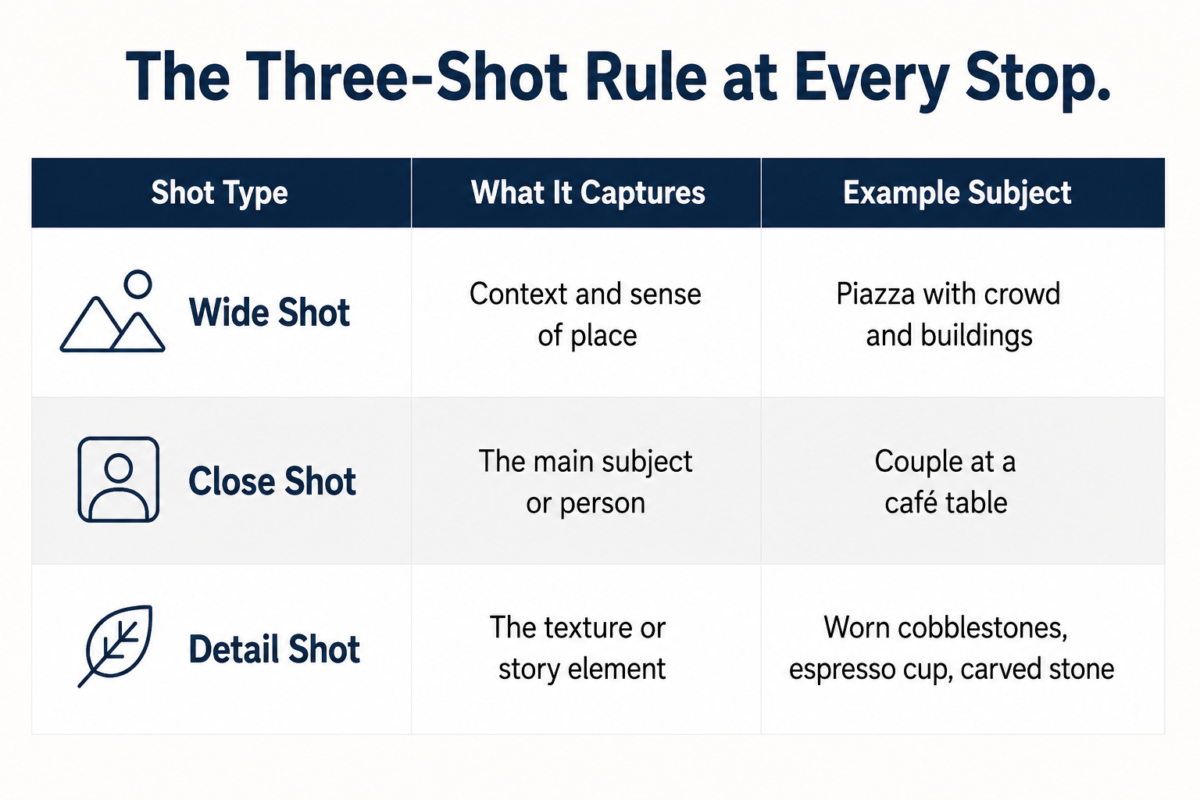
A simple habit: at every meaningful location, take three different types of shots. First, the wide shot that shows where you are and gives the scene context. Second, a closer shot of the people, the thing you came to see, or the one element that makes the place worth visiting. Third, a detail shot: the carved inscription, the worn step, the reflection in a window, the light on the market fruit, the hands holding coffee cups.
Use foreground elements when photographing landscapes. A branch, a railing, a person walking into the frame, a narrow street leading toward a landmark. These elements give the photo depth that a plain shot from a distance simply cannot replicate.
Get closer rather than zooming in. Digital zoom on most phones reduces image quality because the phone is cropping and enlarging, not optically zooming. Move your feet. Step around the crowd. Find a slightly different angle. The photo from one step to the left of where everyone else is standing is almost always more interesting.
Take both vertical and horizontal shots when the moment matters. Horizontal works for landscapes, group shots, and wide scenes. Vertical works for portraits, tall buildings, and anything you will display on a phone screen or in a digital frame. Photographing authentic cultural moments, whether at a street market, a local festival, or a neighborhood café, also means being present and respectful. The best candid travel photos come from moments you were actually a part of. Our guide to capturing authentic cultural moments in travel photography covers how to do this without feeling like an intruder.
A tip from a National Geographic photographer featured in Business Insider: the most memorable travel images are usually ones where you moved closer and waited for the right moment rather than taking the wide shot and moving on. Patience and proximity work better than zoom.
Photograph People, Food, and Landmarks Without Making Them Look Stiff
Most forced-looking travel photos come from two sources: unflattering light and subjects who know the camera is pointed at them.
For people, find open shade first. Then take one quick posed shot (step back slightly because phones distort faces when held too close) and ask them to do something. Point at the view. Start walking. Look at each other. Say something to each other. Candid moments look more genuine than a direct stare into the camera, and you can usually capture one with a second shot immediately after the posed one.
For food, move toward the nearest window or natural light source before lifting the phone. If you are shooting a dish from directly above, clear the items around it and shoot straight down with the phone parallel to the table. If a plated course has height, shoot from eye level or slightly below. The built-in flash washes out color and texture on food consistently. Avoid it.
For landmarks, step aside from the most obvious shooting spot. The postcard angle is fine for a record shot, but the photo that usually looks best a year later is the one that showed the scale of the place, or the people in front of it, or the detail that most visitors walked past. Frame through a doorway, an arch, a gap in trees, or a row of pillars. Include a person for scale when the landmark is massive. Take a detail shot while you are there: the kind of image that makes people ask where it was taken.
For couples or family groups: one posed shot where everyone agrees to look at the camera, then one where you tell them to start walking, say something to each other, or look at the view. The second photo almost always has more life in it.
Keep the Gear Light and the Backup Habit Automatic
A short list of optional support gear covers most situations without adding a camera bag to your trip: a microfiber lens cloth, a small power bank, a phone grip or wrist strap, and a compact Bluetooth remote shutter for self-timer shots. A small flexible tripod that can sit on a table or wrap around a railing is useful for low-light scenes.
That is the whole kit. Everything fits in a jacket pocket or a small day bag. No camera bag. No case full of lenses to swap. No extra batteries to track.
The backup habit matters more than most travelers realize until something goes wrong. Phone theft, a cracked screen, accidental water damage, or a full storage card can mean losing an entire trip’s worth of photos with no recovery option.
Turn on automatic cloud backup before you leave home. Google Photos, iCloud, and Amazon Photos (included with a Prime membership) will sync photos silently over Wi-Fi. According to TechRadar’s guide to the best ways to back up photos, the 3-2-1 rule remains the standard: three copies of your images, on two types of storage, with one stored off-site. In practical travel terms, that means your phone, cloud backup, and a home drive you sync when you return.
At the end of each day, take two minutes to scroll through and favorite the ten to twenty best photos from the day. The favorites become easy to find later, and the habit saves hours of sorting when you are back home.
After the trip, collect the favorites into one shared album. Loading those best shots into a digital picture frame is one of the most satisfying ways to keep the memories of the trip present in daily life at home. We wrote about how a digital picture frame became our favorite way to share our travels. It is a small shift that makes a real difference.
The Short Version Before Your Next Trip
Better travel photos do not require a new camera or a new skill set. The moves that actually change what you come home with are: wipe the lens, find better light, hold the phone steady, move closer instead of zooming, shoot wide and close and detailed at every stop that matters, back up automatically, and spend five minutes each evening marking the keepers.
The phone you already own is ready. These smartphone photography tips are all you are adding.
If you want more practical guides on travel, photography, memory-keeping, and making the most of the second half of life, subscribe to our Newsletter. We share what we are actually working on every week.
We have also written about how to turn your travel photos into a story worth sharing. That is a good next step once you have the keepers sorted.
What is one photo from a recent trip that you wish had turned out better? Drop it in the comments. The situation usually has a straightforward fix, and it is a good conversation to have.
Frequently Asked Questions
Is a smartphone enough for travel photography?
Yes, for most travel scenarios. Modern smartphones handle landscapes, portraits, restaurant photos, architectural shots, and everyday moments with enough quality for social media, photo books, and digital frames. A dedicated camera still has advantages for distant wildlife, fast action, very low light, or professional-quality large prints. For the trips most of us actually take, a good phone camera is fully capable.
How do I avoid blurry phone photos while traveling?
Start with a clean lens, then hold the phone steady with both hands and brace your elbows against your body. Tap the screen to set focus on your subject before shooting. For group shots or self-portraits, use the volume button or a small Bluetooth remote shutter so the phone is not being pressed at the moment it fires. In very low light, use Night Mode and hold completely still until the camera finishes processing.
Should I use digital zoom for smartphone travel photos?
In most situations, no. Digital zoom crops and enlarges the existing image rather than optically zooming, which reduces quality. Move your feet closer to the subject instead. Some newer flagship phones include optical lens options at 2x or 3x that are genuinely good, but the maximum digital zoom levels on most phones produce noticeably soft results. Get as physically close to what you want to photograph as you reasonably can.
How do I take better low-light travel photos with my phone?
Use the available light in the scene first. Tap to focus, then tap again to lower the exposure slider if the image looks washed out. Turn Night Mode on and hold the phone very still against a wall, railing, or table for the one to two seconds it takes to process. Avoid the flash for most indoor shots. It flattens faces and destroys the ambiance of the space. For indoor shots, find a window or lamp you can position your subject near.
How should I organize travel photos after a trip?
Before you start sorting hundreds of shots, pull out just the photos you already favorited each evening during the trip. Create one dedicated album for the destination. Delete obvious duplicates and the photos you already know are not keepers. Then back the full camera roll up to the cloud and a home drive before you do any deleting. From the favorites album, choose the twenty or thirty you genuinely want to see again. Those are the ones worth printing, framing, or adding to a photo book.