

Table of Contents
Learning AI can feel like one more thing you were supposed to understand yesterday. One day it was a news story. Then it was in your phone, your search results, your workplace software, your photo apps, and maybe even your doctor’s office forms.
If you are an adult trying to keep up, that can feel exhausting. Most advice jumps straight to coding, prompt tricks, new tools, paid courses, or loud predictions about who will be left behind. That is a lot to ask from someone who already has work, family, health, money, travel, and real life on their plate.
Here is the calmer truth: learning AI does not have to mean becoming a tech person. For most adults, it starts with one tool, one safe task, and one habit of checking the answer before you trust it.
This guide is for the person who wants to understand AI enough to use it wisely, without turning it into another all-or-nothing project.
Please note this page may contains affiliate links. If you purchase something through these links, I’ll receive a commission at no extra cost to you. Affiliate links help to support my website/blog and I only recommend products I love.
What learning AI actually means for regular adults
Learning the basics does not mean you need to build a model, write code, or memorize technical terms. It means you understand enough to use AI tools with judgment.
That includes knowing what AI is good at, where it can go wrong, how to ask better questions, and when to verify the answer. That last part matters. AI can sound confident even when it is missing context, using stale information, or simply making a mistake.
For a regular adult, this is closer to learning how to use online banking or a smartphone map than learning computer science. You do not need to know every technical layer underneath it. You do need enough comfort to use the tool safely and enough skepticism to stay in charge.
If you want an even gentler starting point, our guide to starting AI for beginners over 50 walks through the basic mindset shift first. This post takes the next step: how to practice.
Google’s AI Essentials program frames beginner AI learning around hands-on practice, prompting, productivity, and responsible use. Coursera and DeepLearning.AI’s AI For Everyone course also positions AI literacy as something non-technical adults can learn. That is the lane we are staying in here.
Grab a copy of our FREE AI Starter Guide for People Over 40
Why learning AI feels harder than it needs to
AI feels overwhelming because the conversation around it is too loud. One headline says AI will change every job. Another says a new tool can do everything. Then a friend mentions ChatGPT, Gemini, Copilot, Claude, image generators, AI search, agents, automations, and suddenly you feel behind before you even start.
The tool overload is real. So is the jargon. Words like model, token, generative AI, machine learning, automation, and agent get thrown around as if everyone already agreed to attend the same class.
But most adults do not need to learn all of AI at once. You need a useful starting point. You need to know how to ask for help, how to spot a weak answer, and how to keep private information private.
The 2025 arXiv paper AI Literacy Education for Older Adults looked at AI learning for older adults and pointed to something practical: adults often need hands-on learning, clear examples, and support that respects their real concerns. That tracks with real life. Most people do not build confidence by reading definitions. They build it by trying one useful thing and seeing where it helps.
Start with one AI tool and one real-life task
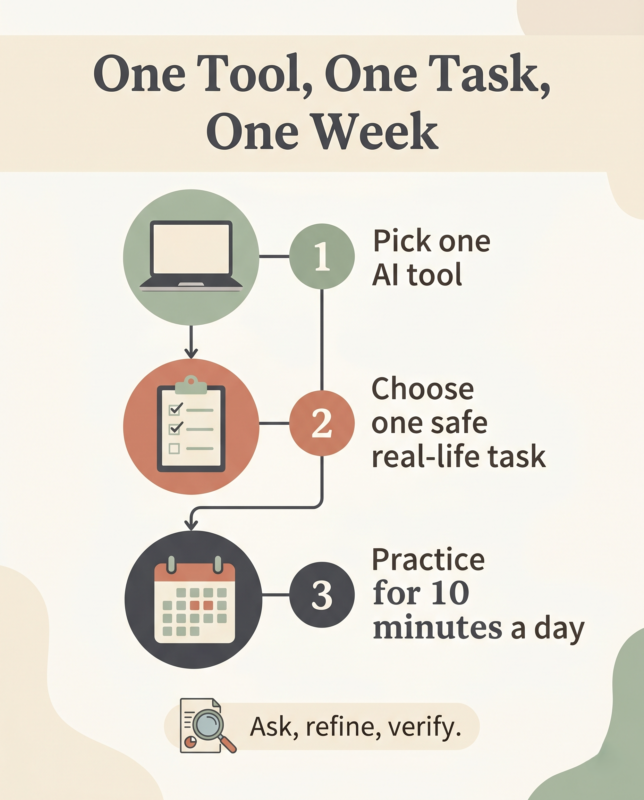
The fastest way to make this harder is to download five tools and compare all of them. Pick one mainstream tool first. ChatGPT, Gemini, Claude, or Copilot can all work for basic practice. The specific tool matters less than staying with one long enough to learn how the conversation works.
Then choose one low-risk task. Do not start with taxes, medical decisions, legal letters, or anything that contains private account information. Start with something ordinary.
- Ask it to explain a confusing term in plain English.
- Ask it to rewrite a message so it sounds warmer.
- Ask it to organize a messy list into steps.
- Ask it to create a packing list for a weekend trip.
- Ask it to turn a big household project into a 30-minute starting point.
This is where AI becomes less mysterious. You are not trying to produce perfect work. You are learning how the tool responds, how much context it needs, and how to push back when the first answer is too generic.
Try this beginner prompt:
“I’m new to AI. Help me understand [topic] in plain English. Give me the short version first, then ask me one follow-up question so you can make the answer more useful.”
That prompt does three helpful things. It tells the tool your level, asks for plain English, and keeps the conversation going. The process gets easier when you stop treating AI like a search box and start treating it like a practice conversation.
If you want more everyday examples, our post on simple ways to use AI in everyday life gives practical uses that do not require a technical background.
The four AI skills adults should learn first
You do not need fancy prompts to begin. You need four basic habits that make almost every AI tool more useful.
Give context. Tell the tool who the answer is for, what you are trying to do, and what limits matter. Time, budget, energy, location, skill level, and tone all help.
Ask follow-up questions. The first answer is a draft, not a final answer. Ask for a simpler version, a shorter version, a checklist, a table, or a different tone.
Turn answers into next steps. If the answer is broad, ask, “What should I do first in 15 minutes?” That forces the tool to become practical.
Verify anything that matters. Check health, legal, financial, safety, travel, and current information against trusted sources or qualified professionals.
That last skill is the one beginners sometimes skip, because AI can write with such confidence. The Guardian’s 2026 guide to using AI tools responsibly emphasizes checking outputs and avoiding over-reliance. That is not fear-based advice. It is just good judgment.
Think of AI as a helpful assistant with no real-world accountability. It can help you draft, practice, organize, and think. You still own the decision.
A simple 7-day plan for learning AI without overwhelm
If you have been waiting for a full free weekend to finally start, that may be the problem. A seven-day plan works better because it keeps the stakes low. Ten minutes a day is enough to build the habit.
- Day 1: Ask your AI tool to explain what it can and cannot do in plain English.
- Day 2: Ask it to rewrite one email or text message in a clearer, kinder tone.
- Day 3: Give it a messy list and ask for a simple checklist.
- Day 4: Ask it to explain one confusing AI term, then quiz you with three questions.
- Day 5: Ask it to compare two low-risk options, like two trip ideas or two weekend projects.
- Day 6: Ask it to turn one big goal into three next steps.
- Day 7: Save three prompts you would actually use again.
The goal is not to master the tool in a week. The goal is to prove to yourself that you can learn it in small pieces.
Once you have basic confidence, you can apply the same skill to bigger life areas. For example, our guide to using AI for financial independence shows how AI can help you think through saving, planning, and money clarity without replacing real financial advice.
The distinction matters. AI can help you organize questions before you talk to a professional. It should not become the professional.
What to avoid when you are learning AI
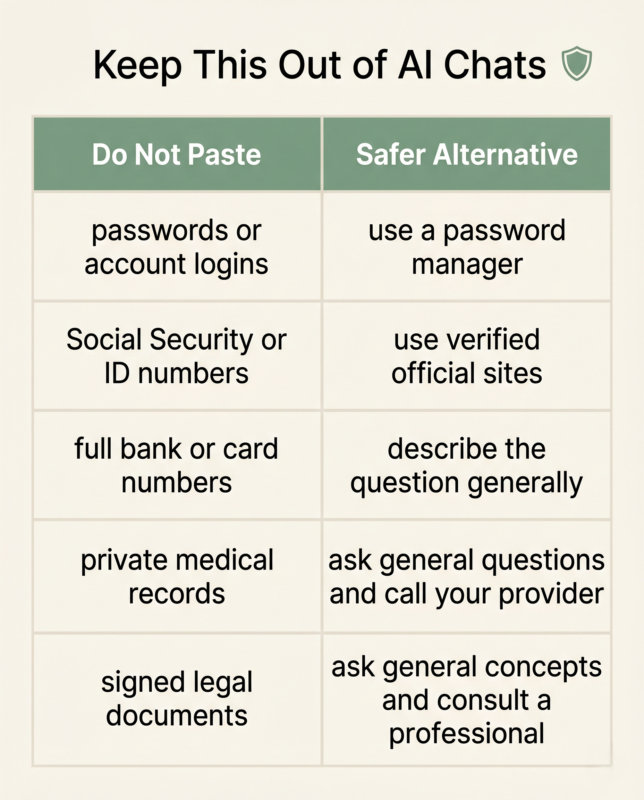
The beginner mistake is not asking a bad prompt. Bad prompts are part of learning. The bigger mistake is getting comfortable too fast and pasting information into AI that should stay private.
Do not paste passwords, Social Security numbers, full account numbers, private medical records, signed legal documents, or anything you would not want stored, reviewed, or exposed outside your control. If you need help with a sensitive situation, remove identifying details and keep the question general.
You should also avoid treating AI like the final word. Ask it to show uncertainty. Ask what you should double-check. Ask which parts of the answer might be outdated. If a decision could affect your health, money, legal standing, safety, or family, verify it somewhere better.
Microsoft Learn’s beginner path for AI applications and agents includes responsible AI concepts alongside tool use. That pairing is right. Learning AI is not just learning what to type. It is learning when to slow down.
One more thing: do not compare yourself to younger users, tech workers, or people posting perfect AI workflows online. You are learning this for your life, not for an internet performance. If AI helps you write one clearer email, understand one confusing bill, plan one trip, or save one hour of mental clutter, that counts.
How should a beginner start learning AI?
A beginner should start learning AI by using one mainstream tool for one simple real-life task. Ask it to explain something, organize a list, rewrite a message, or create a checklist. Then ask follow-up questions and verify anything important. You do not need coding to build useful AI confidence.
Bottom line: you are not too late
Learning AI does not have to become a second job. You do not need to chase every new tool, learn to code, or pretend the whole thing is simple when it is moving fast.
Start smaller. Pick one tool. Ask one useful question. Practice for 10 minutes. Check the answers that matter. Repeat that long enough, and AI stops feeling like a wave you are trying to outrun. It becomes another tool you know how to use when it actually helps.
Grab a copy of our FREE AI Starter Guide for People Over 40
FAQ
Do I need coding to start learning AI?
No. Coding helps for technical AI work, but regular adults can start by learning how AI tools explain, summarize, organize, brainstorm, and draft. Start with practical use before technical theory.
What is the easiest way to start learning AI?
Choose one tool, ask one real-life question, and practice for 10 minutes a day. Use AI for low-risk tasks first, such as rewriting a note, explaining a term, or creating a checklist.
Is AI hard to learn as an adult?
AI can feel overwhelming because the tools change quickly, but the basics are learnable. Many adults do better when they learn through hands-on tasks tied to real life instead of abstract lessons.
What should I avoid when learning AI?
Avoid pasting sensitive personal information, trusting every answer without checking, downloading too many tools at once, or letting AI do all the thinking. Use it as a practice partner, not a final authority.
What AI skill should I learn first?
Learn how to ask clear questions with context. Then learn how to ask follow-up questions, request a simpler answer, turn advice into steps, and verify anything important.