

Table of Contents
If it feels like everyone else got a manual for AI for beginners over 50 and you missed the meeting, you are not behind. You just have not found the right starting point yet.
Most articles about artificial intelligence either talk down to readers or bury them in jargon about large language models and parameters. Neither one helps if you just want to know what to actually do with the thing.
Here is the promise: by the end of this post, you will know what AI actually is, what it is good for, what it is not, and exactly how to spend your first 20 minutes with it. No course required.
Please note this page may contains affiliate links. If you purchase something through these links, I’ll receive a commission at no extra cost to you. Affiliate links help to support my website/blog and I only recommend products I love.
AI for Beginners Over 50: What It Actually Means
AI, in the form you are most likely to use it, is software that can read what you type, recognize patterns in huge amounts of text, and generate a response that sounds like a person wrote it. It can summarize a long document, draft an email, answer a question, or help you think through a decision.
It is not a person. It does not “know” you, and it does not have opinions the way a friend does. It is also not automatically correct. Treat it the way you would treat a smart, fast, occasionally wrong assistant: useful, quick, and worth a second look before you act on anything important.
Tools like ChatGPT, Gemini, and Copilot are the most common entry points. They all work roughly the same way: you type a question or request, and the tool writes back in plain language. You have probably already used a simpler form of AI without thinking much about it, through map suggestions, spam filters, photo organizing, or the autocomplete on your phone.
For most people over 50, the gap is not ability. It is exposure. You have spent decades learning new systems at work, at home, and on every device that came along. This is one more system, and a fairly forgiving one, since a wrong answer just means you ask again.
Why AI Feels Overwhelming After 50
Part of the overwhelm is just volume. New tools, new apps, and new features show up faster than anyone can track. Part of it is the language. Terms like “prompt,” “model,” and “hallucination” can make a practical tool sound like a college course.
There is also a real, valid concern underneath the hesitation: scams, privacy, and the fear of looking foolish in front of younger coworkers or family members who picked this up faster. None of that means you are bad with technology. It means the onboarding has been bad.
Add to that the sheer number of tools competing for attention. ChatGPT, Gemini, Copilot, AI photo editors, AI search, and a new app every month. Nobody, at any age, can keep up with all of it, and you do not need to.
The truth is, you do not need to learn AI the way you would learn a new piece of software at work. You need one small, useful task to try it on. That is a much smaller bar than most guides set, and it is also why it is not too late to start something new in your 50s. The same mindset that applies to a career change or a move applies here. Start small, judge the result, and adjust from there.
Grab a copy of our FREE AI Starter Guide for People Over 40
The Safest Way to Start: Use One Tool for One Task
The best way to start using AI after 50 is to pick one free chatbot, use it for one low-risk task, and check anything important before acting on it. Ask it to explain, summarize, brainstorm, or rewrite something from everyday life. Avoid sharing sensitive information, and build confidence through small, useful wins rather than one big leap.
Skip the temptation to download four different AI apps in one sitting. Pick one mainstream, free tool. ChatGPT is the most widely used right now, but Gemini or Copilot work the same way if you already have a Google or Microsoft account you trust.
Then pick one low-risk task. Rewrite an email so it sounds warmer. Build a packing list for a trip. Summarize a long article you do not have time to read in full. Brainstorm three dinner ideas using what is already in your fridge.
What you should not do is paste in anything sensitive. That means no passwords, no Social Security numbers, no full bank statements, and no medical records. Treat the chat box the way you would treat a conversation in a crowded waiting room. This same caution applies if you later explore using AI to plan a career change after 40, where the stakes of the questions get bigger but the privacy rule stays the same.
One tool, one task, for about a week. Resist the urge to open three apps and compare them on day one. Comparison shopping comes later, after you already trust what the thing is for.
Your First 20-Minute AI Practice Session
Set a timer. Twenty minutes is enough to get a real feel for how this works, and short enough that it will not eat your afternoon.
Start by asking the tool to explain something in plain English. A good first prompt is: “Explain AI to me like I’m new to it and don’t want jargon.” Read the answer. Notice that it sounds like a person talking, not a textbook.
Next, give it a real task. Try: “Rewrite this email so it sounds friendly, clear, and not too formal,” and paste in something you were already planning to send. Or try: “Help me plan three simple dinners using chicken, rice, and vegetables.”
Ask one follow-up question to sharpen the answer, something like “Can you make that shorter?” or “What am I missing here?” This is the step most beginners skip, and it is the one that turns a generic answer into something actually useful.
Last, check anything that matters before you act on it. If the task was low-stakes, like a packing list, you are probably fine. If it touched on money, health, or a legal question, verify it somewhere else first.
By the end of those twenty minutes, you will likely notice two things. The tool is faster than you expected, and it is not as intimidating once you have typed your first real sentence into it. That second part matters more than the first. Most of the resistance lives in the gap between hearing about a tool and actually opening it, and that gap closes the moment you try.
If the first session goes well, repeat it the next day with a different small task. If it goes poorly, that is useful information too. Maybe the prompt needed more detail, or the task was too big for one request. Either way, you learn something real instead of staying stuck in the abstract.
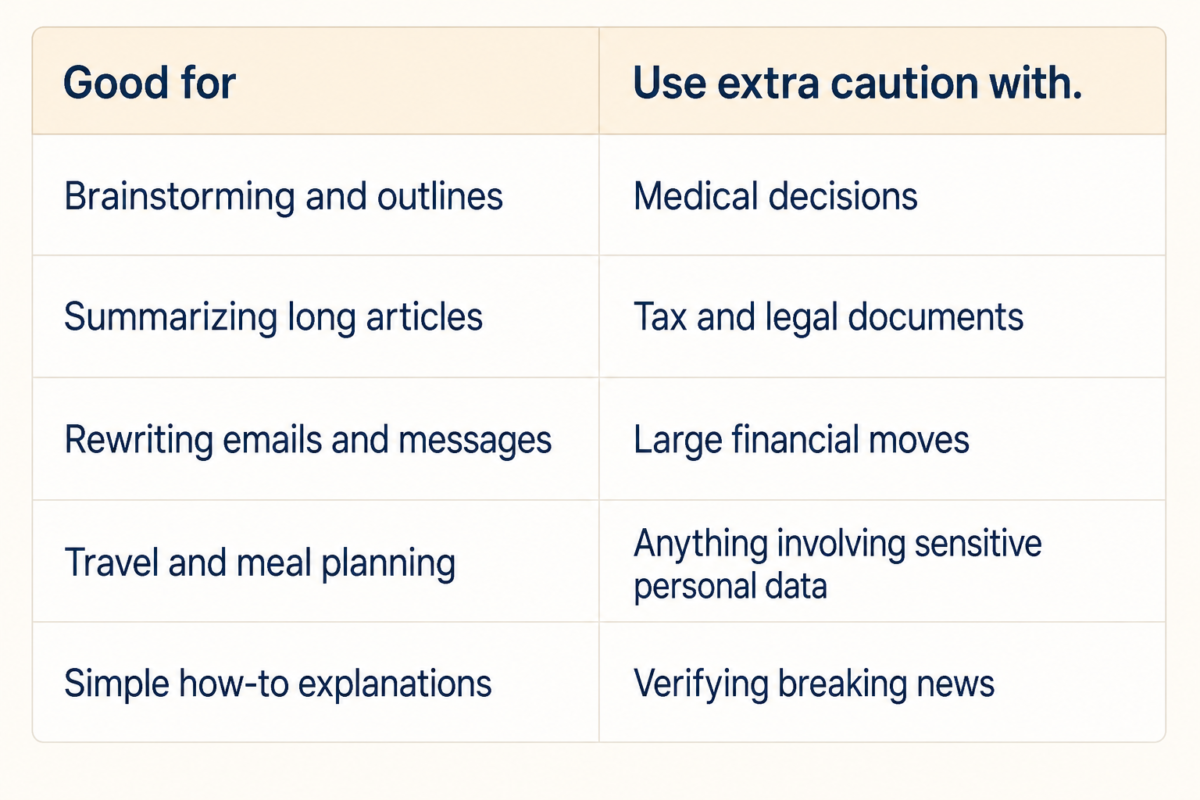
What AI Is Good For, and What You Should Not Trust It With
AI is genuinely useful for brainstorming, summarizing, simplifying, rewriting, and building first drafts of things like checklists, outlines, or travel plans. It is fast, it does not get tired of revising, and it is available at 11pm when you finally have ten quiet minutes to think.
It is a poor substitute for a real professional on anything with real consequences: medical decisions, tax questions, legal documents, or large financial moves. AI tools can sound completely confident while being wrong, a problem OpenAI itself acknowledges in its own help documentation, which is reason enough to double-check anything important.
There is one more risk worth naming directly. The Federal Trade Commission has warned that scammers now use AI-generated voices to impersonate family members in fake emergency calls. If you get an urgent message asking for money, even one that sounds exactly like your child or grandchild, hang up and call them back on a number you already have saved. That single habit will protect you more than any amount of AI literacy.
A poll from AP and the NORC Center for Public Affairs Research found that most American adults have tried generative AI at least once, but far fewer use it regularly or trust it for anything important. That gap between curiosity and trust is healthy. Stay curious, stay a little skeptical, and you are already using AI about as well as anyone else.
A Simple 7-Day AI Confidence Plan
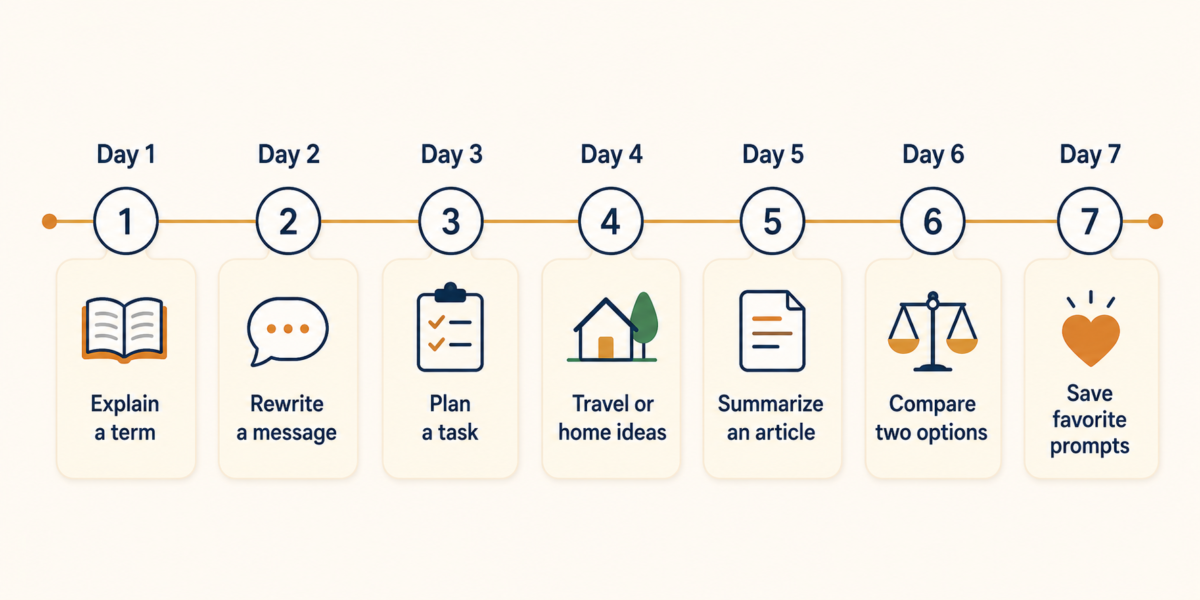
Confidence here comes from repetition, not from mastering every feature. A short plan spread across a week works better than one long session that leaves you frustrated, and it gives each new habit time to settle in before you add the next one.
Print this out, stick it on the fridge, or save it in your phone’s notes app. Treat it like a light commitment, not homework. Missing a day does not reset the clock.
Day one, ask AI to explain one term that has always confused you. Day two, rewrite a real email or text. Day three, plan one meal, errand run, or weekly task list. Day four, ask for travel or home project ideas.
Day five, summarize one article and check the important parts against the original. Day six, compare two real options you are weighing, like two hotels or two routes. Day seven, save your three favorite prompts somewhere you can find them again, and show one to someone else.
This is the same instinct behind the simple, everyday uses for AI that already show up in plenty of ordinary routines. It also connects to a bigger question worth sitting with as these tools spread: whether technology on the whole is making daily life easier or just busier. AI for beginners over 50 does not have to resolve that debate. It just has to earn its place in your week, one small task at a time.
Bottom Line
AI for beginners over 50 is not about catching up to anyone or mastering a new field overnight. It is about finding one small task this week where a fast, occasionally wrong assistant can take some weight off your plate.
You do not need the newest app, the longest prompt library, or a teenager standing over your shoulder. You need one tool, one task, and twenty minutes you were probably going to spend scrolling anyway.
Pick one tool. Pick one task. Give it twenty minutes. That is the whole starting line, and it is one you are not too late to cross.
Grab a copy of our FREE AI Starter Guide for People Over 40
What is the one task you would hand to an AI assistant first, if you tried it this week?
Frequently Asked Questions
Is AI hard to learn after 50?
It can feel unfamiliar at first, but it does not need to be learned like a technical subject the way a new accounting system or a new phone operating system would. Start with one simple task, use plain language, and build confidence through repetition rather than study. Most people find the learning curve flatter than they expected once they actually try it.
What AI tool should beginners over 50 try first?
Start with one mainstream chatbot such as ChatGPT, Gemini, or Copilot. Use the free version first unless you already have a specific reason to pay, and stick with that one tool for at least a week before trying another.
Is ChatGPT safe for seniors?
It can be useful, but avoid sharing sensitive personal information and verify important answers elsewhere. It works best for brainstorming, summarizing, rewriting, and planning rather than final decisions on health, money, or legal matters.
What should I use AI for first?
Pick a low-risk everyday task: rewrite an email, summarize an article, plan meals, organize errands, or ask for a plain-English explanation of something confusing. Save the bigger, higher-stakes questions for after you have a feel for how the tool responds.
What should I avoid putting into AI?
Avoid passwords, Social Security numbers, private financial details, medical records, legal documents, and anything you would not want stored or reviewed outside your control. When in doubt, leave it out and describe the situation in general terms instead.