

AI in Everyday Life used to sound like something from a tech conference, a science fiction movie, or one of those conversations where everyone nods like they understand while secretly wondering what just happened. For a while, I put myself in the skeptical camp. I knew AI was becoming a big deal, but I wasn’t convinced it belonged in my regular, ordinary, already-full life.
Then I started using it for small things. Not to replace my brain. Not to turn my life into a robot-controlled productivity machine. Just to help with the everyday stuff that was taking up more time, energy, and mental bandwidth than it needed to.
That is when AI started to make sense. It wasn’t about becoming a tech person. It was about using a tool that could help me plan, write, organize, learn, and get unstuck a little faster.
Please note this page may contains affiliate links. If you purchase something through these links, I’ll receive a commission at no extra cost to you. Affiliate links help to support my website/blog and I only recommend products I love.
Table of Contents
What Does AI in Everyday Life Actually Mean?
AI in everyday life simply means using artificial intelligence in ordinary routines, tools, and decisions. It shows up in your phone, maps, email, search results, smart home devices, recommendation engines, photo apps, writing tools, and digital assistants. You may not think of those things as “AI,” but many of them already use it in the background.
The newer version of everyday AI is more active. Instead of AI quietly sorting spam or suggesting the fastest route home, tools like ChatGPT, Microsoft Copilot, Gemini, Claude, and Perplexity let you ask questions, create drafts, summarize information, brainstorm ideas, and work through problems in plain English. You do not need to know code, technical terms, or complicated commands.
That is what makes this shift feel different. AI is no longer hidden inside apps you already use. It is now something you can talk to, question, revise, and use as a thinking partner.
Microsoft even has beginner training focused on using AI for everyday tasks, which is a good sign that this is no longer just a tech-industry conversation. The point is not that AI should run your life. The point is that it can help with routine tasks when you learn how to use it wisely.
Why I Was Skeptical About AI at First
My first reaction to AI was not excitement. It was more like, “Do we really need another thing to learn?” By midlife, you have already lived through enough technology shifts to know that every “life-changing tool” comes with a learning curve, a login, a password reset, and at least three updates you did not ask for.
There was also the hype factor. AI was being talked about like it was either going to solve every problem or ruin everything. Neither extreme made me want to jump in with both feet.
I also had real concerns. What happens to creativity? Can you trust the answers? Is it safe to type personal information into these tools? Will using AI make people less thoughtful, less original, or less willing to figure things out themselves?
Those questions still matter. In fact, they matter more now that AI is becoming easier to use. But once I stopped looking at AI as an all-or-nothing decision, I found a more practical middle ground.
How I Actually Use AI in Everyday Life Now
The biggest change for me was realizing I did not need to use AI for everything. I only needed to use it where it made life easier. That made the whole thing feel less intimidating.
I started treating AI like a helper for first drafts, rough plans, simple explanations, and mental clutter. It became useful when I stopped expecting perfection and started using it to get unstuck. That one shift made all the difference.
Here are the places where AI has become genuinely helpful in real life.
I Use AI to Get Unstuck
One of the best everyday uses of AI is getting past the blank page. Whether it is a blog post, a newsletter idea, a caption, a trip plan, or a difficult message, the hardest part is often starting. AI can give you a rough draft, a list of ideas, or a structure to react to.
That does not mean the first answer is always good. Sometimes it is too generic, too polished, or not quite “you.” But even a mediocre first draft gives you something to push against.
For content creation, this is especially useful. You can ask AI for title ideas, outline options, reader questions, examples, or ways to explain something more clearly. The final voice still needs to be yours, but AI can help you move from staring at a blank screen to shaping an actual idea.
I Use AI for Emails and Messages
Emails and messages take up more energy than we admit. Sometimes you know what you want to say, but you cannot find the right tone. Other times, you need to respond kindly, clearly, or firmly without spending twenty minutes rewriting the same three sentences.
AI can help with that. You can paste a rough version of your message and ask it to make it warmer, shorter, clearer, or more professional. You can also ask it to draft a response based on a few notes.
The trick is to never send the first version blindly. Read it, adjust it, and make sure it sounds like you. AI is helpful for structure and tone, but your relationships still deserve your judgment.
I Use AI for Travel Planning

This is one of my favorite uses because travel planning can be fun and exhausting at the same time. AI can help compare destinations, build rough itineraries, suggest packing lists, organize travel days, and remind you of things you might forget. It is especially helpful when you are early in the planning stage and still trying to sort through too many options.
For example, you can ask, “Help me plan a relaxed three-day trip within driving distance. We like good food, walkable areas, scenic views, and quiet mornings.” That kind of prompt gives AI enough context to start somewhere useful.
You still need to verify details like hours, prices, weather, road conditions, and local rules. AI can make mistakes, and travel information changes often. But as a brainstorming and organizing tool, it can save a lot of time.
I Use AI to Learn Faster
AI can be a surprisingly helpful learning tool. You can ask it to explain a confusing topic in plain English, give examples, define terms, or compare two ideas side by side. It is like having a patient tutor available when you do not want to watch a 47-minute video to understand one thing.
This is especially useful when you are learning something new in midlife. Whether it is technology, investing basics, travel logistics, photography, blogging, or a new creative skill, AI can help break the learning curve into smaller steps. You can ask follow-up questions without feeling embarrassed.
That part matters. A lot of people avoid learning new tools because they do not want to feel behind. AI can make learning feel more private, flexible, and less intimidating.
I Use AI for Everyday Decisions
AI is also useful for small everyday decisions. Not because it knows your life better than you do, but because it can help organize your options. You can ask it to compare choices, create a checklist, plan meals, simplify a schedule, or help you think through pros and cons.
For example, if you are trying to organize a busy week, AI can turn a messy list into categories. If you are planning a family gathering, it can help with meal ideas, timing, shopping lists, and seating considerations. If you are trying to build a new habit, it can help you create a realistic starting plan.
Again, the goal is not to outsource your life. The goal is to reduce friction. Sometimes a little structure is all you need to make a decision feel less heavy.
The Best Everyday AI Uses for Beginners
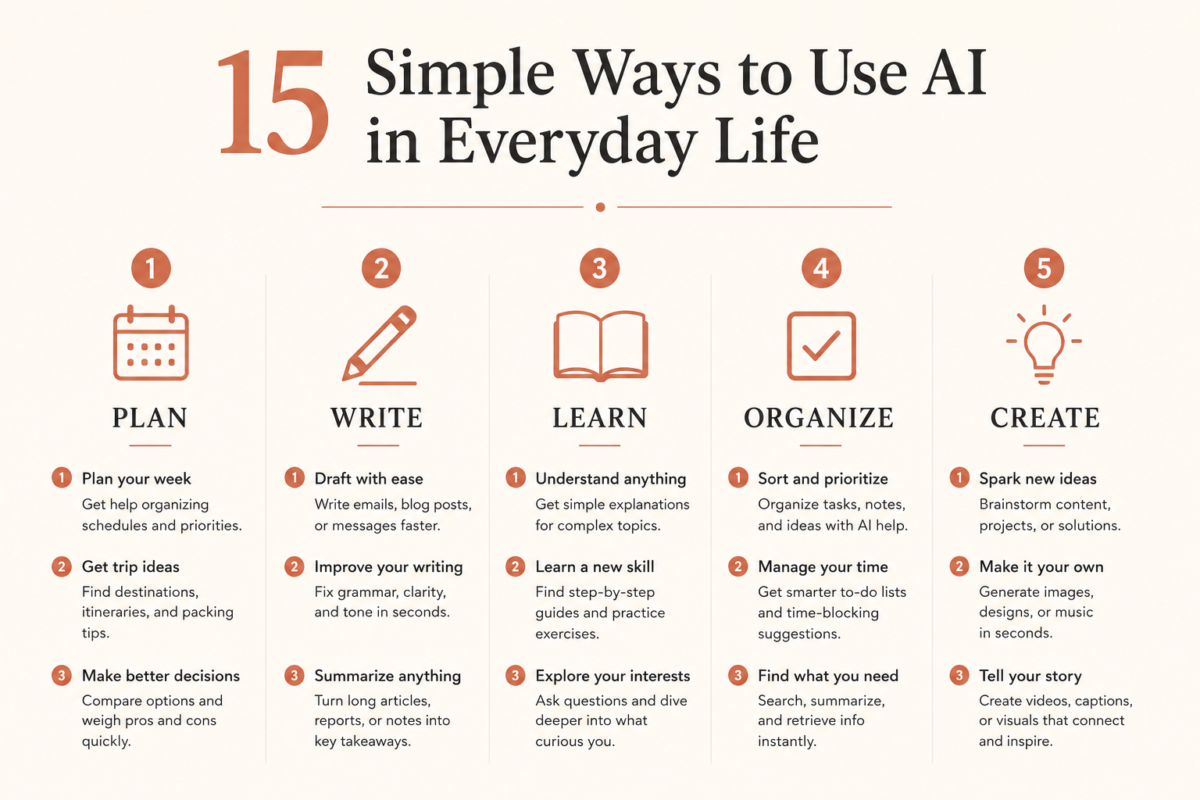
If you are new to AI, the best place to start is with simple, low-risk tasks. Do not begin by trying to automate your whole life. Start with something small enough that you can test it without pressure.
Here are practical ways to use AI in everyday life:
- Summarize a long article
- Draft an email or text message
- Plan a weekend trip
- Create a packing list
- Brainstorm gift ideas
- Compare two products before buying
- Organize a messy to-do list
- Rewrite something in a kinder tone
- Create a simple meal plan
- Learn a new topic in plain English
- Generate questions for a family interview
- Create captions for photos
- Outline a blog post or newsletter
- Prepare for a hard conversation
- Make a checklist for a project
These are not flashy uses, and that is exactly why they work. Most people do not need AI to do something dramatic. They need it to save fifteen minutes, reduce decision fatigue, or help them start something they have been avoiding.
A good beginner prompt sounds like a normal request. Try something like, “Help me organize this list into a simple plan for the week,” or “Rewrite this email so it sounds kind but clear.” The more context you give, the better the response usually gets.
Where AI Still Needs a Human Adult in the Room
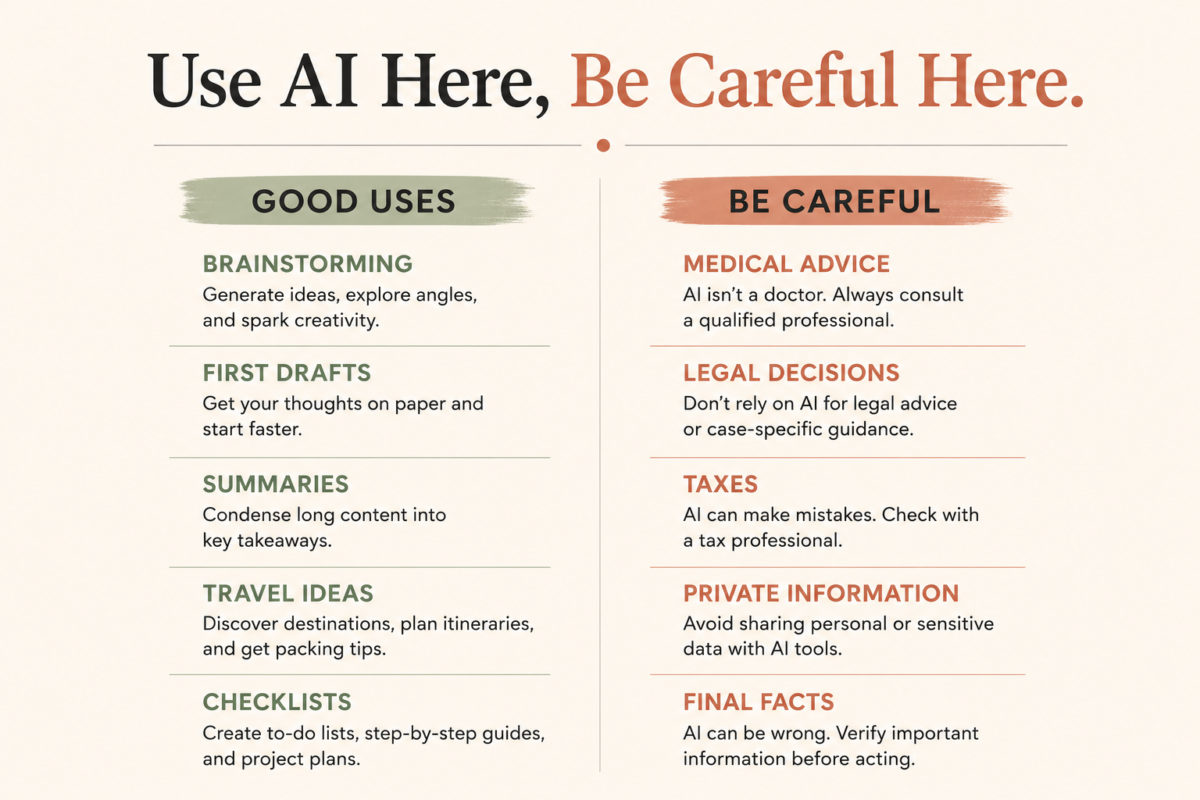
AI can be helpful, but it is not magic. It can be wrong, outdated, biased, overly confident, or just plain weird. Sometimes it gives an answer that sounds polished enough to trust, even when the information needs checking.
That is why AI should not be your only source for medical, legal, tax, financial, or safety-related decisions. You can use it to understand basic concepts or prepare better questions, but you should verify important information with qualified professionals or authoritative sources. A confident answer is not the same thing as a correct answer.
Privacy matters too. Do not paste sensitive personal details, passwords, private financial information, medical records, or anything you would not want stored or reviewed. Treat AI like a helpful assistant, not a diary, doctor, lawyer, or vault.
The National Institute of Standards and Technology has an AI Risk Management Framework designed to help organizations think about AI risks and trustworthiness. Everyday users do not need to study every technical detail, but the larger message still applies: AI works best when people manage the risks instead of pretending they do not exist.
How AI Can Support a Freedom-Focused Life
For us, the most interesting part of AI is not the technology itself. It is what the technology can make easier. When used well, AI can support more time freedom, better planning, clearer thinking, and less mental clutter.
That connects directly to how we think about life. If a tool helps you spend less time stuck in admin mode and more time doing what matters, it is worth understanding. If it helps you plan a trip, write the thing, organize the photos, learn the skill, or finally start the project, that is useful.
AI can also support reinvention. A lot of people reach midlife and start asking new questions about work, travel, money, creativity, identity, and legacy. AI cannot answer those questions for you, but it can help you explore them.
It can help you brainstorm business ideas, draft a personal mission statement, create questions for family stories, organize memories, or think through a lifestyle change. Used that way, AI becomes less about chasing trends and more about building a life with intention.
How to Start Using AI Without Feeling Overwhelmed

The easiest way to start is to pick one small task. Do not download ten apps. Do not spend three hours watching AI tutorials. Just choose one thing you already need to do and ask AI to help with it.
Start with a plain-English prompt. You do not need fancy wording. You can say, “I am new to this, so explain it simply,” or “Ask me questions before you answer.” Those phrases alone can make the result much better.
Here is a simple beginner framework:
- Pick one task
- Give the AI some context
- Ask for a first draft, list, or explanation
- Review the answer carefully
- Edit it to sound like you
- Verify anything factual
- Try again with better instructions
Here is an example prompt you can copy:
“Help me plan a low-stress weekend trip within three hours of home. We like good food, walkable areas, scenic views, and quiet mornings. Give me three destination ideas, a simple itinerary for each, and a list of things I should verify before booking.”
That prompt works because it gives context. It tells AI what kind of trip you want, what matters to you, and what format would be useful. The better the input, the better the output.
My Personal Rules for Using AI in Everyday Life
I have a few personal rules that keep AI useful without letting it take over. First, I use AI to start things, not finish them. It can help me organize ideas, but the final decision, tone, and judgment still need to come from me.
Second, I check facts. If AI gives me a statistic, travel detail, health claim, quote, or recommendation, I treat it as something to verify. This is especially true for anything that could affect money, safety, health, or major decisions.
Third, I do not paste sensitive personal information into AI tools. That includes private financial details, medical records, passwords, personal documents, and anything that feels too private. Convenience is not worth being careless with information.
Fourth, I keep my own voice. This is a big one for creators, writers, and anyone building a personal brand. AI can help shape ideas, but the lived experience, point of view, humor, stories, and honesty need to be human.
AI in Everyday Life Is Not About Becoming a Tech Person
One of the biggest myths about AI is that you have to become a tech person to use it. You really do not. You only need curiosity, a little patience, and the willingness to try one useful thing at a time.
Think of it like learning to use GPS years ago. You did not need to understand satellite systems to get directions. You just needed to know where you wanted to go and how to use the tool well enough to make the trip easier.
AI is similar. You do not need every feature, every platform, or every new update. You just need a few practical uses that fit your life.
For people in midlife, that can be empowering. It is a reminder that learning new tools is not just for younger people, corporate teams, or tech enthusiasts. We can learn what is useful, ignore what is noise, and use AI in ways that support the life we are actually building.
Final Thoughts: AI Can Be Useful Without Taking Over
AI in everyday life does not have to be intimidating, dramatic, or complicated. It can be as simple as drafting a message, planning a trip, organizing a messy list, learning something new, or getting unstuck when your brain is tired. The best use of AI is not to replace your judgment, but to support it.
For me, the shift happened when I stopped asking, “Should I use AI for everything?” and started asking, “Where could this make one small part of life easier?” That question made AI feel less like a threat and more like a tool.
And that is the place to begin. Pick one task. Try one prompt. Keep what helps, ignore what does not, and remember that you are still the human in charge.
If you want more practical tips like this, join our newsletter. We share real-life tools, honest observations, and simple ideas for using technology, travel, creativity, and intentional living to build a life that feels more like yours.
FAQ About AI in Everyday Life
What are examples of AI in everyday life?
Examples of AI in everyday life include maps, email filters, voice assistants, smart home devices, recommendation engines, photo organization, chatbots, writing tools, search tools, and travel planning tools. Many people are already using AI without thinking of it as AI. The newer shift is using AI more directly through tools that can draft, summarize, organize, and explain information.
How can beginners start using AI?
Beginners should start with one simple task, such as summarizing an article, drafting an email, planning a trip, or organizing a to-do list. The key is to ask in plain English and give enough context. You do not need a perfect prompt to begin.
Is AI safe to use for personal tasks?
AI can be useful for personal tasks, but you should be careful with sensitive information. Avoid sharing passwords, private financial details, medical records, confidential documents, or deeply personal information. Use AI as a helper, and verify anything important.
Can AI help with travel planning?
Yes, AI can help with travel planning by suggesting destinations, building rough itineraries, creating packing lists, comparing options, and helping you think through logistics. You should still verify current details like prices, hours, travel rules, weather, and availability. AI is great for planning support, but it should not replace final research.
Will AI replace human creativity?
AI does not have to replace human creativity. It can help with brainstorming, structure, first drafts, and idea generation, but your lived experience and taste still matter. The best creative use of AI is as a support tool, not a substitute for your own voice.