

Table of Contents
Your phone buzzes with the same warning halfway through a trip you have been planning for a year: storage full. You delete a few blurry shots to make room, promise yourself you will deal with it properly later, and keep shooting. Later usually means never, until the phone goes missing on the last day of the trip, or gets dropped in a pool, or simply dies, and every photo from the last two weeks disappears with it.
A real photo backup system for travelers would have prevented all of it, and it takes less effort to set up than most people assume.
Most guides to backing up travel photos are written for people who own a dedicated camera, carry a laptop, and swap memory cards between shoots. That is not most travelers over 40. Most of us shoot everything on a phone and just want the pictures to still be there when we get home.
This system does not require new gear or a computer science degree. It requires two decisions made once, before you leave, and a five-minute habit repeated a few times during the trip.
This is that system. No memory cards, no RAW files, no jargon. Just a phone, a cloud account you already have, and one habit that keeps the whole trip from riding on a single device.
Please note this page may contains affiliate links. If you purchase something through these links, I’ll receive a commission at no extra cost to you. Affiliate links help to support my website/blog and I only recommend products I love.
Why Travel Photos Disappear More Than People Think
A normal week might produce a handful of photos. A trip produces a flood of them. Research on smartphone photo habits, reported by TechRadar based on Cunard-commissioned data, found that people take roughly three times as many photos while traveling as they do at home, yet only about a third of people actually back their photos up to the cloud at all.
That gap is exactly where trips go wrong. The one week of the year when you are taking the most photos is also the week you are most likely to be relying on a single, unbacked-up phone.
Losing the phone itself is not a rare, freak accident either. McAfee has reported that close to 5% of smartphones are lost every year, and travel is one of the most common settings for it to happen: an unfamiliar taxi seat, a beach bag, a hotel nightstand in a room you are checking out of in ten minutes.
None of this means you are careless. It means the odds catch up with everyone eventually, and a phone full of once-in-a-lifetime photos is a bad thing to be the exception to.
The instinct to protect these photos is the same one that pushes people to sit down and record a parent’s life story before it is too late. A photo of your kid on a beach in Portugal, or the two of you at a table in Lisbon nobody remembers the name of anymore, is a small piece of family history. Losing it is not just a tech inconvenience. It is a legacy problem, and it deserves to be treated like one.
The 3-2-1 Rule, Minus the Jargon
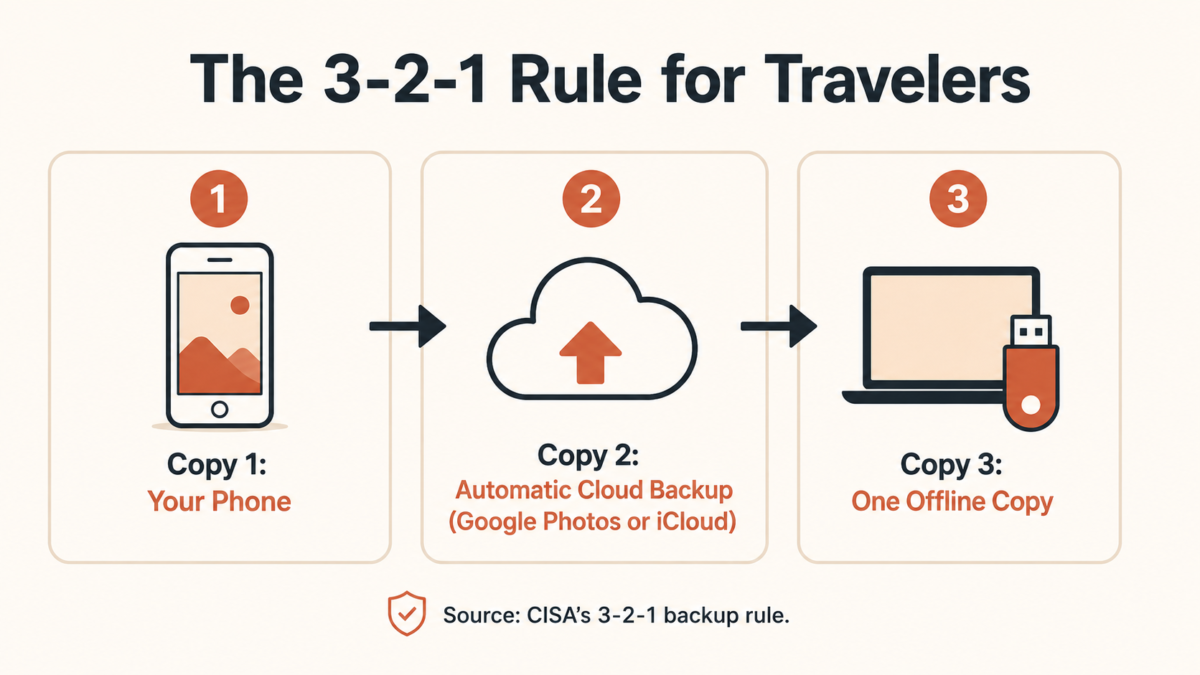
If you search for backup advice, you will run into “the 3-2-1 rule” almost immediately. The Cybersecurity and Infrastructure Security Agency, the same federal agency that tells businesses how to protect their data, recommends keeping three total copies of anything important, on two different types of storage, with at least one of those copies stored somewhere else entirely.
Translated for a phone-only traveler, that becomes something almost nobody explains in plain English:
Copy one is the phone itself, which is also the single point of failure if you stop there. Copy two is an automatic cloud backup, Google Photos or iCloud, which protects you the moment the phone is lost, stolen, or destroyed.
Copy three is something physically separate from the phone, added at the end of each day or the end of the trip, which protects you in the rare case that the cloud backup itself fails or never actually finished syncing.
None of this is an IT department policy. It is the same logic that protects a phone full of grandkid photos as protects a company’s financial records. The stakes are personal instead of corporate, but the math is identical.
The Simplest Photo Backup System for Travelers: Just Your Phone and the Cloud
The simplest way to back up photos while traveling is three copies in two places: your phone, an automatic cloud backup like Google Photos or iCloud, and one offline copy such as a flash drive or laptop. Turn on cloud auto-backup before you leave, then transfer photos to the offline copy each evening you have downtime.
For most trips, the bare minimum system is two steps, done once before you leave. First, turn on automatic cloud backup, Google Photos on Android or iCloud on iPhone, and actually open the settings to confirm it is running rather than assuming it already is. Second, pick a storage tier large enough to cover the trip without you having to think about it again.
A phone shooting mostly photos, not hours of 4K video, typically uses somewhere between 5 and 15 gigabytes over a two-week trip. That is a small number against what cloud storage actually costs in 2026. A 200GB tier runs about $2.99 a month on either Google One or iCloud+, which comfortably covers years of trips, not just this one.
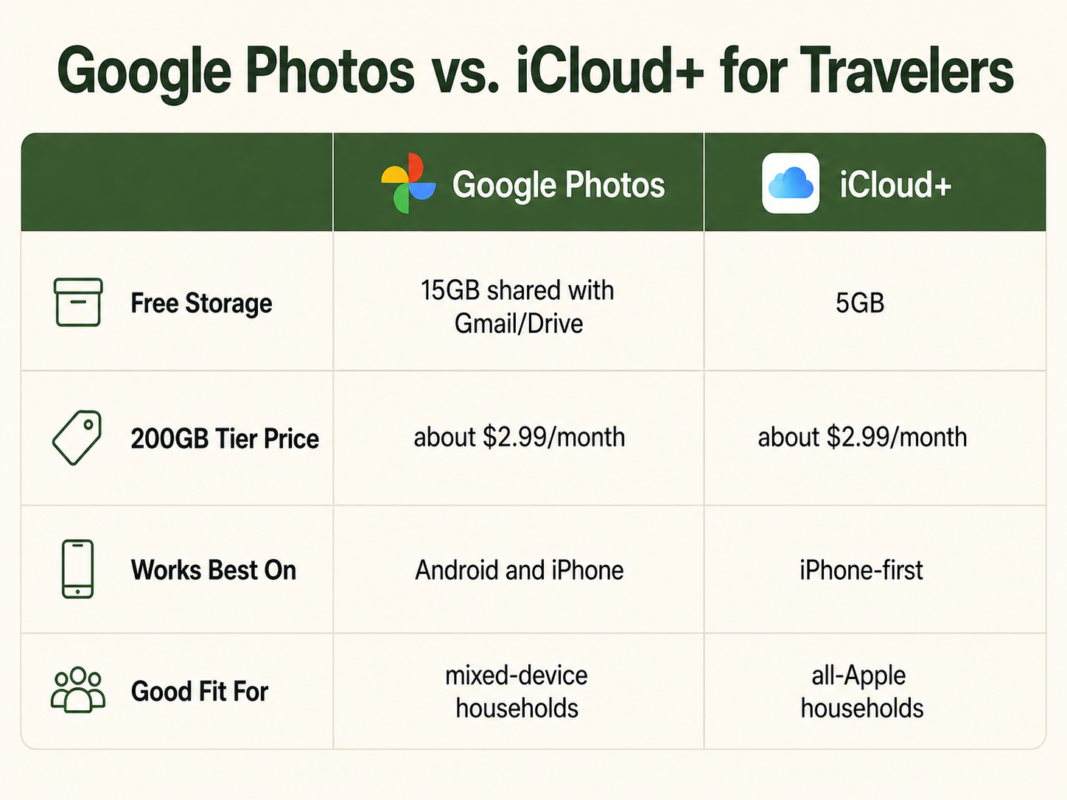
Google Photos gives more free storage to start with, 15GB shared across Gmail and Drive, and works the same whether you carry an Android phone or an iPhone. iCloud integrates more tightly if you are already deep in the Apple ecosystem, but its free tier is smaller, just 5GB. Neither choice is wrong. Either one is a massive upgrade over the alternative, which is no backup at all.
Once this is set up, the system for a short trip is essentially finished. You do not need to think about it again until you get home, which is the part almost every guide skips and the one that actually matters most.
The Belt and Suspenders Version for Longer Trips
For trips longer than about a week, or destinations where you already know the WiFi is unreliable, it is worth adding a small third copy that does not depend on an internet connection at all. A basic flash drive or a small portable drive, connected by cable each evening, gives you a physical copy that exists whether or not the cloud backup ever finished uploading that day.
This does not need to turn into a photography-enthusiast setup. There are no card readers involved, no RAW files, no software to learn. It is a drag-and-drop transfer from your phone to a drive, done for five minutes before bed.
If a hotel WiFi network drops your cloud backup for two days straight, which happens more often than any traveler would like, this is the copy that keeps the trip protected anyway.
The same habit that protects photos while you are actively traveling with a camera in hand applies here in a lighter form. Getting a better shot matters less than making sure the shot survives the trip.
The Moment You Get Home (Don’t Skip This Part)
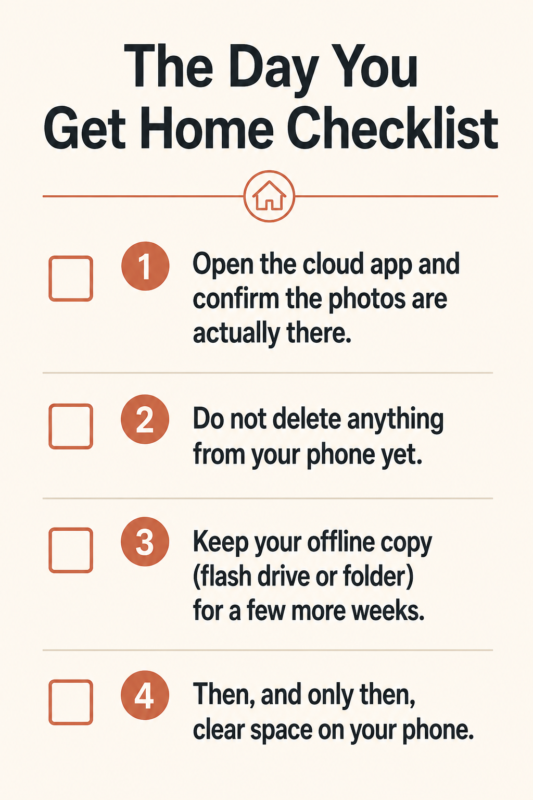
Almost every backup guide stops at “back up your photos while traveling” and never addresses the single moment where most people actually lose photos: the day they get home. The instinct, once you are back and your phone feels cluttered, is to clear out the camera roll to free up space. That instinct is exactly what causes the loss the whole system was supposed to prevent.
Before deleting anything, confirm the cloud backup has fully finished syncing, not just that it says “backing up” somewhere in a settings menu. Open the cloud app itself and scroll through to see the actual photos sitting there, not a progress bar. Then keep whatever third copy you made, the flash drive or the extra folder, for at least a few weeks rather than clearing it the moment you feel like the trip is officially over.
This is the same protective instinct behind why midlife is exactly when this kind of thing starts to matter more. You are not being paranoid. You are simply old enough to know that “I will deal with it later” is how most people actually lose the photos that mattered.
When It’s Worth Spending a Little Money
None of this requires spending much, but it is worth being honest about what a few dollars a month actually buys. A 200GB storage tier costs less than a single coffee shop drink, and it is protecting something that cannot be repurchased if it disappears.
Compare that monthly cost, somewhere between $2.99 and $9.99 depending on how much storage you actually need, against what is sitting inside the photos themselves: a grandchild’s first steps on a cruise ship deck, a parent who will not always be well enough to travel, a trip you saved for and will not get to take again exactly the same way.
This is not a pitch to buy something you do not need. Most travelers are well served by the smallest paid tier available. It is simply a reminder that the math strongly favors spending the three dollars.
Turning Protected Photos Into Something Worth Keeping
A backup system is not the finish line. It is what makes the next step possible. Once your photos are safe in at least two places, they stop being a liability you are quietly worried about and start being something you can actually use: a photo book, a shared album for family who could not come on the trip, or turned into a story worth sharing rather than a folder nobody opens again.
That is really the whole point. The backup habit is not about becoming a more technical person. It is one decision, made once, that lets you actually enjoy looking back at the trip instead of hoping nothing ever happens to the only copy.
The Bottom Line
You do not need to become a tech person to protect your travel photos. You need two decisions made before you leave, cloud backup turned on and a storage tier picked, and one habit repeated a few times during the trip. Set it up once, and every trip after this one benefits from the same five minutes of setup you already did.
What’s the one photo you’d be most gutted to lose right now, and is it actually backed up?
Want more practical, no-jargon guides for the second half of life? Join our Newsletter.
Frequently Asked Questions
What is the 3-2-1 rule for backing up travel photos?
The 3-2-1 rule means keeping three copies of your photos, on two different types of storage, with one copy stored somewhere else entirely. For a traveler, that usually means your phone, a cloud backup, and either a flash drive or your laptop back home.
Do I need a laptop to back up photos while traveling?
No. A phone with automatic cloud backup turned on covers most casual travelers. A laptop or portable drive adds a second layer of protection, useful on longer trips or when WiFi is unreliable, but it isn’t required.
Which cloud storage is best for travel photos, Google Photos or iCloud?
Both work well and are similarly priced at higher tiers. Google Photos gives more free storage, 15GB shared with Gmail and Drive, and works across Android and iPhone. iCloud integrates more tightly with iPhone but its free tier is smaller, just 5GB. Either is a major upgrade over no backup at all.
How much storage do I actually need for a two-week trip?
A smartphone shooting mostly photos, not 4K video, for two weeks typically uses 5 to 15GB. The 200GB tier, about $2.99 a month on either Google One or iCloud+, comfortably covers most travelers with room for years of trips.
What should I do the moment I get home from a trip?
Confirm the cloud backup finished syncing before deleting anything, then make a second copy on a laptop or external drive if you haven’t already. Don’t clear your phone’s photo library until the backup is verified in at least one other place.